GameDev.net gamedev.net
🔒 Locked

ATI light scattering implementation

Started by shadow_bobble Jan 26, 2004 at 9:31 PM 22 replies 16.8k views
Original Post
shadow_bobble
shadow_bobble
Hi everyone. I''ve implemented the light scattering as described by Preetham et al. Below i''m just talking about in-scattered light. Don''t worry about extinction as i''m only drawing the skydome for now. They perform the scattering calculations in 3 distinct regions, approximately equal to the wavelengths of red, green, and blue light. If anyone cares, they use 650nm, 570nm, and 475nm. Anyway, you basically use those wavelengths to generate Rayleigh and Mie scattering coefficients, then you approximate single-scattering for each vertex on your skydome. I end up with a floating point value for each of R,G and B that is very small. I need to scale them up by a factor of 20 or so to get decent colors on my dome. Has anyone else encountered this? I hope I am making a mistake somewhere, because otherwise selecting the multiplier seems completely arbitrary. thx shadow
Drilian
Drilian
No, I had that problem too. What I ended up doing was similar to what you did: I ended up tweaking the values until I got them right.

I also simplified the way it calculates, and it's done on a "per-pixel" level, at the expense of two texture stages and some accuracy (though the model wasn't super accurate anyway, and it still looks good, so I don't care so much).

What I did was the following:

I have 2 textures: a cube map, which for test purposes is 32 pixels on a side (due to computation time), but in-game it will be larger because the sun will be in a fixed position, and a 2048x1 greyscale exponent texture.

Now, These are calculated as follows:


float CalculateSkyLength(const CEVector3 &inDirection) const
{
CEVector3 dir = inDirection;
dir.Normalize();

float a, b, c, t;

// We're on the surface of a planet (centered at 0,0,0), effectively standing at the point (0, planetRadius, 0).

// The atmosphere is a sphere with the equation r^2 - x^2 - y^2 - z^2 = 0.

// We need to find the intersection of that with the vector:

// (0, pRadius, 0) + dir*t

// So, substituting, we have

// r^2 - (dir.x*t)^2 - (pRadius + dir.y*t)^2 - (dir.z*t)^2 = 0

// Doing some math (steps below):

// r^2 - dir.x^2*t^2 - pRadius^2 - pRadius*dir.y*t - dir.y^2*t^2 - dir.z^2*t^2 = 0

// (dir.x^2 - dir.y^2 - dir.z^2)*t^2 - (pRadius*dir.y)*t + (r^2 - pRadius^2) = 0

// And, since the length of dir = 1, (-dir.x^2 - dir.y^2 - dir.z^2) = -(dir.x^2+dir.y^2+dir.z^2) = -1, so:

// -t^2 - (pRadius*dir.y)t + (z^2 - pRadius^2) = 0

// We now have a nice quadratic equation. Solve it using the handiferous quadratic formula:

a = 1;
b = 2*m_planetRadius*dir.y;
c = m_planetRadius*m_planetRadius - m_atmosphereRadius*m_atmosphereRadius;

// This is the positive result, and that's the one we want, so only solve for this quadratic solution.

t = (-b + sqrtf(b*b -4*a*c))/(2*a);

return t;
}

CEColor3 CalculateExtinctionAmount(float distance) const
{
CEColor3 Fex;

Fex.r = expf(-m_betaExtinction.r*distance);
Fex.g = expf(-m_betaExtinction.g*distance);
Fex.b = expf(-m_betaExtinction.b*distance);
return Fex;
}

// view direction is direction FROM the point TO the camera, and the light direction is the direction

// FROM the light TO the point.

CEColor3 CalculateLin(const CEVector3 &lightDirection, const CEVector3 &viewDirection)
{
// Get the cosine of the angle between the light direction and view direction.

float cosTheta = (lightDirection * viewDirection) / (lightDirection.Length() * viewDirection.Length());

// Calculate the raleigh scattering at this angle

// fR(theta) = 3/16pi * (1 + cos^2(theta))

float fR = 3.0f/(16.0f*D3DX_PI) * (1.0f + cosTheta*cosTheta);

// Now the mie scattering

float denominator = sqrtf(1+m_g*m_g + 2*m_g*cosTheta);
float fM = (1-m_g)*(1-m_g) / (4*D3DX_PI * denominator*denominator*denominator);

// Now the full Bsc(theta)

CEColor3 betaScattering = m_betaRaleigh*fR + m_betaMie*fM;


// We now need the color of the sun (Based on its position in the sky)


float skyLength = CalculateSkyLength(lightDirection);

CEColor3 sunExtinction = CalculateExtinctionAmount(skyLength);

CEColor3 sunColor = sunExtinction * m_sunBrightness;
m_sunColor = sunColor;

float viewLength = CalculateSkyLength(viewDirection);

CEColor3 viewExtinction = CalculateExtinctionAmount(viewLength);

CEColor3 finalColor = sunColor*betaScattering/m_betaExtinction*(1-viewExtinction);

float exposure = -1;
finalColor.r = 1-expf(finalColor.r*exposure);
finalColor.g = 1-expf(finalColor.g*exposure);
finalColor.b = 1-expf(finalColor.b*exposure);
// TODO: Take into account the amount of inscattering (Reduced by the shadow of the earth from the sun).

return finalColor;
}

void CalculateETexture()
{
// First up, lock the texture

DWORD pitch;
void *dest;

m_eTexture->Lock(0, pitch, dest, 0);

float exp = (m_betaExtinction.r+m_betaExtinction.g+m_betaExtinction.b)/3; // Crap average


float farthest = 1-expf(-exp*m_maxDistance*70);

for(DWORD i = 0; i < m_eTextureSize; i++)
{
float s = ((float)i) * m_maxDistance / ((float)(m_eTextureSize-1));

float check = 1-expf(-exp*s*70);//*.676887300508f;

check /= farthest;
check = 1-check;
CEColor3 Fex(check,check,check);
Fex.Clamp();

((DWORD*)dest)[i] = (DWORD)D3DCOLOR_COLORVALUE(Fex.r, Fex.g, Fex.b, 1);
}

m_eTexture->Unlock(0);
}

void CalculateLinTexture(const CEVector3 &lightDirection)
{
float size = 0.5f * (float)(m_LinTextureSize-1);

for(DWORD face = 0; face < 6; face++)
{
DWORD pitch;
void *outBuffer;

m_LinTexture->LockFace(face, 0, pitch, outBuffer, 0);

float w, h;

for (DWORD y = 0; y < m_LinTextureSize; y++)
{
h = (float)y;
h -= size;

for (DWORD x = 0; x < m_LinTextureSize; x++)
{
w = (float)x;
w -= size;
CEVector3 normal;

DWORD* pBits = (DWORD*)((BYTE*)outBuffer + (y * pitch));
pBits += x;

switch((D3DCUBEMAP_FACES)face)
{
case D3DCUBEMAP_FACE_POSITIVE_X:
normal = CEVector3(size, -h, -w);
break;
case D3DCUBEMAP_FACE_NEGATIVE_X:
normal = CEVector3(-size, -h, w);
break;
case D3DCUBEMAP_FACE_POSITIVE_Y:
normal = CEVector3(w, size, h);
break;
case D3DCUBEMAP_FACE_NEGATIVE_Y:
normal = CEVector3(w, -size, -h);
break;
case D3DCUBEMAP_FACE_POSITIVE_Z:
normal = CEVector3(w, -h, size);
break;
case D3DCUBEMAP_FACE_NEGATIVE_Z:
normal = CEVector3(-w, -h, -size);
break;
default:
ASSERT(0);
break;
}

CEColor3 color = CalculateLin(lightDirection, normal);
color.Clamp();

*pBits = (DWORD)D3DCOLOR_COLORVALUE(color.r, color.g, color.b, 1);
}
}
m_LinTexture->UnlockFace(face, 0);
}
}


Some things, like the *70 in the CalculateETexture, are somewhat arbitrary, but other things (like the code to make sure that, at the maximum distance, the haze becomes impenetrable) are there on purpose. They may or may not suit your purposes. I did need to have a max distance on the e texture though (because it's a finite size). Note that the extinction in my model is monochromatic; this is unfortunate, but I don't notice any great loss in visual quality so I left it.

Now, the values I use are as follows (in the first picture only):

MaxDistance(2000);
PlanetRadius(6.378e6);
AtmosphereRadius(6.3864e6);
SunBrightness(40);
BetaRaleigh(6.95e-6, 1.18e-5, 2.44e-5);
BetaMie(4e-7, 6e-7, 2.4e-6)
MieG(-1.2)

Some of these values were picked due to actual significance (I think the Mie and Raleigh values are fairly close to the ATI stuff, and the planet/atmosphere radii are the actual radii from Earth), but some I just made up (the SunBrightness I got by changing it until it looked "right").

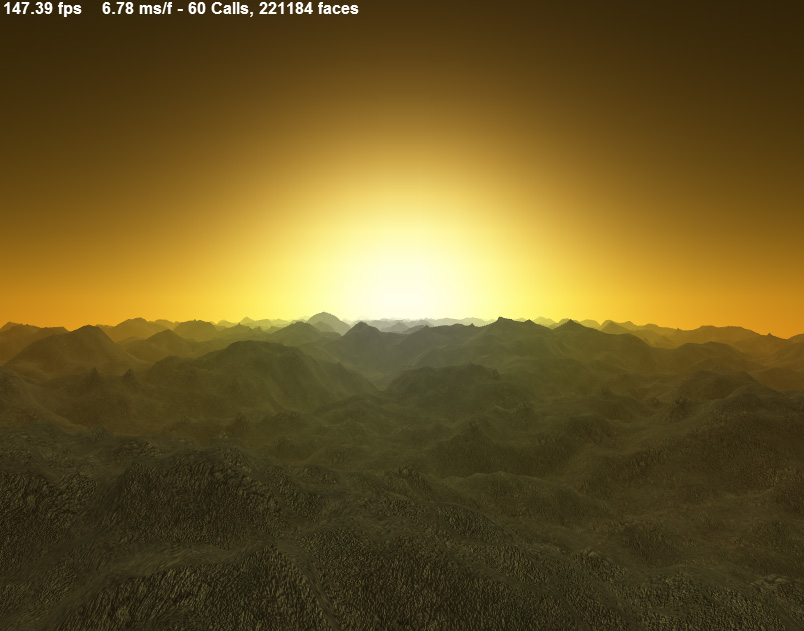
However, the results, in my humble opinion, are fairly good (ignore the terribly boring landscape - I'm still working on that part):


And two more images (that I will link to instead of displaying):

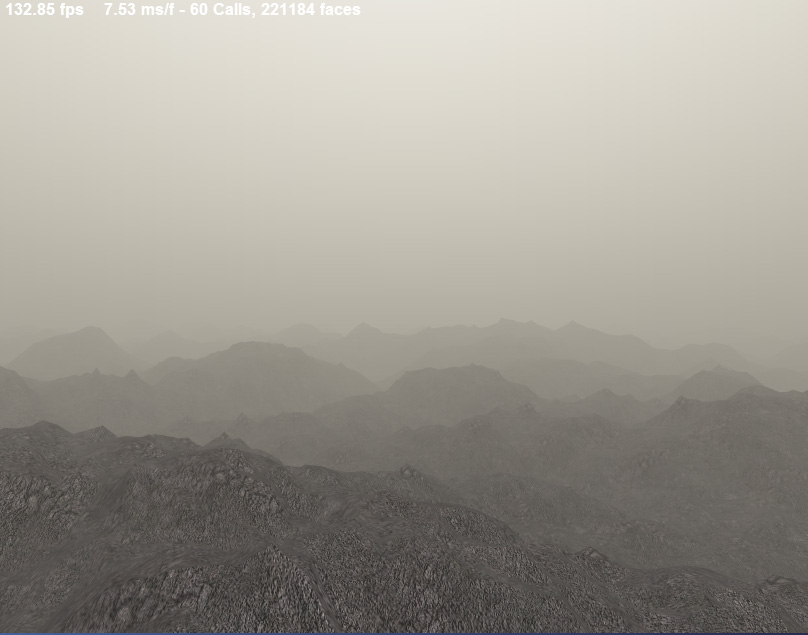
Pic 2
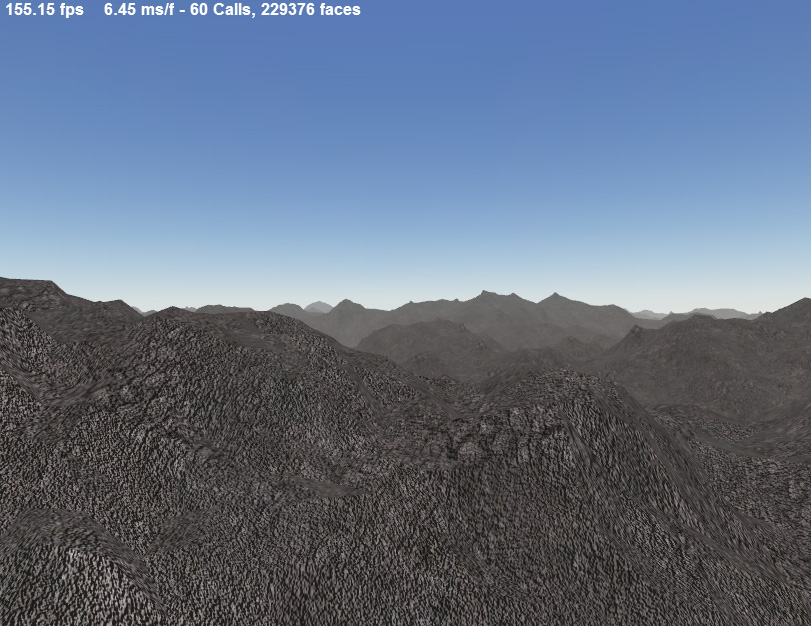
Pic 3

Hope this all helps!

EDIT: I guess I didn't explain how the textures are USED. Basically, for each vertex, the distance from the view is calculated and stored into the x value for the E Texture's texture coordinate. The direction to the point (the point's position in camera space) is stored for the LinTexture's coordinates (x, y, z - it's a cubemap). This value is currently used as an alpha value for a second pass of drawing the terrain using the cubemap's texture (so at 2000, full distance, the final alpha is 1, so the cube map is drawn completely over the terrain), though it doesn't have to be a second pass (given enough texture stages).

Anyway, that's my method and my constants - If nothing else, hopefully seeing another set of constants might help. Good luck

[edited by - Drilian on January 26, 2004 12:01:39 AM]

[edited by - Drilian on January 26, 2004 12:08:45 AM]
Muhammad Haggag
Muhammad Haggag
quote:
No, I had that problem too. What I ended up doing was similar to what you did: I ended up tweaking the values until I got them right.

Well, you must''ve forgotten to run your coefficients through all the multipliers Preetham *scattered* throughout the code. After you generate your coefficients (code should be a straigh-forward copy of Preetham''s, because it all depends on his Thesis), you have the following multipliers:
- SunIntensity is the most important multiplier. Without it, the inscatter term has the value range shown in the graphs below. Preetham uses a value of 100, seemingly for 100% intensity. (i.e. normal). I can''t tell that the 100% thing is true, he never elaborated on his choice. On ATI, you can find his notes for SIGGRAPH2003, which are much more detailed than the GDC2002 notes, so maybe he says something new there. I didn''t have time to look at it yet.
- Direct multipliers for the betas: Preetham chose 0.2 and 0.01 for Rayleigh and Mie scattering coefficients, respectively. Of course, that means if you use the beta/betaDash way of doing things, that multiplier goes into BOTH.
- Inscatter multiplier: Used to scale inscatter. He used a value of 0.3

That''s it about the mutlipliers. I spent around 3 days pulling my hair because things weren''t working (because I''ve assumed that the paper has what''s enough for me to implement the thing - which it isn''t. It even gets some formulas wrong).

Anyway, here''s an HLSL implementation that works on vs1.1 and ps1.1:
float4x4        matWorld,
matWorldView,
matWorldViewProj;

float3 eyePos,
sunDir;

float3 betaR,
betaRD,
betaMie,
betaMieD,
invSumBetas;
float2 multipliers;
float3 reflectance;
float3 gConst;
float4 sunColor;

struct SCATTER_OUTPUT
{
float4 pos : POSITION;
float3 TE : COLOR0;
float3 inscatter : COLOR1;
};

SCATTER_OUTPUT ScatteringVS( float4 pos : POSITION )
{
SCATTER_OUTPUT ret;
ret.pos = mul( pos, matWorldViewProj );

// Get the view vector, from the eye to the vertex

float3 wPos;
wPos.xyz = mul( pos, matWorld );
float3 wDir = normalize( wPos - eyePos );

// Calculate angle between sun direction and view direction

float cosTheta = dot( sunDir, wDir );
// phase1_theta: Preetham uses the power of ''2''. However, it gives

// "glow" at angles > 90

// A power of ''3'' doesn''t, but - besides being a hack - it causes darkening

// of the sky points opposite to the sun (which doesn''t look realistic either).

// See the accompanying ''partialInscatterCosSquared/Cubed'' png''s

float phase1_theta = 1 + pow( cosTheta, 2 );
float phase2_theta = gConst.x * pow( rsqrt( gConst.y - gConst.z * cosTheta ), 3 );

// Calculate distance to vertex

float3 posViewSpace;
posViewSpace.xyz = mul( pos, matWorldView );
float dist = posViewSpace.z;
// Alternatively, can try:

// float dist = length( posViewSpace );


// Calculate extinction term

float3 extinct = exp( - dist * ( betaR + betaMie ) );
float3 totalExtinct = extinct * reflectance * sunColor;

// Calculate in-scatter

float3 inscatter = ( betaRD * phase1_theta + betaMieD * phase2_theta ) * sunColor.xyz * ( 1 - extinct )/( betaR + betaMie );

ret.TE = totalExtinct * sunColor.w;
ret.inscatter = inscatter * sunColor.w * multipliers.y;

// Pass: ret.inscatter = sunColor.xyz * ( 1 - extinct );

// Pass: ret.inscatter = pos;

// Pass: ret.inscatter = sunColor;

// Pass: ret.inscatter = sunColor.w;

// Pass: ret.inscatter = wPos;

// Pass: ret.inscatter = wDir;

// Pass: ret.inscatter = cosTheta;

// Half-pass: ret.inscatter = phase1_theta - 1;

// Pass: ret.inscatter = phase2_theta;

// Half-Pass: ret.inscatter = dist;

// Half-Pass: ret.inscatter = extinct;

// Pass: ret.inscatter = totalExtinct;


return ret;
}

float4 PS( float4 TE : COLOR0, float4 inscatter : COLOR1 ) : COLOR
{
return inscatter;
}

technique ScatteringSky
{
pass P0
{
// States

// Disable Z-writes and tests

ZEnable = False;
ZWriteEnable = False;

PixelShader = compile ps_1_1 PS();
VertexShader= compile vs_1_1 ScatteringVS();
}
}


This HLSL shader is an *equivalent* to the asm shader used by ATI''s demo. If you map the global constants to constant registers used by ATI, compile this to asm, copy the asm overwriting ATI''s asm, it''ll work (That''s how I did testing).

That said, you''ll most probably bump into a couple of problems:
- Sun size
This is absolutely positively the biggest problem I''ve bumped into with their model. Forget about HUGE. The sun is HUMONGOUS, literally taking so so so much of the sky that whatever direction you''re facing, if you look slightly up you''ll see it.
Note that it''s not a problem with my shader, I''ve modified the ATI demo to allow me to look up and down (which they didn''t allow you to do, as far as I recall) and using their own implementation I looked up. And the sun was there, looking wholly unrealistic (which makes me wonder why they didn''t even give the slightest mention to this problem anywhere I''ve looked).

Here''s a screenie taking from my own demo:


I''ve been lately analyzing this with octave and trying to find a remedy. I plotted the partial inscatter (without sun color, inscatter multiplier, or sun intensity multiplication) versus theta (the angle between the vector from eye-to-verrtex and the sun direction). When using cos^2(theta) for phase1_theta (=1 + cos^2(theta)) I got this:


Keep in mind that inscatter is going to be scaled by (100 * 0.3 * sunColor), so for a white sunColor, you scale by 30. Scaling the results in the previous graph with 30 means that all the partial inscatter values >= 0.03 will become (after the scaling) >= 0.9. If you look at the theta axis, you''ll find that this spans angles in the range [0,~47 or so], and we''re talking about 0.9 (very white) color results here.

Looking at the graph, you can notice something else. The partial inscatter (and hence the total inscatter) increases again as theta gets greater than 90. There''s some sort of inflection point at 90, and this leads us to the next point:

- Sunset glow at sky dome edges opposite to the sun
I don''t have a screenshot for this right now, sorry. But basically, when nearing sunset (not when you''re sun actually gets orange, before that), you have 3 regions in your dome:
1. A "lit" glowing region: The one your sun is in.
2. A somewhat dark region: If looking directly at the sun, this region is directly to your right and left.
3. A somewhat bright region: If looking directly at the sun, this region is directly behind you.

The problem comes from the 3rd region. The angle between vectors from eye-to-vertices-in-that-region is mostly greater than 90, so the cos is negative. However, we''re using cos^2, and thus it becomes positive, and those regions are actually more "lit" than those in region 2, which didn''t look realistic (at least to me). At appeared as if there''s another sun that''s going to rise up from there.

I''ve tried to quickly hack this using cos^3(theta) for phase1 calculation, and it gave me this graph:

Looking at this, you realize that it''s somewhat similar to using cos^2 in the 1st theta range [0,90] after which it takes a smooth dive to zero.

So how did it look like? Bad!
Problem is that now your 2nd region is nearly the same, except that suddenly you get a "dark" area directly opposite to the sun, which doesn''t look realistic either.

I''m going to inspect things further when I get the time, god-willing. I''m planning to do some things:
1. Plot some "sunSize" correction points (vs cosTheta, of course) and fit them with a sunSize correction curve. This sunSize correction curve should be evaulated at every vertex and added to the inscatter.
2. Plot some "glow correction" term that manages to merge the 2nd and 3rd regions into one region, which hopefully would look more realistic.
3. Inspect some other lighting model, that''s hopefully more accurate (I''ve not got the chance to inspect any of Dobashi''s work yet).

Of course, before I do that, I might as well try to get out in some village or desert at sunset, and actually watch how the color gradient looks like (the problem is that you can''t see a thing from all the city buildings).

Muhammad Haggag

shadow_bobble
shadow_bobble
Wow! Truly awesome answers from both of you Coder and Drilian! Thank you very much!

I wish all the fudge factors weren''t necessary (I like "clean" implementations), but if that''s what i''ve got to do, then so be it. :-)

shadow
Muhammad Haggag
Muhammad Haggag
quote:
Original post by shadow_bobble
I wish all the fudge factors weren''t necessary (I like "clean" implementations), but if that''s what i''ve got to do, then so be it. :-)

I''d really love to find such a model that doesn''t require playing with numbers until it''s right. I''ve not tried Dobashi''s stuff, and it was recommended by Yann L before, so why don''t you give it a shot? (You can read the famous sky thread for more details. I don''t have the link, but it''s on triplebuffer.devmaster.net, go for "Yann''s greatest hits" (top-right) link, and select it off the "Sky rendering" list)


Muhammad Haggag

shadow_bobble
shadow_bobble
Hi again Coder.

About your other post, I have to agree about the problem with an *enormous* sun in ATI''s implementation. It would also be nice if they mentioned the *numerous* multipliers in their siggraph talks.

I once emailed Preetham about his more complex paper designed for offline rendering of skys. I asked him how he combined the skylight and sunlight terms, because the paper seems to imply you just add them, but that doesn''t work. He said something like "I never really found a great looking combination. Just pick multipliers that look good to you."

So much for the science. :-) It really surprised me because the paper seems to have a solid foundation in physics. Oh well.

Thx for the Nishita/Dobashi suggestion too. I have actually read that paper before. I considered an implementation, but ran into difficulties. However they do have some very cool stuff. They can condense a lot of info into lookup tables because they use cylindrical coordinates for points in the atmosphere. If you point the cylinder at the sun, any unique point (with respect to optical depth) in the atmosphere can then be expressed as (r,z).

Has anyone implemented that one? I always thought their colors looked sorta cartoony, but at least their sun doesn''t cover half the sky. :-)

shadow

Muhammad Haggag
Muhammad Haggag
quote:
Original post by Anonymous Poster
Hi,

It''s good to see so many people are using our work, though not good to see that they are having problems...

The version of our paper on the ATI site is rather old. The version published in Game Developer has a lot of corrections and clarifications, and the version published in ''Graphics Programming Methods'' has still more corrections in the constants, etc. and is the one that should be used as a reference. I wouldn''t use the demo source as a strict reference since it hasn''t been updated since the original GDC talk and (as people have noticed) has a lot of adjustment factors.

Thanks,

Naty Hoffman

Hey , thanks for the quick feedback:
- I see a problem with updating a public demo in a non-public context/environment (in our case, the book). This is the first time I even heard about the book, and looking at amazon it seems to be available starting from ~$32 (used) to $50 (new), which is somewhat fine. I''ll try to get my hands on it.
- I don''t have access to GameDeveloper mag.
- What kinds of "corrections" are we talking about, exactly? Is the "sun" problem solved? (or "re-modelled", actually?)


Muhammad Haggag

_the_phantom_
_the_phantom_
quote:
Original post by Coder
- I see a problem with updating a public demo in a non-public context/environment (in our case, the book). This is the first time I even heard about the book, and looking at amazon it seems to be available starting from ~$32 (used) to $50 (new), which is somewhat fine. I''ll try to get my hands on it.


Its certainly worth getting your hands on, i''ve had it since release and its got some intresting stuff in (not least of all the artical this thread refers to)

pingz
pingz
I just got the book ( "Graphics Programming Methods ). The only differences i can see in the constants are the refractive index while calculating the scattering constants being changed to 1.0003 and CV_HG.y changes to 1+g^2.

Still the demo on the book''s CD exhibits the same "huge sun" syndrome.
Tom Spilman Co-owner | Programmer www.sickheadgames.com
Soiled
Soiled
quote:
Original post by shadow_bobble
Thx for the Nishita/Dobashi suggestion too. I have actually read that paper before. I considered an implementation, but ran into difficulties. However they do have some very cool stuff. They can condense a lot of info into lookup tables because they use cylindrical coordinates for points in the atmosphere. If you point the cylinder at the sun, any unique point (with respect to optical depth) in the atmosphere can then be expressed as (r,z).

Has anyone implemented that one? I always thought their colors looked sorta cartoony, but at least their sun doesn''t cover half the sky. :-)


Yeah, I use that method. The sun is pretty much entirely due to the mie scattering term so changing the width of the scattering lobe changes the size of the sun. The colours don''t look too cartoony to me though I do agree that the ones in the paper look that way. I don''t know if they just used one wavelength to represent each of R, G and B or not. Instead I passed four wavelengths (400nm, 500nm, 600nm, 700nm) through the sky and then fitted the four results with a spline to represent the final spectrum of a single ray. To convert the spline to an RGB triplet I integrated (summed over 40 wavelengths) the spline multiplied by each of the three CIE xyz colour matching functions to get the XYZ triplet. Then converted XYZ triplet to RGB triplet.
I also found you can get a bright sun with a dark sky even at noon (and even after gamma correction) so before converting XYZ to RGB I multiply XYZ by pow(Y,1/3)/Y which increases intensity of the sky relative to the sun. This is just that luminance to lightness thing they mention in the gamma FAQ - a simple form of tone mapping.
However all of this is done offline and stored in a skybox sequence.

It really does come down to tweaking parameters to get it looking right - that part is crucial.

Sky at 3:30pm, 4:30pm, 5:30pm and 6pm...
Sky pics
HellRaiZer
HellRaiZer
Nice pictures,Soiled!!!The sun is awesome.

Can you tell me the paper you are refering to?

What do you mean when saying:
quote:

However all of this is done offline and stored in a skybox sequence.


Do you mean that the result is an animated skybox(animated textures)?

Thanks in advance.

HellRaiZer
HellRaiZer
Soiled
Soiled
quote:
Original post by HellRaiZer
Can you tell me the paper you are refering to?


Yeah, it''s "Display method of the sky taking into account multiple scattering". Although I don''t use the multiple-scattering part of paper. Just the part shadow_bobble was referring to.

quote:

What do you mean when saying:
quote:

However all of this is done offline and stored in a skybox sequence.


Do you mean that the result is an animated skybox(animated textures)?


Yes. I have 90 skyboxes for one day/night cycle. A good part of the night can share one skybox but I haven''t bothered with that. Each skybox is a hemi-cube. The side faces have resolution 32x64 and top face 64x64 texels - this is more than is needed for a sky with no sun but with the sun in there it gives enough resolution around the sun edges. Each texel is calculated using that paper (with those additions I mentioned). For 8-bit RGB this is a total of over 3Mbs. I huffman compress this down to 0.5Mb (but that wasn''t really necessary - only did it because I was initially using larger resolutions and had 17Mb of skyboxes). At runtime I decompress the two nearest skyboxes into textures (depending on time of day) and blend between them on GPU.
Jamm0r
Jamm0r
I find that one of the biggest drawbacks to this implementation is the fact that it does not model absorption. This explains the completely unrealistic sky approaching sunset and sunrise, where the sky is almost totally black. In reality, the ozone layer absorbs blue light, which is why the sky remains blue during sunset and only becomes black well after the sun has set. Has anyone found a mathematical solution to this problem that would fit in with the implementation?

[edited by - Jamm0r on March 26, 2004 1:12:37 PM]
Jamm0r
Jamm0r
quote:
Original post by Coder
That said, you'll most probably bump into a couple of problems:
- Sun size


I've found that lowering SunIntensity to 40-50, and playing with the Mie multiplier solves this particular problem.

quote:
- Sunset glow at sky dome edges opposite to the sun


Try using (2 + 0.5 * cos^2(theta)) instead of (1 + cos^2(theta)), this reduces the directionality of Rayleigh scattering. As the algorithm directly maps intensities to RGB instead of using tone mapping, reducing the directionality sort of compensates for this.

EDIT: Fixed typo (1.5 to 0.5).

[edited by - Jamm0r on March 29, 2004 10:21:21 AM]
Mephiston
Mephiston
quote:
Original post by Anonymous Poster
(...)
float3 WorldPos = mul(glstate.matrix.modelview[0], position).xyz;
(...)
And it doesn''t work...
Have someone allready convert this to openGL ??
Do I fogot any mul ??


I guess the problem is that you''re using the ModelView matrix instead of the "pure" world matrix to determine the vertex'' position in world space. You have to manually pass the world matrix to the shader. At least that''s what I''m doing in my Cg version of Hoffman''s scattering method.
Dipl.-Inf.(FH) Marco Spoerlwww.marcospoerl.com
Lutz
Lutz
Your CG program looks good for me. I'm doing it the same way for exactly the same purpose.

Is your SunDirection normalised? Is it in the same coordinate system as WorldPos (i.e. in world coordinates)? You have to set the light position when the modelview matrix is identity. This is important. I.e. it could look like that:

glMatrixMode(GL_MODELVIEW);
glLoadIdentity();
glLightfv(GL_LIGHT0, GL_POSITION, WorldLightPos);
SunDirection = normalize(WorldLightPos);

Otherwise (if the modeview matrix is not zero), the current modelview matrix is applied to the light position you send to glLightfv giving it another world position in the GL engine and you have to invert this operation by hand.

Another issue: IIRC, but I am absolutely not sure, glstate is only available in vertex programs version 1.0. What exactly does not work? Does the program compile correctly?

BTW: Do you use a fragment shader? You don't need to. Instead, you can use GL_COLOR_SUM and the secondary color filled with LIn.

[edited by - Lutz on March 31, 2004 5:48:47 AM]
Lutz
Lutz
Several questions:

A) What exactly doesn''t work?
Do you get any but wrong lighting or
do you get no lighting at all?

I''ve implemented the program in a very similar way.

One thing is disturbing me: In my implementation, the modelview matrix transforms object coordinates to eye coordinates but it may depend on how you have defined your modelview matrix. There are 2 possibilities:

1) Modelview matrix: Object->Eye, Projection matrix: Eye->Window
2) Modelview matrix: Object->World, Projection matrix> World->Window

But you always start in object coordinates.

B) Which one do you use?

Anyway, the row

sunDirection = mul(glstate.matrix.modelview[0], float4(sunDirection,0)).xyz;

transforms sunDirection from OBJECT coordinates to WORLD/EYE coordinates. So when you say you submit sunDirection already in world coordinates, you should rather leave this line out.

You should always strictly trace in which coordinate system your vector lives, i.e. by writing ESun for eye coords and OPos for object coords and so on. This is much easier and prevents much confusion.

motote
motote
I''ve build this implementation over another I make from papers and the line
sunDirection = mul(glstate.matrix.modelview[0],float4(sunDirection,0)).xyz;

exists because if not the Sun doesn''t turn with the camera.

After change the implementation and insert the coder''s one I only got a white dome and suspect in theta and dist calc since is the only diferent I made to coder''s implementation.

About modelview I make it in a gluLookAt way and draw my dome centered in camera world position.
Lutz
Lutz
Hmmm, yes, I guess either dist or the betas are too big. For debugging, just try

float dist = length(WorldPos) / 10; or 100 or 1000, until something happens

Topic Locked

This topic has been locked by a moderator. New replies are not allowed.

Sign in to reply to this topic.