
GameDev.net gamedev.net
🔒 Locked

fast accurate terrain linesegment intersection

Started by zedz Apr 30, 2008 at 4:24 PM 17 replies 6.2k views
Original Post
zedz
zedz
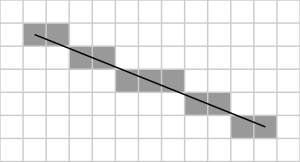
the terrain is an evenly spaced triangle grid (pretty standard) ignoring the scenegraph phase for a sec. now whats the best method to check for a intersection? y == up im thinking of taking the XZ positions of the start + end points of the linesegment + creating a 2d line from this + check the triangles along this line, now if i use bresnhams line algorithm it will miss some quads, eg 1,1 hit, 2,1 hit but 2,2 the line goes through it but its not registered whats need is some sort of antialiased line. whats the best method? Xiaolin Wu's line algorithm or DDA or something else? cheers zed

emeyex
emeyex
Is this really a 2D problem? Or are you projecting the ray and terrain into 2D so you can do a DDA algorithm? If it is truly a 3D situation, I'd recommend a quadtree where you store each cell's min/max heights, and so can actually step "over" entire cells by doing a simple ray/box calc (rejecting many tris at once). If you get rid of the the 3rd dimension, you'll have to literally walk every triangle from the start of the projected ray to the end. Granted, you'll be walking along the ray, but that could still be a number of tris. I have tried the way you're talking about (a bresenham-style cell-walking alg), it wasn't amazingly elegant and I don't have the source code in front of me, but I recall just checking for whether my current x or y value had changed and adding in the skipped quad for consideration. It worked okay, but I believe the quadtree method is faster.
zedz
zedz
yes see the second line of my post :)
'ignoring the scenegraph phase for a sec.'
this concerns the testing of the tris in the final leaf eg say the final 16x16x2 triangles

the bresenham line will miss triangles, does the DDA method etc also miss them?

Quote:
but I recall just checking for whether my current x or y value had changed and adding in the skipped quad for consideration
so u werent doing a true bresenham method, hmm i might have a look at this closer.
ta
emeyex
emeyex
Quote:
yes see the second line of my post :)
'ignoring the scenegraph phase for a sec.'
this concerns the testing of the tris in the final leaf eg say the final 16x16x2 triangles
Apologies, wasn't sure if that's what you meant :).
Quote:
so u werent doing a true bresenham method, hmm i might have a look at this closer.
No, it was not a true bresenham, but I guess I lump all those algorithms together (DDA, others). DDA will also miss those quads I believe. The part about checking for a change in x or y was where I diverged from those algorithms (i.e., if you stepped in both x and y, then you know you've possibly missed a quad by moving along a diagonal; I just handled this case manually within the line drawing algorithm, checking for which direction I just stepped, calculating the potentially missed quad; this is the part that might have a more elegant/natural solution, but it seemed to work fine and wasn't the most performance sensitive part of the loop).
DekuTree64
DekuTree64
Here's a variation of bresenham that seems like it would do what you want.

First, as you know, bresenham steps 1 unit at a time over the "long axis", and then updates the "short axis" by a fractional delta value. In your diagram, x is the long axis, y is the short. I'll just refer to them as that for the explanation, and the delta as dy/dx.

So my idea is to first define the x coordinate as the left edge of the "pixel", and the y coordinate as the top edge. So when iterating along the line, x is directly on the left edge (has no fractional portion), and y is the intersection of the line with that edge. Draw the pixel using that left edge coordinate (call this point curX,curY). Then step y (before stepping x), and if the integer portion of it changes, plot another pixel at (curX,nextY). Then step x and repeat.

That way you get a more "solid" line, where when the y coordinate moves down, the line steps down a pixel before stepping over.

One more thing to be aware of incase you haven't ever written a totally acurate line algorithm before: In order to have the left coordinate refer to the left edge of the pixel, you may need to "back up" along the line until you get to that edge, before you start iterating.
In your diagram, the line starts near the center of the pixel, so you'll need to step about -0.5 in the x direction, and -0.5*dy/dx in the y direction. That will get you to the intersection point of the line at the left edge.


...and during all that typing emeyex said basically the same thing. But hopefully this will help you with the specifics.
oliii
oliii
That's what I use.

#include <stdio.h>#include <stdlib.h>#include <math.h>#include <gl/glut.h>inline float frand(float x=1.0f){	return (rand() / (float) RAND_MAX) * x;}//===========================================================================// VECTORS//===========================================================================class Vector{public:	float x,y;public:	inline Vector(void)	{}	inline Vector(float Ix,float Iy)	: x(Ix)	, y(Iy)	{}	inline Vector &operator /=(const float Scalar)	{ x /= Scalar; y /= Scalar;		return *this; }	inline Vector &operator *=(const float Scalar)	{ x *= Scalar; y *= Scalar;		return *this; }		inline Vector &operator +=(const Vector &Other) { x += Other.x;	y += Other.y;	return *this; }	inline Vector &operator -=(const Vector &Other) { x -= Other.x;	y -= Other.y;	return *this;	}	inline float operator ^ (const Vector &V)	const	{	return (x * V.y) - (y * V.x); } // cross product	inline float operator * (const Vector &V)	const	{	return (x*V.x) + (y*V.y); } // dot product	inline Vector operator * (float  s)			const	{	return Vector(x*s, y*s); }		inline Vector operator / (float  s)			const	{	return Vector(x/s, y/s); }		inline Vector operator + (const Vector &V)	const	{	return Vector(x+V.x, y+V.y); }			inline Vector operator - (const Vector &V)	const	{	return Vector(x-V.x, y-V.y); }	friend Vector operator * (float k, const Vector& V) {	return Vector(V.x*k, V.y*k); }		inline Vector operator -(void) const { return Vector(-x, -y); }		inline float length(void) const { return (float) sqrt(x*x + y*y); }	void randomise(const Vector& min, const Vector& max)	{		x = frand(max.x - min.x) + min.x;		y = frand(max.y - min.y) + min.y;	}};//--------------------------------------------------------------------------// window size//--------------------------------------------------------------------------float width  = 640;float height = 480;float zoom = 30.0f;Vector start;Vector end;void Reset(){	start.randomise(Vector(0, 0), Vector(width / zoom, height / zoom));	end.randomise(Vector(0, 0), Vector(width / zoom, height / zoom));}void renderPixel(int x, int y){	glColor4f(1, 1, 1, 1);	glBegin(GL_LINE_LOOP);	glVertex2f(x, y);	glVertex2f(x+1, y);	glVertex2f(x+1, y+1);	glVertex2f(x, y+1);	glEnd();}void dda(const Vector& start, const Vector& end){	const float tolerance = 1.0E-8f;		// render segment	glColor4f(1, 1, 1, 1);	glBegin(GL_LINES);	glVertex2f(start.x, start.y);	glVertex2f(end.x, end.y);	glEnd();	// increment	Vector delta = end - start;	Vector inc;	inc.x = (fabs(delta.x) < tolerance)? 1.0f / tolerance : 1.0f / fabs(delta.x);	inc.y = (fabs(delta.y) < tolerance)? 1.0f / tolerance : 1.0f / fabs(delta.y);	// pixel coords	int x = (int)(start.x);	int y = (int)(start.y);	int dx = (delta.x < 0.0f)? -1 : (delta.x > 0.0f)? 1 : 0;	int dy = (delta.y < 0.0f)? -1 : (delta.y > 0.0f)? 1 : 0;	Vector accum;	accum.x = (delta.x < 0.0f)? (start.x - (x)) * inc.x : ((x+1) - start.x) * inc.x;	accum.y = (delta.y < 0.0f)? (start.y - (y)) * inc.y : ((y+1) - start.y) * inc.y;	float t = 0.0f;	// dda	while (t <= 1.0f)	{		renderPixel(x, y);		if(accum.x < accum.y)		{			t		 = accum.x;			accum.x += inc.x;			x		+= dx;		}		else		{			t		 = accum.y;			accum.y += inc.y;			y		+= dy;		}	}}//-----------------------------------------------------// displays the objects//-----------------------------------------------------void Display(){	//--------------------------------------------------------------------------	// render stuff	//--------------------------------------------------------------------------	glClearColor(0, 0, 0, 0);	glClear(GL_COLOR_BUFFER_BIT | GL_DEPTH_BUFFER_BIT);	glMatrixMode(GL_PROJECTION);	glLoadIdentity();	glOrtho(0, width / zoom, 0, height / zoom, -100, 100);		//-----------------------------------------------------------------	// Setup the model view matrix	//-----------------------------------------------------------------	glMatrixMode(GL_MODELVIEW);	glLoadIdentity();		dda(start, end);	glutSwapBuffers();}void Timer(int t){	Display();	glutTimerFunc(t, Timer, (int) 500.0f / 60.0f);}	void Reshape(int w, int h){	width  = w;	height = h;	glViewport(	0, 0, w, h);}void Keyboard(unsigned char key, int x, int y){	if (key == 27)		exit(0);	if(key == ' ')		Reset();}void main(int argc, char** argv){	//--------------------------------------------------------------------------	// OpenGL / GLUT init	//--------------------------------------------------------------------------    glutInit( &argc, argv );	glutInitDisplayMode		(GLUT_DOUBLE | GLUT_RGBA | GLUT_DEPTH);		glutInitWindowSize		(width, height);	glutInitWindowPosition	(0, 0);	glutCreateWindow		("dda");		glEnable				(GL_BLEND);	glBlendFunc				(GL_SRC_ALPHA, GL_ONE_MINUS_SRC_ALPHA);	glDisable				(GL_DEPTH_TEST);	glDisable				(GL_LIGHTING);		glutDisplayFunc			(Display);	glutReshapeFunc			(Reshape);	glutTimerFunc			(0, Timer, (int) 100.0f / 60.0f);	glutKeyboardFunc		(Keyboard);	Reset					();	glutMainLoop			();}
Everything is better with Metal.
oliii
oliii
3D version (I was bored)

#include <stdio.h>#include <stdlib.h>#include <math.h>#include <gl/glut.h>inline float frand(float x=1.0f){	return (rand() / (float) RAND_MAX) * x;}//===========================================================================// VECTORS//===========================================================================template<typename TYPE>class Vector3{public:		union	{		struct		{			TYPE x,y,z;		};		TYPE coords[3];	};public:	inline Vector3(void)	{}	inline Vector3(TYPE Ix,TYPE Iy, TYPE Iz)	: x(Ix)	, y(Iy), z(Iz)	{}	inline TYPE  operator[] (const int i) const { return coords; }	inline TYPE& operator[] (const int i)       { return coords; }		inline Vector3 &operator /=(const TYPE k)		{ x /= k; y /= k; z /= k;		return *this; }	inline Vector3 &operator *=(const TYPE k)		{ x *= k; y *= k; z /= k; 		return *this; }	inline Vector3 &operator +=(const Vector3 &v)	{ x += v.x;	y += v.y; z += v.z; return *this; }	inline Vector3 &operator -=(const Vector3 &v)	{ x -= v.x;	y -= v.y; z -= v.z;	return *this; }	inline Vector3 operator * (TYPE  s)				const	{	return Vector3(x*s, y*s, z*s); }	inline Vector3 operator / (TYPE  s)				const	{	return Vector3(x/s, y/s, z/s); }	inline Vector3 operator + (const Vector3 &v)	const	{	return Vector3(x+v.x, y+v.y, z+v.z); }	inline Vector3 operator - (const Vector3 &v)	const	{	return Vector3(x-v.x, y-v.y, z-v.z); }	friend Vector3 operator * (TYPE k, const Vector3& v)	{	return Vector3(v.x*k, v.y*k, v.z*k); }	inline Vector3 operator ^ (const Vector3 &v)	const	{ return Vector3((y*v.z)-(z*v.y), (z*v.x)-(x*v.z), (x*v.y)-(y*v.x)); } // cross product	inline TYPE    operator * (const Vector3 &v)	const	{ return (x*v.x) + (y*v.y) + (z*v.z); } // dot product	inline Vector3 operator - (void)				const	{ return Vector3(-x, -y, -z); }	inline TYPE length(void) const { return (TYPE) sqrt(x*x + y*y + z*z); }};typedef Vector3<float> Vector;typedef Vector3<int>   Voxel;Vector randomise(const Vector& min, const Vector& max){	Vector v;	v.x = (frand(max.x - min.x) + min.x);	v.y = (frand(max.y - min.y) + min.y);	v.z = (frand(max.z - min.z) + min.z);	return v;}//--------------------------------------------------------------------------// window size//--------------------------------------------------------------------------float width    = 640;float height   = 480;float size	   = 30.0f;float camdist  = size * 0.5f;float camtheta = 0.0f;float camphi   = 0.0f;Vector start;Vector end;void Reset(){	start = randomise(Vector(0, 0, 0), Vector(size, size, size));	end   = randomise(Vector(0, 0, 0), Vector(size, size, size));}void renderSegment(const Vector& start, const Vector& end){	// render segment	glLineWidth(3.0f);	glColor4f(1, 0.5f, 0.5f, 1);	glBegin(GL_LINES);	glVertex3f(start.x, start.y, start.z);	glVertex3f(end.x, end.y, end.z);	glEnd();}void renderVoxel(const Voxel& voxelPos){	glPushMatrix();	glLineWidth(1.0f);	glTranslatef(voxelPos.x + 0.5f, voxelPos.y + 0.5f, voxelPos.z + 0.5f);		glColor4f(1, 1, 1, 1);	glutWireCube(1.0f);	glColor4f(0.2f, 1.0f, 0.5f, 0.1f);	glutSolidCube(1.0f);		glPopMatrix();}void renderDDA(const Vector& start, const Vector& end){	const float tolerance = 1.0E-8f;		// dda increment	Vector delta = end - start;	Vector inc;	inc.x = (fabs(delta.x) < tolerance)? 1.0f / tolerance : 1.0f / fabs(delta.x);	inc.y = (fabs(delta.y) < tolerance)? 1.0f / tolerance : 1.0f / fabs(delta.y);	inc.z = (fabs(delta.z) < tolerance)? 1.0f / tolerance : 1.0f / fabs(delta.z);	// voxel coords	Voxel  voxelpos((int)(start.x), (int)(start.y), (int)(start.z));	Voxel  voxelinc((delta.x < 0.0f)? -1 : (delta.x > 0.0f)? 1 : 0,					(delta.y < 0.0f)? -1 : (delta.y > 0.0f)? 1 : 0,					(delta.z < 0.0f)? -1 : (delta.z > 0.0f)? 1 : 0);	// dda accumulator	Vector accum;	accum.x = (delta.x < 0.0f)? (start.x - (voxelpos.x)) * inc.x : ((voxelpos.x+1) - start.x) * inc.x;	accum.y = (delta.y < 0.0f)? (start.y - (voxelpos.y)) * inc.y : ((voxelpos.y+1) - start.y) * inc.y;	accum.z = (delta.z < 0.0f)? (start.z - (voxelpos.z)) * inc.z : ((voxelpos.z+1) - start.z) * inc.z;	float t = 0.0f; // terminating condition	// dda	while (t <= 1.0f)	{		// callback when the ray hits a new voxel.		renderVoxel(voxelpos);		// find axis with minimum accumulated value		int min = 0;		if(accum[1] < accum[min]) min = 1;		if(accum[2] < accum[min]) min = 2;				// add the increments		t				 =    accum[min];		accum[min]		+=      inc[min];		voxelpos[min]   += voxelinc[min];	}}//-----------------------------------------------------// displays the objects//-----------------------------------------------------void Display(){	//--------------------------------------------------------------------------	// render stuff	//--------------------------------------------------------------------------	glClearColor(0.1, 0.1, 0.1, 1);	glClear(GL_COLOR_BUFFER_BIT | GL_DEPTH_BUFFER_BIT);	glMatrixMode(GL_PROJECTION);	glLoadIdentity();	gluPerspective(80, (float)width/(float)(height+1), 0.1f, 1000.0f);		//-----------------------------------------------------------------	// Setup the model view matrix	//-----------------------------------------------------------------	glMatrixMode(GL_MODELVIEW);	glLoadIdentity();		Vector camDir	= Vector(	cos(camphi) * cos(camtheta), 								sin(camphi), 								cos(camphi) * sin(camtheta));	Vector camRight = Vector(	-sin(camtheta), 								0.0f,								cos(camtheta));	Vector camUp	= (camDir ^ camRight);	Vector camTarget = (start + end) * 0.5f;	Vector camPos	= camTarget + camDir * -camdist;	gluLookAt(camPos.x, camPos.y, camPos.z, camTarget.x, camTarget.y, camTarget.z, camUp.x, camUp.y, camUp.z);	// show stuff	renderSegment(start, end);	renderDDA(start, end);	glutSwapBuffers();}void Timer(int t){	Display();	glutTimerFunc(t, Timer, (int) 500.0f / 60.0f);}	void Reshape(int w, int h){	width  = w;	height = h;	glViewport(	0, 0, w, h);}void ExtKeyboard(int key, int x, int y){	if(key == GLUT_KEY_DOWN)		camdist += size / 100.0f;	if(key == GLUT_KEY_UP)		camdist -= size / 100.0f;}void Keyboard(unsigned char key, int x, int y){	if (key == 27)		exit(0);	if(key == ' ')		Reset();}void Mouse(int x, int y){	static int mousex = -1;	static int mousey = -1;	if(mousex == -1 || mousey == -1)	{		mousex = x;		mousey = y;	}	else	{		const float speed = 0.005f;		int deltax = x - mousex;		int deltay = y - mousey;		mousex = x;		mousey = y;		camtheta += deltax * speed;		camphi   -= deltay * speed;	}}void main(int argc, char** argv){	//--------------------------------------------------------------------------	// OpenGL / GLUT init	//--------------------------------------------------------------------------    glutInit( &argc, argv );	glutInitDisplayMode		(GLUT_DOUBLE | GLUT_RGBA | GLUT_DEPTH);		glutInitWindowSize		(width, height);	glutInitWindowPosition	(0, 0);	glutCreateWindow		("dda 3D");		glEnable				(GL_BLEND);	glBlendFunc				(GL_SRC_ALPHA, GL_ONE_MINUS_SRC_ALPHA);	glDisable				(GL_DEPTH_TEST);	glDisable				(GL_LIGHTING);		glutDisplayFunc			(Display);	glutReshapeFunc			(Reshape);	glutTimerFunc			(0, Timer, (int) 100.0f / 60.0f);	glutSpecialFunc			(ExtKeyboard);	glutKeyboardFunc		(Keyboard);	glutPassiveMotionFunc	(Mouse);	Reset					();	glutMainLoop			();}

Everything is better with Metal.
zedz
zedz
thanks very much for that guys

i see how that fits in with what im doing. actually im thinking, perhaps ignoring the scenegraph is quickest just cast a line over the whole terrain, in theory it is
oliii
oliii
I dont really see how you could do a faster trace. At the end of the day, it's only a few additions and comparaisons, and it will scan every single cell along the path. However, if you subdivided your heightmap with a quad tree and store the height value of each quadtree cell, there is potential for fast rejects if for example, the ray fires high above the terrain.

Note that for a ray/segment, it's usually useful to cache the inverse of the direction vector (or the delta in my case), as it's costly to compute, and it's used in every ray interection routines.
Everything is better with Metal.
DanielH
DanielH
Are you doing this for generating shadow maps? If so this might be a good read.

http://www.gamedev.net/reference/articles/article1817.asp
zedz
zedz
a late update - (im moving house to wellington in a couple of weeks so not so much spare time recently)

i tried the bresenham variant but it returns some quads as hits when theyre misses + visa versa
oliii nice app with dda, but it also returns false info.

strange cause on the surface it seems so simple

the only way i could get it to work was with Xiaolin Wu's line algorithm (antialiased lines) + using some cutoff value, but even this is a bit hacky cause it varies with line gradent


blue = oliii's, green = wu's + red = bresenham
oliii
oliii
Quote:
Original post by zedz
oliii nice app with dda, but it also returns false info.


I find this hard to believe!

I suppose it's worth for me to see what's wrong with it, as afaik, algorithmically, it seems flawless [grin]. It's based on the optimisation of a ray/square intersect routine.

BTW, if the red is suppose to be my algo, then there is a problem. It *cannot* scan diagonally.
Everything is better with Metal.
zedz
zedz
>>I find this hard to believe!

:) test it yourself, remove the +0.5 offset for the cube (as the cube is centered on the quad) u might wanna freeze the camera as well to see it easier.
sorry i made a mistype
blue = oliii's dda,
red= wu's,
green= bresenham

oliii
oliii
I suppose I can eplaint what it's doing.

1) We are marching through a 2D square grid, with squares of size (1, 1) (a voxel grid).

Starting from the start position, that point will be contained inside a voxel :

min corner : ((int)rayStart.x, (int)rayStart.y).
max corner : ((int)rayStart.x+1, (int)rayStart.y+1)).

Firing a ray from there, there will be only two of the sides of that voxel the ray can potentially intersect (to or bottom face, and left or right face). That is, ignoring the case where the ray is parallel to an axis.

Say, the ray is going diagonally upwards. So we'll be intreseted in the intersections with top and right faces of voxel(1). The times of intersections with these faces will be (t_top(1)) and (t_right(1)).

But which face will it be? Simple, it's the one that returns the earliest intersection. t_intersect(1) = min(t_top(1), t_right(1)). And the point of intersection will be P(1) = start + t_intersect(1) * dir.

And now, since we know which face will be crossed to exit the voxel, we can deduce what the next voxel will be along the scanline. It's the one that shares that face.

Applying the algo again, we need to test against the same two faces of that next voxel, find the earliest intersection, and move to the next adgacent voxel. t_intersect(2) = min(t_top(2), t_right(2)).

and so on and so forth until we reach the end (t_intersect(n) == 1.0f);

To find a time of intersect t with a face, it's simple.

t = ((faceOrigin - rayStart) . faceNormal) / (rayDir . faceNormal);

for all the faces, it will be

t_top(i) = (rayStart.y - voxel.y) / rayDir.y;

similarly, for the right faces

t_right(i) = (voxel.x + 1 - rayStart.x) / rayDir.x;

left faces :

t_left(i) = (rayStart.x - voxel.x) / rayDir.x;

bottom faces :

t_bottom(i) = (voxel.y + 1 - rayStart.y) / rayDir.y;

But now, voxels are equally spaced, and of size (1).

so t_top(i+1) = t_top(i) + 1 / rayDir.y;
so t_right(i+1) = t_right(i) + 1 / rayDir.x;
so t_left(i+1) = t_left(i) - 1 / rayDir.x;
so t_bottom(i+1) = t_bottom(i) - 1 / rayDir.y;

and t_top (0) = (rayStart.y - (int)rayStart.y) / rayDir.y;
and t_right (0) = ((int)rayStart.x + 1 - rayStart.x) / rayDir.x;
and t_left (0) = (rayStart.x - (int)rayStart.x) / rayDir.x;
and t_bottom(0) = ((int)rayStart.y + 1 - rayStart.y) / rayDir.y;

and every time we cross a voxel, we choose the face that will give the nearest 't' value to tell us which way to go.

See, flawless [grin].
Everything is better with Metal.
oliii
oliii
ok, I'll have a look.
Everything is better with Metal.
eq
eq
I was in the need for something similar some time ago (many years).
Actually I wasn't to interested in lines but rather a very robust and exact convex polygon renderer that included all pixels it touched.
It turned out that it work equally well for lines (and points) to.
Screenshot:
Rasterized line

Download exe here.

If you're REALLY interested I could probably try to locate the code.

Cygon
Cygon
I've had trouble with this as well.

In addition to the tracing problem itself, my height maps are used for islands, so I needed stable and well defined behavior for rays passing below ground outside of the height map (= on the ocean floor). Therefore, my algorithm acts as if height map borders extended to infinity:
    |  |  |    |  |  |----+--+--+----    |  |  |----+--+--+----    |  |  |----+--+--+----    |  |  |    |  |  |


My approach is:

1) Determine if the ray start lies below ground level. If so, immediate contact at distance 0

2) Determine the section the ray is in and check whether it crosses the planes of the two triangles in that tile

2b) If a plane was crossed, check whether the hit is still inside the region of the tile. If so, return the first plane that was crossed as contact.

3) Determine which section border the line will cross first (simple 2D line intersection query).

3b) Repeat the checks from 2) until the ray enters one of the four corner sections (it's impossible to cross any other tile borders once we followed the ray here). When they're reached, do a final check against the vertical floor plane there.

Was quite a bit of work, but so far it has proven to be fast and very stable.

My implementation can be found here (it's in C#, .NET 2.0)
Heightmap Collision Detection

-Markus-
Professional C++ and .NET developer trying to break into indie game development.
Follow my progress: http://blog.nuclex-games.com/ or Twitter - Topics: Ogre3D, Blender, game architecture tips & code snippets.
oliii
oliii
Quote:
Original post by zedz
>>I find this hard to believe!

:) test it yourself, remove the +0.5 offset for the cube (as the cube is centered on the quad) u might wanna freeze the camera as well to see it easier.
sorry i made a mistype
blue = oliii's dda,
red= wu's,
green= bresenham


the glutCube() builds a cube centred at (0, 0), and of size (1). A voxel would be a cube centered at (0.5, 0.5), and also of size (1). So you do need to shift the cube render buy (0.5, 0.5).

That's my understanding anyway.

pixel(0, 0) has square coordinates ((0, 0), (1, 1)).
pixel(1, 0) has square coordinates ((1, 0), (2, 1)).
pixel(2, 0) has square coordinates ((2, 0), (3, 1)).
pixel(0, 1) has square coordinates ((0, 1), (1, 2)).
...

It is possible that if you want pixel(0, 0) top be centred at (0.5, 0.5), it needs to have some 0.5 offset added somewhere.

But like anything relating to heightmaps and grids, that's part of the coordinate mapping and the clipping you would perform prior to running the dda to trasverse the grid.
Everything is better with Metal.
zedz
zedz
Quote:
the glutCube() builds a cube centred at (0, 0), and of size (1). A voxel would be a cube centered at (0.5, 0.5), and also of size (1). So you do need to shift the cube render buy (0.5, 0.5).

yes thats correct, but if u do that to the cube then u also have to do it to the line as well, which u arent doing in the code

ie u need to do
void renderSegment(const Vector& start, const Vector& end)
{
glBegin(GL_LINES);
glVertex3f(start.x + 0.5, start.y + 0.5, start.z + 0.5);
glVertex3f(end.x + 0.5, end.y + 0.5, end.z + 0.5);
glEnd();
}

void renderVoxel(const Voxel& voxelPos)
{
glTranslatef(voxelPos.x + 0.5f, voxelPos.y + 0.5f, voxelPos.z + 0.5f);
glutWireCube(1.0f);
}

thus the result for going from pixel/quad (0,0)->(1,2) is

try doing a line from the center of the quads (0,0)->(3,7) it fails the test

yes eq that looks like what i need (though from my testing it does seem to also shade extra pixels/quads eg from (0,0)->(3,7) it should only shade (1,3)+(2,4)
but i assume this is due to floating point inprecision

thanks for everyones input (esp oliii)

(edit) whooops forgot to ask, eq what method are u using?

[Edited by - zedz on May 9, 2008 6:26:17 PM]

Topic Locked

This topic has been locked by a moderator. New replies are not allowed.

Sign in to reply to this topic.