
3D Backface Culling
Explains what backface culling is and why it's used.
As I said in my vector tutorial, the dot product can be used to find the measure of the angle between two vectors. It's sign is also important because it alone can tell a rough estimate of the angle. In backface culling the sign of the dot product is enough to tell us which polygons are visible, and which are not.
There is a catch though. When defining polygons for an object, they must be defined in counter-clockwise (or clockwise) order. Which ever you choose will reflect whether you cull objects with a dot product greater than 0 or less than (more on this later). This is a very simple requirement for such a powerful device. On average, it can be said that half of the polygons in a polyhedron are facing backwards, so, with this simple technique, you can remove 50% of the work load from the rest of your routines!
Okay, now that I've hopefully persuaded your of the importance of backface culling, let's look at how it works. First you must calculate the normal of the polygon you wish to test. This is done as shown in my vector tutorial. It is recommended that you precalculate polygon normals, of course, because it can save you calculating it each frame. While normalizing the normal is not needed in backface culling, it will be in shading, etc. so you might as well normalize the normal only once, rather than every frame.
Next we have to calculate the view vector. This vector is defined by the camera location (stationary at (0,0,0) for now) and any point on the polygon. Simply subtract the two vertices to get this vector. Now you have a view vector and a polygon vector (the normal). By finding the dot product between these two you will get the angle between them. By examining the meaning of the sign of the dot product, it should be obvious that if the dot product is positive (or negative, if your polygon was described as clockwise) then the polygon is visible, otherwise it is not visible.
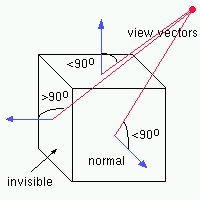
So, to recap, the steps to determine if a polygon is visible or not are as follows; First, calculate the polygon normal. Next, calculate the view vector. Now find the dot product between these two vectors. At this stage you only draw polygons that have a positive dot product (or negative if the polygon was described as clockwise). Simple as that. For completeness, I'll also include some code on how this might look:
int i;
 Vector normal, // the polygon normal
 camera(0,0,0), // the camera at 0,0,0
 cv; // the camera vector (or view vector)

 // Loop through all the polygons
 for(i = 0; i < faces; i++)
 {
 // Transform our normal to view space...
 // This example assumes you've already precalculated the normal and
 // so all you must do is rotate it into world space by your matrix.
 // See my vector tutorial on how to calculate a polygon normal.
 normal = *face.normal;
 normal = normal * to_world_space;

 // Now calculate a vector from the camera to any point on the polygon
 cv.set(camera, world_space[ face.vertex[0] ] );

 // Now calculate the dot product of the normal and the camera vector
 if((cv.dot(&normal) > 0))
 {
 // draw the polygon here, it's visible
 }
}Related Tutorials

Procedural Generation of 2D Tile Maps in Games
The article explains how to build a procedural 2D cave map generator using cellular automata. It covers map representat…

Localizing A Game Into French — Which Variant Should You Choose?
So, you’re making an awesome indie game, and now you’re thinking about localizing it into French? Great idea! There ar…
 Level Up Translation

How Long Does It Take To Localize An Indie Game?
So you’re planning on localizing your indie game, but you’re not sure how much time to schedule in. While the timing o…
Level Up Translation

Creating game videos: best practices and pitfalls to avoid
Game video production: practical tips on how to create a game trailer or teaser that you can be proud of. Give your aud…
 Alconost

Adopting CI/CD: How Midwinter Entertainment iterates at speed with the help of IMS
Game development was once like one long sprint: a huge effort until you reached the finish line — at which point you co…
 GameDev.net

5 Things to Consider When Making a Video to Promote Your App or Game
How can you show an app or game in your video in a way that attracts new users? Let’s take a look at what to go by when…
Alconost
Discussion
More from Jeff Weeks
Comparing Shadow Mapping Techniques with Shadow Explorer
New Incentives and a Whole New Platform From The Intel AppUp developer program
The final installment in this series on Intel's AppUp program details additional incentives and opportunities for devel…
The Game Maker
This book excerpt contains the first chapter of the book that introduces beginning game developers to the Game Maker pr…
Discussion