
Smooth interpolation of irregularly spaced keyframes
Describes a method of grouping keyframes where they're most needed to obtain smooth animation.
| Linear interpolation k(u) = k(0)x(1-u) + k(1)x(u) traditionally written with a single multiplication k(u) = k(0) + ux(k(1) - k(0)) | 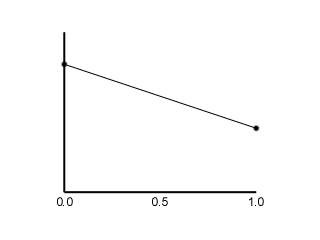 | The most common method of interpolation. Certainly its speed of calculation is an advantage, but sharp changes of gradient at each keyframe can be visually disturbing. It creates the appearance of huge forces acting on the bone, or a lack of mass in the model. | ||
| Cubic interpolation k(u) = k(0)x(2u[sup]3[/sup]-3u[sup]2[/sup]+1) + k(1)x(3u[sup]2[/sup]-2u[sup]3[/sup]) | 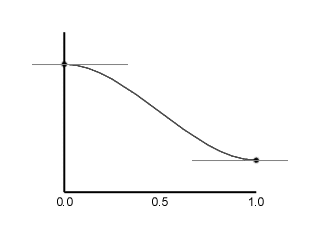 | This interpolation overcomes the gradient change problem, as it has C(1) continuity (continuity of both position and gradient). However, it achieves this by reducing the gradient to zero at each keyframe, so the interpolation of a series of colinear values of k(t) would produce a curve with a peculiar oscillating gradient. | ||
| Catmull-Rom spline interpolation Requires the gradients of the tangents at k(0) and k(1), denoted k'(0) and k'(1). Finding these tangents is explained below.
| 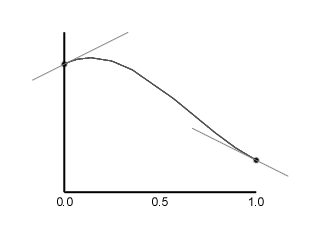 | By modifying the cubic interpolation in this way, the curve can tend to a gradient other than 0. When an appropriate tangent is chosen, the resulting curve fits the keyframes very smoothly - with C(1) continuity, and no unnecessary points of inflexion. |
while (t >= kt[iKeyFrame+1]) iKeyFrame++; Then we come across a slight snag - we need the value of u for the spline to work correctly. This is calculated as u = (t - kt(i)) / (kt(i+1) - kt(i)). The value (kt(i+1) - kt(i)) is actually used three times per interpolation, so I give it its own name, dx. u = (t - kt(i)) / dx. Of course, we've now scaled time, so while k(t) will hold, the tangent values k'(t) will be scaled by the same amount. We must replace k'() in the Catmull-Rom interpolation by k'() x dx. At first glance it may seem that this is the inverse operation to that performed when calculating the tangents, but it is not; both operations are necessary. You now have your interpolated value of k(t). Apply this to your Euler angles, or your sleek slerped quaternions, and you will see some real smooth animation. Enjoy! [size="5"]Glossary k(t) [bquote]The value of a keyframe at time t (one number, so several may be used to represent a complete orientation).[/bquote] k(u) [bquote]The interpolated value between two values k(t) and k(t+1) (assuming a spacing of 1). u always takes a value in the range 0 to 1.[/bquote] k'(t) [bquote]The "gradient" of a keyframe - this is not set by the user, as is the case with splines in many graphics programs, but is calculated as an average of the gradients of lines to the keyframes on either side.[/bquote] kt(i) [bquote]The time value t for keyframe number i. It must always be the case that kt(i) < kt(i+1).[/bquote] dx [bquote]The time interval between two particular keyframes. In most keyframing systems, dx is 1, or some constant value. In this system, dx can take any value, and can vary throughout the animation.[/bquote]
Related Tutorials
Balancing Game Development and Creative Direction in Indie Production
A practical look at how indie developers can balance creative direction with hands-on game development. This article co…
 huseyin_onur
My Unreal Engine Development Process: From Core Idea to Playable Build
A practical overview of my Unreal Engine development process, covering how I move from a core game idea to a playable b…
huseyin_onur

Introducing LaneGraph: The Ultimate Road Network Solution for Unity
Discover the power of LaneGraph, a lightweight and flexible lane-based navigation system for Unity. LaneGraph makes it…
Retargeting Mixamo Characters with Root Motion In Unreal Engine 5.4.
I have always found Retargeting Mixamo Characters To have Root Motion is a serious lengthy Tast, Recently I stumbled up…

How To Make A SIMPLE Main Menu In Unity
In this tutorial for unity, i go over how to make a simple main menu for unity, it's an unlisted video because i do not…
 FlipThaSwitzh

Guide to Gameplay Balance
A perspective on competitive gameplay balance, from a background of "shooter" sandbox design.
 Tucker933
Discussion
More from Jon Langridge
Comparing Shadow Mapping Techniques with Shadow Explorer
New Incentives and a Whole New Platform From The Intel AppUp developer program
The final installment in this series on Intel's AppUp program details additional incentives and opportunities for devel…
The Game Maker
This book excerpt contains the first chapter of the book that introduces beginning game developers to the Game Maker pr…
Discussion