
A Postmortem of Game Programming with Digital Mars’ D Programming Language
A detailed look at getting set up and started with D, as well as various highlights and pitfalls of the language
Prologue
One thing I find very interesting is different computer languages, their development and their differences. I spend most of my time in C++, but the little exposure IAEve had to LISP or to other languages always leaves me wishing that CAEs macros were cleaner, or that C++ had a way to implement a nice multi-variable for-each.
This past month IAEve been on vacation and since my wife would be bringing her laptop, since I didnAEt feel like bringing the MSVC++ CDs or backing up my projects directory, and since I didnAEt really have any current project I wanted to work on, I decided to break out Digital MarsAE D Programming Language and try to learn it.
I had read through some of the first pages of Digital MarsAE DAEs documentation and propaganda, but I had never taken the time to actually work with the language. After a few weeks of fiddling with it when not at the pool, I have to say I really like the language.
Two major design philosophies that I feel when working in D are: 1) Things that you do a lot should be simple and 2) A language should be clean, simple and consistent.
This diary is about the specific joys and difficulties of working with D.
D is billed as a ground up rewrite of C ? a new version of a good language, or everything that C++ wishes it could be but never will be.
Installing
Google is everyoneAEs best friend. ?D Programming Language Download? drops you to a page with all the downloads. I was running Windows XP Pro in the hotel room, so I grabbed DMC.ZIP and DMD.ZIP. (The Linux people will want to grab the DMD.ZIP for Linux and must have GCC lying around. Presumably youAEll know where to find that. ) You might also want to find CandyDoc because itAEs pretty.
ItAEs a quick download, which is nice because IAEm on dialup at home.
I initially wanted to run the programs from the desktop, so that I could easily clean everything off when I left the hotel. That didnAEt work out in the brief time I spent fighting, but the following files seem to be important if you want to bash D into running from a non-root location: DMD\bin\sc.ini and DMD\source\d\all.sh. ThereAEs probably more to it, but I gave up. At least some of the tools donAEt handle file paths with spaces in them.
I still didnAEt want several folders littering my C: root, so I extracted the DMD.zip into c:\DMD and the DMC.ZIP into c:\DMD\DMC. This required modifying the LINKCMD in DMD\BIN\SC.INI to reflect the moved DMC folder. (On a second attempt at home, I extracted everything into c:\dmd\... \bin, \src, \include. You have to update sc.ini again to reflect D's settings, but it worked.)
I created a projects folder under c:\dmd\projects.
Getting work done
I like using Textpad as my editor with a modified D.syn file. The standard Textpad download D.SYN is missing some keywords. I also opened two cmd windows with the following batch file
@ECHO OFF SET PATH=%PATH%;"C:\DMD\bin";"C:\DMD\dmc\bin" CMD ; Run a command line and don't return (At home, I don't need the c:\dmd\dmc\bin, because I successfully flattened DM-C and DM-D into the same set of directories.) The batch file was configured to run in c:\dmd\projects.
My first cmd window was used for compiles and my second was used for running my programs. This resulted in some mouse clicking, but left everything open. Both BUD and dmd also have the "execute on successful compile" option, so having just one cmd window works as well. I also opened folder windows to the Phobos standard library source and to the documentation and had Textpad taking up + the screen.
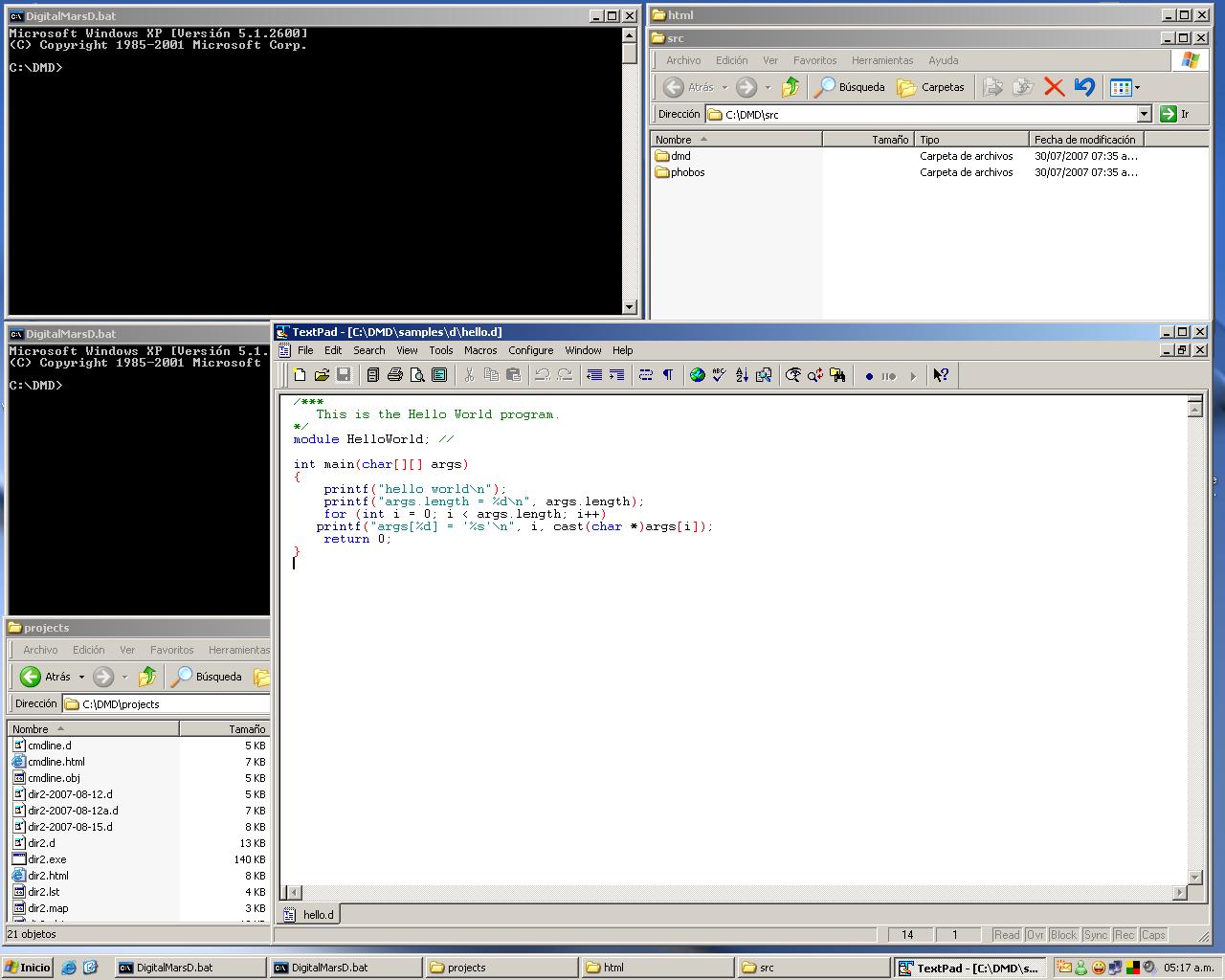 A good test of whether your install worked is to run your command window, then navigate to c:\dmd\samples\d\ and run:
 shell all.sh If it works, D is configured and installed correctly. If it doesnAEt, you failed somewhere. It took me a few tries at home and 1-2 tries at the hotel to get things up and going.
My experiences
The online documentation, a lot of which is installed with the compiler, is very readable. IAEm a bit odd, but I found the documentation to be enjoyable reading. (I find Microsoft help to be useless and Microsoft online documentation to be needlessly obfuscated. (UnixAEs man help pages are alright. They are uniformly terse, but are still complete and tend to actually answer the questions I have .) After I started working with the D compiler, I found that Digital Mars D Documentation suffers from two inexcusable lacks. First, there is no comprehensive index or table of contents. All month, IAEve been struggling with 2-3 recurrent problems with features which I want to use, but donAEt remember how they worked. IAEve been searching the documentation for ?const? and ?function parameters" numerous times, but since Digital Mars uses Google as their index front end, the results are all original discussions of the feature in the forum archives (filled with people much smarter than I am) and buried somewhere is the actual documentation page. Continually searching for ?site:digitalmars.com ?archive class object? improves the results.
Beginning work : Dir2
I started by grabbing the ?hello world? or ?word count? app, I forget which. I copied it from \samples to \projects, changed the documentation to reflect that I was now its author and started work.
IAEve wanted a nice directory diff tool for a while now. I realize that there are many of these available, but IAEve always been busy when I needed one, IAEm too cheap to spend the $20 for a commercial one and too lazy to search for a good open source one. Besides, not finding a good tool has left me this opportunity to write one. When I got to the hotel, I immediately copied my 1000 crappy 80AEs games CD on to the computer and Windows copy barfed after 975 of them. This left me with no good way of knowing which of the 100,000 files the problem was, but I tried to manage. This is a perfect illustration of one application of my directory diff tool. I want to be able to repair large directory copies, not merely delete and retry.
The first job is to write a tool which can list all files recursively across a folder and report the findings. D has a function with this functionality; listdir. I immediately encountered the unacknowledged recursive NTFS listdir bug. In the D archives, thereAEs a complaint that listdir doesnAEt always recurse. The response is the classic ?It works on my machine." On the hotel computer, I had this same problem. I donAEt know why, but I had to write a listdir which could recurse. (I later encountered a copy-file problem: std.file.write( out_filename, std.file.read(in_filename)); worked fine, but copy_file(out_filename, in_filename); didnAEt. Ah, turns out that the parameters are SRCPATH, DESTPATH ? no wonder the file didnAEt exist.)
Being able to toss strings and arrays of objects around as parameters and return values without worrying about the memory leaks is really nice. In C++ you must always be aware of whose responsibility an object is. D is really nice about allowing you to pass references (low overhead on function calls) around without worrying about later releasing the objects or performing expensive copies.
DERELICT Game Library
After finishing my directory diff tool and deciding that the HTML source code reformatter was too boring to work on; I returned to trying to get some kind of a game working in Digital MarsAE D programming language.
I downloaded Derelict, the everything-related-to-games-or-graphics linkage library for D. It takes good advantage of DAEs ability to statically and dynamically link to C without hassle. I liked Derelict. Add one additional initialization function call and the C code for your OpenGL or SDL program is very nearly ready to run.
Derelict needed Build / BUD in order to run. (BUD is the name of the tool formerly known as Build. BUD parses your source files as needed and acts as an intelligent MAKE. YouAEve already specified in your source which imports you need. BUD uses this information to compile and link your executable.). (Download this, then rename the junk file that downloaded as ?bud.exe?. The download link was broken for me.) After using BUD to get Derelict compiling, I discovered I like it better then dmd for my compiles. No make files. The naming scheme of your files appears to be sensitive, but you can build a single file and all dependencies will be dragged in.
One of the tutorials I read recommended breaking DerelictAEs zip file layout by searching for every subdirectory named ?derelict? and then dropping those files into DMDAEs SRC directory. This worked very well.
I grabbed one of NeheAEs articles (Try 6 and 15, I forget which I used) as a base, started with the OpenGL ?flying a little plane around the screen with the keyboard? and built upwards to a Asteroids / Bosconian type game.
I took that basic file and started adding layers of functionality. I mildly kept in mind how I would be using my code in the future, but mostly I just kept a list beside my keyboard of the features I wanted to add, and then refactored the code as I went.
I havenAEt been a fan of C# and JavaAEs one file layout because it seemed cluttered to me. A header gives you a nice concise list of what functions and structures are available, leaving the source file to do actual work in. Using BUD made splitting D source files very easy, since once the files marked what imports they needed, the compile just worked. D has nice class / object oriented support, but doesnAEt mandate it religiously. I find it easier to refactor stray functions out into new files than to break an existing class in half to make navigating the files easier.
If I had worked much longer with my little toy game, I would have broken the render and keyboard process functions in half. I had code for both gameplay and the main menu in the same functions and that looked ugly. I would probably add a function pointer ?process mode? system to handle which render and process was currently executing. After adding many enemies and weapons, I was starting to get irritated at the duplicated code in the ?behaviors? file. Most of that code could be converted to data and placed in an external script or in an .INI type definition file.
Various Notes on D
writefln
writef is a cool function. If you are looking for control, it works just like printf.
writef(?%d + %d is %d\n?, 1, 1, 1 + 1); However, if you are in a hurry and want a bunch of debug stuff dumped out: writef(filename, ? ?, line_number, ?\n?); Even better: since every printf IAEve ever written in C has had \n tacked to the end of it: writefln(?%d + %d is %d?, 1, 1, 1+1); writef is type safe. It auto-detects sign, so no more %u / %d nonsense. You can also use %s for every insertion and D will lexical cast everything into a string before displaying.
Strings
In D, strings are a built-in part of the language. But itAEs better than that. In D, arrays are a first-class part of the language. Strings (being arrays of characters) benefit from all the cool things youAEve ever wanted arrays to do.
return array[4..length] This is possibly one of the coolest single lines of code IAEve ever seen. ItAEs free! Because IAEm making no modifications, but am just returning a slice of an array, the line of code above uses 8ish bytes of memory and no processing time. Also note that length is automatically scoped inside array.
Unit Testing
On these first two projects, I didnAEt use DAEs built-in unittest keyword . Later, on another project, I decided that I should toss in some tests. unittest{} is very well written. Anywhere in your files, you can drop a unittest{} block (treat it like a self-calling pseudo-function (if youAEre from C++)) and those tests will get executed when you run a ?unittest build. It is a simple written system that works well. I donAEt normally unit-test my code, but with as easy as D makes it, I can see the benefits. After filling out one of these blocks, I know my code is not broken in several ways. I also know that it cannot become accidentally broken, because my tests will demonstrate that. I found this pattern throughout my experience with D. D makes it easier for me to be the kind of programmer I would like to be.
Unfortunately, the simplest version assert is about the only built-in testing function. More about that next.
Code generation
In C, macros are seriously powerful tools. I donAEt accept the arguments of people that macros are ugly, type-unsafe, code-unfriendly, and un-debuggable. That is all perfectly true, but in C/C++, there are jobs which can be done either only by macros, or can be done best by macros. Inline templated functions help, but macros still fill a niche. D doesnAEt have a macro preprocessor. ThereAEs static if, static assert, templates, delegates and mixins. The big point here is that there isnAEt a separate macro language you have to learn. The entire D language is available to you AT COMPILE TIME! (There are also nested functions, which help alleviate the macro problem, but thatAEs a different topic.) Unfortunately, D ends up being short a little functionality by removing the full preprocessor. After working with the language a little, I wanted to add a more comprehensive assert_equal(param1, param2) to my programs. This construct is very useful for unit testing, but ends up being very ugly or unhelpful without full support. In C, this function is implemented as:
#define assert_equal(param1, param2) \ do { \ if((param1) != (param2)) { \ printf(?Test %s == %s failed.\n?, #param1 #param2); \ printf(?%s != %s\n?, as_string(param1), as_string(param2) ); \ assert(0); \ } else { \ printf(?Test %s == %s passed.\n?, #param1 #param2); \ } \ } while (0) This has the problem of evaluating the params too many times, but gets close. The important things that I want here are that the text of the test (Test obj.name == foobar passed) and the reason for the failure (bazdoo != foobar) are both printed. Also, when this code is run in a debugger or the assert(0) line fires, I want the file / line number reported to be that of the client code, not the file location of the macro. I have made several attempts at this and failed one of my three requirements. Using mixins (evaluate a string as code at compile time) is ugly. Instead of assert_equal(obj.name, ?foobar?), I end up with mixing assert_equal(?obj.name?, ?\?foobar\??). This code also doesnAEt report the failure line correctly, and I couldnAEt get a __LOCATION__ (defined as __FILE__, __LINE__) compile time variable to work. Using a normal function prevents me from reporting both the text of the test and the correct failure line. For example broken code, see the appendix.
Documenting
Built-in source documentation. I realize Java and C# and other development platforms offer this. D is nice in that this is part of the basic compiler (add one flag and you get a nice HTML file showing your documentation) and that it was designed in from the start. Further, the documentation thing isnAEt some separate source file based xml parser: ItAEs part of the same language. (CONSISTENCY!) Add an extra trailing comment character to your comment:
/// IAEm a documentation comment /** so am I */ /++ and so am I! +/ ? and the compiler does the rest. Because this is built-in to the language and is so easy to use, youAEll use it too. There isnAEt a separate mark-up language you have to learn (though there are some features if you care) itAEs all part of D, and D is a clean language. Using CandyDoc as part of your project gives a nice sidebar and some syntax coloring.
Automatic variable typing
autos are really, really nice. In C++, if you want to iterate across a list, you have to do some nonsense like:
for(list
Related Tutorials
Balancing Game Development and Creative Direction in Indie Production
A practical look at how indie developers can balance creative direction with hands-on game development. This article co…
 huseyin_onur
My Unreal Engine Development Process: From Core Idea to Playable Build
A practical overview of my Unreal Engine development process, covering how I move from a core game idea to a playable b…
huseyin_onur

Introducing LaneGraph: The Ultimate Road Network Solution for Unity
Discover the power of LaneGraph, a lightweight and flexible lane-based navigation system for Unity. LaneGraph makes it…
Retargeting Mixamo Characters with Root Motion In Unreal Engine 5.4.
I have always found Retargeting Mixamo Characters To have Root Motion is a serious lengthy Tast, Recently I stumbled up…

How To Make A SIMPLE Main Menu In Unity
In this tutorial for unity, i go over how to make a simple main menu for unity, it's an unlisted video because i do not…
 FlipThaSwitzh

Guide to Gameplay Balance
A perspective on competitive gameplay balance, from a background of "shooter" sandbox design.
 Tucker933
Discussion
More from Jonathan Breuer
Comparing Shadow Mapping Techniques with Shadow Explorer
New Incentives and a Whole New Platform From The Intel AppUp developer program
The final installment in this series on Intel's AppUp program details additional incentives and opportunities for devel…
The Game Maker
This book excerpt contains the first chapter of the book that introduces beginning game developers to the Game Maker pr…
Discussion