
A Simple Fast Resource Manager using C++ and STL
This article describes an implementation of a resource manager in C++ using STL. It is simple yet efficient. Sample usage is shown to reflect the ease of use
Introduction
Resource management is a vital aspect of game development. Every game has resources of various types and an efficient resource management system can improve the overall performance of a game. In this article, we look at an implementation of a resource manager that can be set up with minimal effort, yet which provides noticeably better performance than more generic approaches.
The Role of a Resource Manager
A resource manager manages various resources of a game. Meshes, sounds, scripts, shaders, textures can all be considered as resources, yet they have one thing in common: they are loaded from files before use. A resource manager can handle the mundane tasks associated with loading and accessing the resources. Ideally, the resource manager should be fast, efficient, should use minimum memory and also be easy to use at the same time.
Design Goals
Our resource manager should satisfy the following goals:
- It should be consistent across various resource types.
- Access to resources should be done in O(1) time.
- Insertion should reuse previously loaded resources.
- Insertion should reuse slots for resource pointers that have been free up due to removal of resources before making new slots.
- Removing a resource should be at most O(1).
- Using it should be simple.
Approach
To achieve the goals above, we are using the following:
- C++ templates to enable use for all resource types.
- A simple base resource class so that initialization of some parameters is consistent.
- Reference counting so that the same resource is not loaded off disk multiple times.
- STL to simplify basic coding tasks.
Structure
The Resource Class
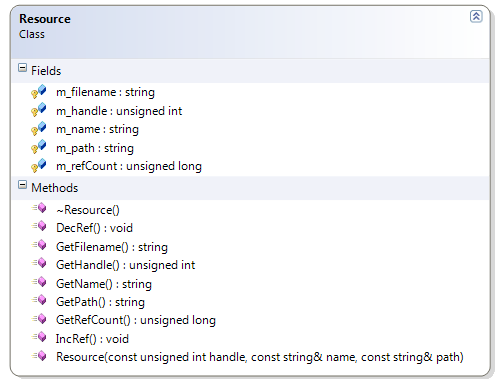
To enable consistent handling and initialization across various types of resources, we have used a common base class for all resources. For fast access, we have chosen to use unsigned integer handles for each resource. The resource class also has a reference count and members to hold the file name and path. The following figure shows the members of the class:
The ResourceManager Class
The ResourceManager class manages different types of resources. We use a different ResourceManager instance for every type of resource, and thus the ResourceManager is a template class. The members are shown in the following diagram:
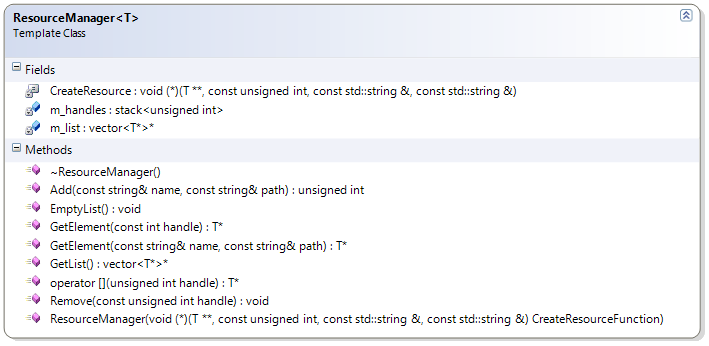 The ResourceManager class has four member variables. m_list is a pointer to a vector which holds pointers to resources of a specific type. The resources are instances of the Resource class, or a class that derives from the Resource class. The stack m_handles is used to keep track of free slots within the m_list vector. Its role is explained later. The third member, CreateResource, is a pointer to a callback function that is called by the resource manager when a new resource is being added.
 How it Works
Resource Types
For every type of resource, we need to derive a class from the base resource class. This derived class will contain member variables and methods that are needed for that specific resource type. For example, say we need to use resources of type Mesh. We would need to derive a Mesh class from the Resource class. In addition, we would require the constructor of the Mesh class to accept the parameters handle, name and (optional) path. The Mesh class would hold other members like mesh containers, frame lists, vertices, indices etc. and also methods to update and render the mesh. So the Mesh class may be something like this:
class Mesh : public Resource { private: Vertex * vertices; public: Mesh(const unsigned int handle, const std::string& name, const std::string& path = "./"): Resource(handle, name, path) { //load mesh specific stuff } ~Mesh() { //destroy mesh specific stuff } Render() { //do rendering here } };
ResourceManager Creation
We create a ResourceManager instance for each type of resource. While creating a resource manager, we specify a type and an optional callback function that will be called when adding a resource to the manager. If the callback function is not passed into the constructor of the manager, it is set to null. The constructor also initializes m_list to a vector that holds pointers to resources.
ResourceManager Destruction
The destructor of the ResourceManager class destroys all the resources the ResourceManager loaded and destroys the m_list vector.
Access
The GetElement method is used to access the resources loaded by the ResourceManager. It has two overloads:
- One takes the file location and iterates through all its resources till a match is found. If a match is found, the corresponding resource is returned. This runs in linear time.
- The other overload is very fast and just indexes into the resources by a given handle. This is the overload that will be used most of the time and as it is a simple index into a vector, it is O(1).
Removal
Removal is done by the Remove method. It takes a handle and checks if removal is possible. If so, it gets the resource indexed by the handle. The reference count of the resource is then decremented. If the reference count reaches 0, the following code runs:
// If the resource is no longer being used then destroy it. if( resource->GetRefCount() == 0 ) { //add the handle to the stack of free handles m_handles.push(handle); //delete the resource delete resource; //mark the slot as NULL (*m_list)[handle] = NULL; } We first save the handle onto the stack. This is done so that on the next insert, that handle will be used (i.e. the next insertion will use that slot in the m_list vector). If a vector is full when another element is being inserted, the vector resizes itself. The resize operation is costly and once a vector grows, it usually canAEt shrink ? even when elements are removed. Keeping the stack of handles, we ?save? the slots in the vector that used to hold resources which were later removed. Using these slots for insertion will mean the vector will not grow while there is an unoccupied slot in it. Since the Remove method does not rely on the number of resources loaded or the number of slots available, it runs in O(1) time. We also set m_list[handle] to NULL so that if for some reason the handle is used to access a resource, NULL is returned.
Insertion
Inserting a resource is done by the Add method. HereAEs the signature:
unsigned int Add( const std::string& name, const std::string& path = "./" ) The function takes the file location to load the resource from and checks if the specified resource has already been loaded. If it has, then the reference count of the resource is incremented and the handle of the resource is returned. If not, then a resource is created. In this case, a check is made to see if any handles are available on the m_handles stack. If so, that handle is used. If not, then a curent size of the vector serves as the handle and m_size is also incremented. The following code does this: //Check if there is an available handle. If not, use new handle. bool handleAvailable = !m_handles.empty(); unsigned int handle; if(handleAvailable) { handle = m_handles.top(); m_handles.pop(); } else handle = m_list->size(); After that, the callback function is called if it has been set by the user. If not, the constructor of the resource is called. Either way, a resource object is created. Next we check if a slot was available. If so, the resource is added to the vector at that index. If not, it is appended to the end of the vector. if(handleAvailable) (*m_list)[handle] = resource; else m_list->push_back(resource); The Add function iterates through all of the elements of m_list to see if the element already exists. This means it runs in linear time. This is a performance bottleneck, but since resources are usually created at load time, we chose to go with this approach for the sake of simplicity. Another alternative would be to have an stl::map in the ResourceManager class that would map a filename to a handle. In such an approach, insertion would be reduced to logarithmic time (as GetElementAEs first overload would run in logarithmic time), but the complexity of Remove would increase to logarithmic time from the current constant time.
Usage
Using the resource management system is fairly simple. The file sample.cpp has a basic application that uses the system. The first step to using the system to manage resources of a certain type is to create a class for that type. That is what the TestResource class is for. As mentioned before, this class must derive from the basic Resource class and provide a constructor that takes three arguments: the handle, the name of the file and (optional) the path to the file. If the resource class needs initializing anything else, we can do it in the constructor. In the example, the string m_details is initialized in this manner. The constructorAEs code is given here:
TestResource(const unsigned int handle, const string& name, const string& path = "./"):Resource(handle, name, path) { stringstream s; s << "Hello handle: " << handle << " name: " << name << " path: " << path; m_details = s.str(); } After defining the class, the next step is to create a ResourceManager instance for the type. In our sample, this is done by: //Create the resource manager for managing TestResources ResourceManager TestResourceManager; After that, we can add a few resources to the manager. The Add method returns the handle for each resource added. Our handles vector is used to hold the handles. We request resources from the ResourceManager by indexing into it by these handles. The following code shows the usage: for(vector::iterator i = handles.begin(); i != handles.end(); i++) { TestResource *r = TestResourceManager[*i]; if(r != NULL) cout << TestResourceManager[*i]->ToString() << endl; } Here, we have requested resources from the manager and called the ToString() method for each valid resource returned. In the sample, we have added two resources with the same name and path (?Hello? and ?./? respectively). Printing the ToString() of each resource shows that the reference count for the resource corresponding to handle 0 is 2 (i.e. as the same resource was added twice, the manager actually created only one instance and increased the reference count to 2 on the second Add call). We then remove one of the resources with a Remove call. We again print the resources. This time, we see that the reference count for the resource with handle 0 has been reduced to 1. We then call Remove for handle 0 again (since the resource with name ?Hello? was Added twice before the other resources, handles[0] and handles[1] both equate to 0). Printing the details this time shows that the resource with handle 0 (and name=?Hello?) has been removed from the manager entirely.
The CreateResource function
In our sample application, we have not used the CreateResource function that can be specified during creation of the ResourceManager.If our system were to be used in a game engine (most likely), the engine would have access to the constructor of the class representing a resource (like Mesh), but the application using the engine will probably not. The application may need to create some resource in a specific way, but as it has no access to the constructor of that resource class, it canAEt use the constructor for custom initialization. If the application has a resource manager, it can specify a function that will create the resource as well as do the other things needed and pass a pointer to that function during creation of the ResourceManager. The Add method of the ResourceManager will then utilize that function instead of calling the constructor of the resource class and the custom initialization tasks will be accomplished.
Notes
- The accompanying source code has been tested with Visual C++ 2008 running on Vista Ultimate x64. The source code is not dependant on the system architecture and should work with standard compilers.
- We have taken vector::size() to be constant time. The STL allows this method to be linear time, but nearly all implementations are constant time. If it is linear time, then some of the methods will also run in linear time and performance would degrade. In such a case, a possible improvement would be to have a variable in the ResourceManager class that would hold the number of resources currently managed by the manager and use that variable instead of calling m_list->size().
References
- Vaughan Young, Programming a Multiplayer FPS in DirectX, Charles River Media, 2005.
- MSDN library.
Related Tutorials
Balancing Game Development and Creative Direction in Indie Production
A practical look at how indie developers can balance creative direction with hands-on game development. This article co…
 huseyin_onur
My Unreal Engine Development Process: From Core Idea to Playable Build
A practical overview of my Unreal Engine development process, covering how I move from a core game idea to a playable b…
huseyin_onur

Introducing LaneGraph: The Ultimate Road Network Solution for Unity
Discover the power of LaneGraph, a lightweight and flexible lane-based navigation system for Unity. LaneGraph makes it…
Retargeting Mixamo Characters with Root Motion In Unreal Engine 5.4.
I have always found Retargeting Mixamo Characters To have Root Motion is a serious lengthy Tast, Recently I stumbled up…

How To Make A SIMPLE Main Menu In Unity
In this tutorial for unity, i go over how to make a simple main menu for unity, it's an unlisted video because i do not…
 FlipThaSwitzh

Guide to Gameplay Balance
A perspective on competitive gameplay balance, from a background of "shooter" sandbox design.
 Tucker933
Discussion
More from Ashic Mahtab, Zinat Wali
Comparing Shadow Mapping Techniques with Shadow Explorer
New Incentives and a Whole New Platform From The Intel AppUp developer program
The final installment in this series on Intel's AppUp program details additional incentives and opportunities for devel…
The Game Maker
This book excerpt contains the first chapter of the book that introduces beginning game developers to the Game Maker pr…
Discussion