
3. Vectors
Covers the basics of vectors and vector math.
In the last section, we discussed the movement of a particle through 2 dimensions. When we wanted to give a direction to any velocity, we could give it simply a positive or negative sign. This does not hold true in three dimensions. So, in order to annotate the direction of a particle's motion, we assign what is known as a vector to it.
As previously noted, vectors have both a magnitude and a direction. Some quantities we can typically represent with vectors include : displacement, velocity, and acceleration. But not all quantities can be represented with vectors. These quantities include such things as mass, temperature, pressure, energy, and time. These are known as scalar quantities.
One of the simplest quantities to represent using vectors is displacement (change in position). This vector, for obvious reasons, is called a displacement vector. Displacement vectors can be calculated by simply subtracting the destination point in 3d space from the starting point. But how exactly do we subtract vectors!?
Well, there are a couple of operations we can do on vectors. But first, we need a way to annotate a vector. The unit vectors I, j, and k are typically utilized in conjunction with some scalar quantity. Wondering what a unit vector is? It is simply a vector of length 1. So, by putting together what we have learned, a vector can be represented with the following notation: (xi, yj, zk).
Ex. (30i , 20j, -10k).
Now we'll need to think about what we are really saying here a second. If i is a unit vector of length 1, then 30 times that unit vector will give us a new position 30 units to the right of 0i. The same theory applies for 20j and -10k.
[size="3"] Addition
A + B = S
Si = Ai + Bi | Sj = Aj + Bj | Sk = Ak + Bk
Surprising eh? Actually, note that the plus sign means sum rather than just the symbol +
[size="3"]Subtraction
A - B = S
Si = Ai - Bi | Sj = Aj - Bj | Sk = Ak - Bk
[size="3"]Dot Product (Scalar Product)
The dot product shouldn't cause you any trouble. It is simply a way to multiply vectors. We aren't going to utilize the unit vector notation that we described above for simplicity's sake. Keep in mind that we would normally describe these vectors in unit vector notation.
Here is a typical representation of a dot product for vectors A and B:
A ? B
Or we can describe the same equation in terms of vector components:
A ? B = A.x * B.x + A.y * B.y + A.z * B.z
Using a Dot Product, we can obtain the angle between two vectors A and B as follows:
Cos q = (A ? B) / (|A| ? |B|)
q = arcCos ((A ? B) / (|A| ? |B|))
Okay, lets break down what just occurred above. What we are saying is that the cosine of theta is equal to the dot product of A and B divided by the product of A and B's magnitudes. The magnitude of a vector V is denoted by : |V|
One can calculate the magnitude of a vector simply by taking the square root of each term
in the vector squared. Ie.
|A| = sqrt (A.x * A.x + A.y * A.y + A.z * A.z)
[size="3"]Cross Product (Vector Product)
The cross product is a little more tricky. The cross product between two vectors yields a third vector which is perpendicular to the first two.
For vectors A, B, and a resultant C :
A X B = C
Or in component form :
( A.x , A.y , A.z ) X ( B.x , B.y , B.z ) = ( A.y * B.z - A.z * B.y , A.z * B.x - A.x * B.z , A.x * B.y - A.y * B.x)
This is commonly utilized to compute something known as a surface normal. As by the cross product formula, a normal is simply a vector that is perpendicular to some plane. In graphics, this plane is usually a polygon of some type. The surface normal is demonstrated by a line with an arrow pointing in a certain direction in Illustration 2.01 below.
Illustration 2.01:
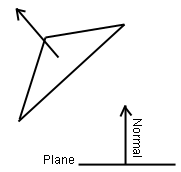
Please note that A X B <> B X A . Ordering is very important in cross products. What actually happens is that B X A will yield a vector which points in the opposite direction of A X B.
That about covers an introduction to vectors. I hope you've understood a portion of it. If not, it may help to see some vector calculations in action in the upcoming tutorials.
On to the next section..
Related Tutorials

A Day As A Game Designer
The fabled game designer. The man, the myth, the legend behind the game. An inspiration to young creatives who wish to …
 Kai Wüest

So You Want to be a Game Developer?
Battletech tools developer Chris Eck describes his journey and advice for getting a job in the industry.
 Chris Eck
A Quick Guide to Gamification and Gamification Careers
If you find yourself slightly stumped over the ever-growing buzz around gamification, and unsure whether there is any o…
Sophie Jackson

Raph Koster's Postmortems: Una Carrera
This excerpt from Raph Koster's Postmortems is an adaptation from a speech he delivered at GameDay Peru in early 2015. …
Raph Koster

Negotiating Sign-On Bonuses in the Games Industry
A quick blurb on signing bonuses in the games industry and how to approach asking for one.

A LinkedIn Profile for Job Hunting and Networking
Marc Mencher is founder and CEO of GameRecruiter and author of Get in the Game!, an instructional book on building a ca…
Discussion
More from Mike Tanczos
Comparing Shadow Mapping Techniques with Shadow Explorer
New Incentives and a Whole New Platform From The Intel AppUp developer program
The final installment in this series on Intel's AppUp program details additional incentives and opportunities for devel…
The Game Maker
This book excerpt contains the first chapter of the book that introduces beginning game developers to the Game Maker pr…
Discussion