
Exploring Metaballs and Isosurfaces in 2D
Ever wondered how the classic 'metaballs' effect worked? This article covers an overview and explanation of metaballs, as well as a simple implementation, some examples, suggestions for optimizations, and a meta-playground demo
Introduction
Posing the Question
In the history of game development, there has always been a "standard" means to represent data in the game world.
During the 2D era the world and its components were shown by using sprites -- collections of pixels to form an image. As the industry moved into 3 dimensions, this standard-format became the 3D model. Models representing the world, characters, and objects as collections of vertices in 3D space.
Both (arguably) represent the most basic element that can be used in the given number of dimensions, but still allow for the greatest amount of speed. Making things run as fast as possible has always been a critical element in the game industry.
But what about other data representations? Aren't there other means of storing information about a given "thing" in the game world aside from sprites and models? They exist, but generally just don't succeed in quite reaching into the industry of game development. What if some of these representations aren't quite as infeasible as people think?
Overview
The goals of this article are three-fold:
- To discuss the history, concept, and implementation of metaballs and isosurfaces.
- To examine the current applications of isosurfaces in the game- and graphics industries, and their possible future.
- To investigate the performance issues involved with isosurfaces, and some existing optimizations/approximations.
What are Metaballs?
Metaballs largely made their introduction in the 1990's through the demoscene: groups of enthusiastic programmers and artists that aimed to create graphical/musical effects that pushed the known limits of older hardware, such as the Commodore 64 and Amiga. The goal of demosceners was to create audio-visual effects in real-time that would impress viewers and confound other demoscene programmers with how the effect was implemented.
One such effect that gained popularity was metaballs: squishy circular objects that had an organic look and feel to them.
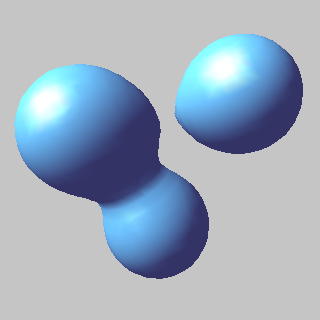
(Metaballs. Note how they have a tendency to "merge" with nearby metaballs.) The main allure to metaballs is their tendency to 'meld' into other metaballs that are nearby, thus creating smoothly formed shapes. Well, how are these objects represented, and why aren't they being used in real-time more often? To discuss this, we will have to talk about the subset of which metaballs is a member: isosurfaces.
What is an Isosurface?
This article will focus entirely on 2D metaballs and isosurfaces. Although an isosurface generally refers to 3D space, it will be seen that it is very easily adapted to 2 dimensions.
Simply put for our purposes, an isosurface is a surface created by applying one or more functions -- whose domain is the entire real 2D plane - onto the screen (or game map). An isosurface is a level set of this function. For those of you who are not already familiar with the subject, just what does this mean?
Pretend we had a function over the 2D plane (read: a function that has a certain resulting value, given any X and Y) that looked like this:
F(x,y) = (x - x0)^2 + (y - y0)^2 You might recognize this as looking similar to the equation for distance from the point (x0,y0). Well, what would this function look like if we drew it on the 2D plane at some arbitrary point? It might look something like this, if distances are highlighted: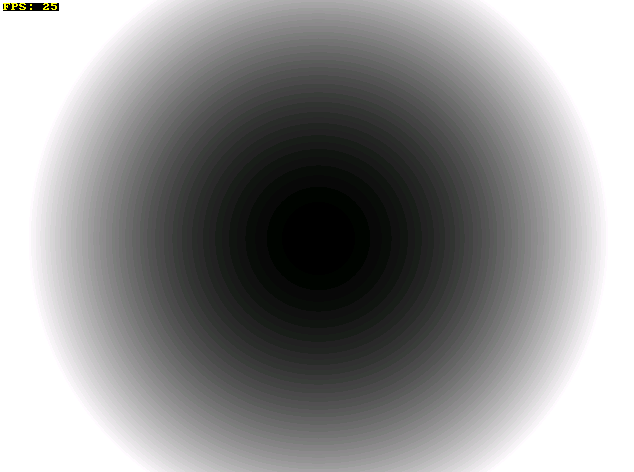
(An image whereas pixel brightness corresponds to distance from the centre of the screen.) From this it is clear that any given X and Y coordinate will have a value corresponding to it, with said value being larger and larger as it gets farther from the centre (x0,y0). It's sort of pretty, but how is this useful? It's not really an isosurface after all.
Like we said above, an isosurface is a level set of this function. What the heck does that mean?
What it means is that the surface is composed of all points on our screen/world that are equal to a certain constant value. To make that a little more clear, let's look at a modification to our previous function:
F(x,y) = (x - x0)^2 + (y - y0)^2 = R^2 This is starting to look very familiar, as the equation for a circle in 2D space. It shouldn't be a surprise what we get if we were to draw this equation over the 2D plane:
(Circle generated by a metaball-like function.) A plain circle, nothing more. We said that an isosurface is made up of all of the points that are equal to a certain value, across the 2D plane. Our circle is a simple isosurface which is composed of just that: every single point in the 2D plane has a distance of exactly R units from the centre of the circle. After all of that talk of 'level sets', it turns out that these isosurfaces really aren't that complicated after all.
In fact, breaking down the word "isosurface" you see "iso", meaning "the same", and "surface", referring to something that is solid and flat. By taking the set of all points in the 2D plane that exactly meet the radius of the circle, we see just that: a surface created by all of the values in the X and Y that meet the same value required by the function. Hardly rocket science!
But surely you're now saying, "If an isosurface is just something simple like a circle, then how do we use this information to make something that looks neat, like that 3D image was shown?".
Let's take a look at a simple implementation for Metaballs.
Creating Meta-Things
A Simple 2D Implementation
Before stepping into more explanations and equations, here is the basic algorithm that we will be using for rendering metaballs to the screen:
- Iterate through every pixel on the screen:
- Iterate through every Metaball in the world:
- Calculate that Metaball's function for the current pixel, and add it to that coordinate's current value.
So, for every frame we want to render featuring Metaballs, we want to examine every pixel, and do a summation of all of the Metaballs' functions on each of these pixels. What do we mean by a 'summation', and 'the Metaballs's function'? - [url="http://www.paulsprojects.net/opengl/metaballs/metaballs.html"]Paul's Projects
- Ryan's Balls
- Hannu's Plaza
- Wikipedia (Metaballs) (Isosurface) (Level Set) About the Author
Stephen Whitmore is a Canadian student currently studying Computer Science at the University of Waterloo. His interests lie mostly in the areas of game development and graphics programming/theory.
If you have any further questions about metaballs or isosurfaces, or any comments regarding the article, please don't hesitate to drop him an email at stephen.whitmore (at) gmail (dot) com; he'd love to hear from you.
Each Metaball (or "Meta-Thing") is defined by a function over the X,Y plane. Like we said in the previous example, we create a circular isosurface with the following function:
F(x,y) = (x - x0)^2 + (y - y0)^2 = R^2 In order to have Metaballs influence other Metaballs that are nearby (thus creating that 'gooey' effect that we are ultimately aiming for), we need to add a little more complexity to the equation in order to achieve the effect we want.
Equation of a Metaball
As an end result, we want to eventually achieve something like this:
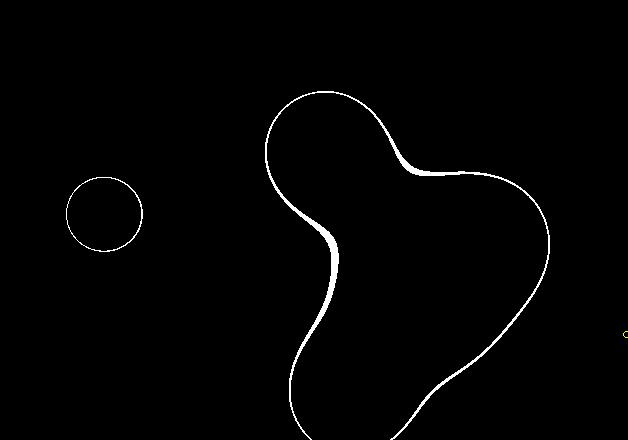
(Four metaballs, all influencing eachother's overall shape. Metaballs that are closer to each other provide greater attraction.) As you can see, the circles are contributing to each other directly, and creating a unique isosurface in the end that is more complex - and much more interesting - than just our one plain circle. However, how is this creating the 'gooey' effect that we sought? It seems like the Metaballs tend to attract each other more strongly depending on how close they are to one another.
The typical equation for a Metaball is as follows:
M(x,y) = R / sqrt( (x-x0)^2 + (y-y0)^2 ) It seems to vaguely resemble our equation for a circle, but we are instead dividing the radius of the Metaball by the distance the point is from its centre. This equation is based on the equation for calculating the strength of an electrical field in science, which is why this function will provide the largest value in the centre of the Metaball (positive infinity) and then drop off quickly approaching zero as the distance from the Metaball gets larger and larger. If we were to look at what these values look like on the 2D plane, it would resemble this:
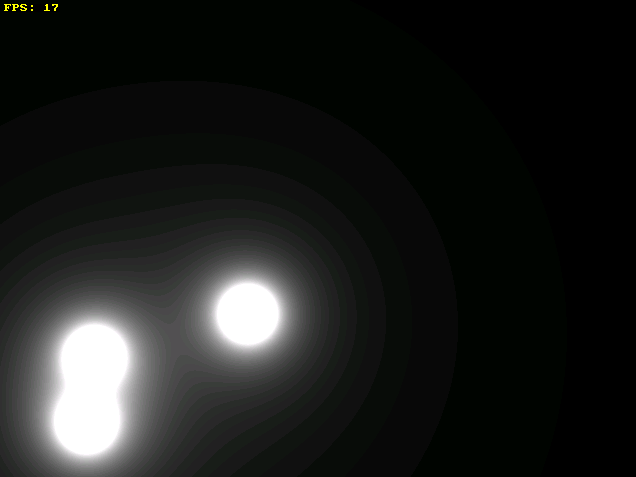
(Notice the banding that occurs around each of the Metaballs, and the way they combine to form 'layers' of Meta-things.) In order to define the curves that we have above, we need to also define a threshold value (with a minimum and maximum) to have the pixels appear along the perimeter of our newly created isosurface. We need to use this minimum and maximum threshold because our screen, unlike a mathematical real-valued 2D plane, only has a finite amount of accuracy and a finite number of points. If we only used a single value for our threshold (eg. F(x,y) = C), many points would be missed by our algorithm, resulting in a much less accurate image:
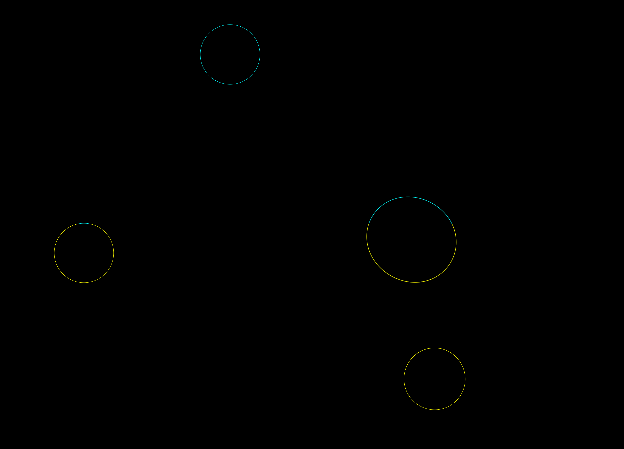
(Badly chosen MAX and MIN threshold values can result in very thick metaballs, or ones that are thin and flicker as they move.) An ideal threshold is usually found by trial-and-error, based on the average size of the Metaballs in the game world.
Writing a 2D Implementation
After discussing the ideas, equations, and algorithm behind Metaballs, let's examine some code that will provide us with a 2D implementation to work with. We'll start by defining a structure for a Metaball object, and an array to hold all of our Metaballs in:
struct METABALL { float _x, _y; float _radius; METABALL(float startx, float starty, float radius) { _x = startx; _y = starty; _radius = radius; } float Equation(float x, float y) { return (_radius / sqrt( (x-_x)*(x-_x) + (y-_y)*(y-_y) ) ); } }; const MAX_METABALLS = 15; METABALL *ballList[MAX_METABALLS]; // A list of Metaballs in our world Now, assuming that you already have your graphics library of choice up and running, we jump straight into the core of the implementation, which is just as simple as applying the algorithm discussed: const float MIN_THRESHOLD = 0.99f; const float MAX_THRESHOLD = 1.01f; // Minimum and maximum threshold for an isosurface ... void draw_metaballs() { // Value to act as a summation of all Metaballs' fields applied to this particular pixel float sum; // Iterate over every pixel on the screen for(int y = 0; y < SCREEN_HEIGHT; y++) { for(int x = 0; x < SCREEN_WIDTH; x++) { // Reset the summation sum = 0; // Iterate through every Metaball in the world for(int i = 0; i < MAX_METABALLS && ballList != NULL; i++) { sum += ballList->Equation(x,y); } // Decide whether to draw a pixel if(sum >= MIN_THRESHOLD && sum <= MAX_THRESHOLD) draw_pixel(x, y, COLOR_WHITE); } } } This is the real work-horse of the entire Metaballs implementation - with this, one can easily create and tinker with one's own Metaballs. If you'd like to see the full source code of a working implementation, you can download several examples and demos in the References section.
Other Meta-Shapes
Balls are certainly the most popular shape to apply this effect to, largely due to the simple nature of the equation of a circle, but it's not hard to modify the original equation to form other interesting 'blobby' shapes.
Ellipses
An ellipse isn't really a far cry from a circle, so its equation might be the easiest to fathom. The equation for an elliptical Metaball is much the same as our original equation, but with floating-point multipliers (Xm and Ym respectively) applied to the X and Y squares:
M(x,y) = R / sqrt( Xm*(x-x0)^2 + Ym*(y-y0)^2 )
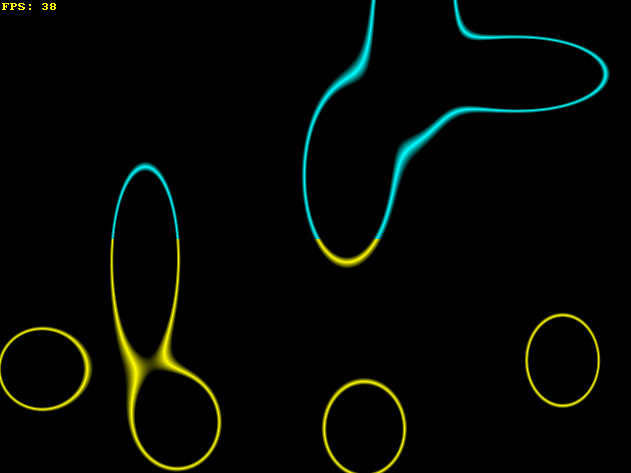
(An elliptical shape generated from a metaball.) When Xm and Ym are both 1, it will be identical to a regular Metaball, but supplying numbers between zero and one will stretch the Meta-Ellipse, while numbers greater than one will shrink it.
Diamonds
The equation for a Meta-Diamond is as follows:
M(x,y) = R / ( |x-x0| + |y-y0| )
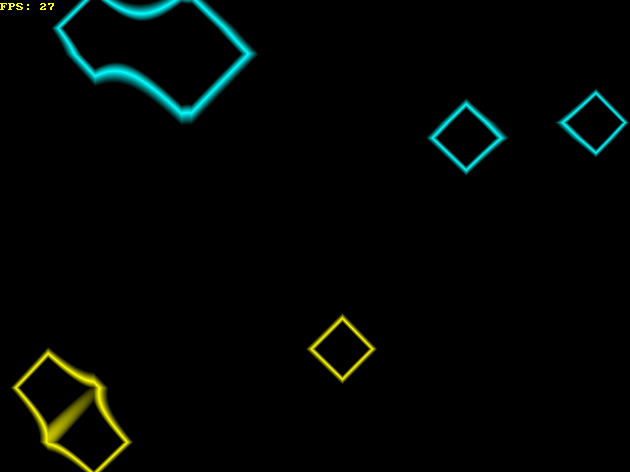
(A simple diamond shape generated from a metaball.) There is a much simpler formula here, where we are simply dividing the radius (or 'size') by the sum of the X-distance from the centre and the Y-distance from the centre, via the absolute-value (ie. '|') symbols. These shapes are particularly fast to render, compared to Metaballs, since they only consist of a few relatively inexpensive operators and functions.
Donuts
We can define a donut-like shape by considering a function that passes our threshold value twice: once near the centre, and again further away. We can accomplish this by introducing an offset to the distance calculated (ie. the value in the denominator) to make the meta-shape cross our threshold more than once. Consider:
M(x,y) = Radius_1 / |Radius_2 - sqrt( (x-x0)^2 + (y-y0)^2 )|
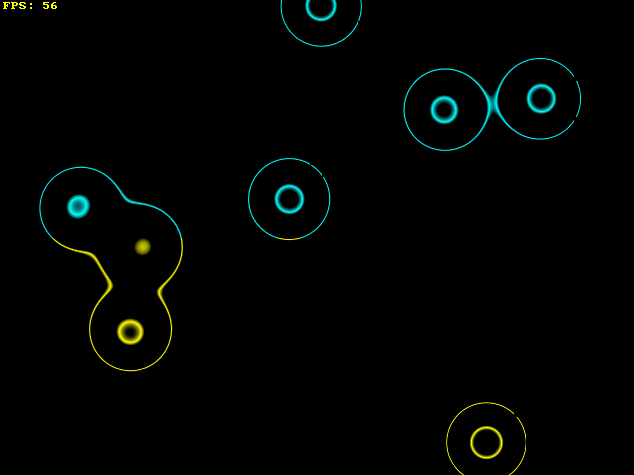
(A donut shape generated from a metaball.) Given two radius values, somewhat alike to an inner- and outer-radius, the threshold for our points to draw will become both Radius_2 units toward the centre of the shape, and Radius_2 units away from the centre of the shape, thus producing a donut-like shape. Note that these are a little slower to draw, since the equation requires an additional subtraction and absolute-value compared to regular Metaballs.
Optimizations and Improvements
With all of this practical uses existing for clearly high-demand areas like medicine and engineering, why is it that they aren't particularly prominent in the world of game development? If you've taken a try at implementing the algorithm above, you'll know the answer in a heartbeat: they're slow.
Or rather, rendering isosurfaces is slow in the naive implementation of performing a summation of each Meta-Shape on every pixel. There are several immediately noticeable optimizations that we can apply to speed up our Metaballs, depending on what result exactly we want to end up with. Below are several optimizations that one can implement that are not too challenging to add into your own Metaballs rendering routine, or may find generally useful.
Uniform Box Division
As you may have noticed in many of the images shown in this article, only a small amount of the screen is actually being drawn. The majority of the pixels (in most situations) remain black and unaffected by the metaballs.
A fairly easy to implement optimization is thusly to compute only the portions of the screen that will actually be drawn. Imagine the screen as divided into uniformly-sized grid boxes. The idea is to sample one or more points within that box to determine if it is worth drawing the contents of it.
Recall that the equation for a metaball is much like the equation of an electrical field, whereas the "charge" of the metaball gets gradually smaller and smaller the farther from the centre of the metaball that you go. This means that you can check for another threshold value every time you sample from the grid to determine whether the grid box is worth drawing. If it is above the threshold, than there must be a metaball nearby.
To make it easier to visualize, the end-result should look something like this:
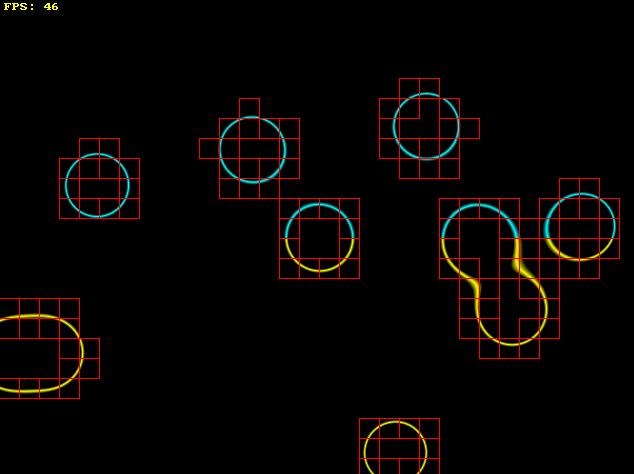
(Filling the map with fixed-size boxes which are sampled to determine their viability to be drawn.) In terms of how useful the optimization is, I receive a speed increase of between 200% and 300% on my machine, but your mileage may vary. The increase you receive is proportional to the size of the grid boxes, how large most metaballs are, and how many metaballs are in the game world. This requires a bit of experimentation to find values that 'fit' nicely for your purposes.
A possible further improvement to this would be to implement something like a quadtree, which would allow for quicker sampling and culling of unneeded areas.
Equation Simplification (Square-Root)
The original equation for a metaball was given as follows:
M(x,y) = R / sqrt( (x-x0)^2 + (y-y0)^2 ) In general, square root is a rather expensive function. Especially when it is being used for every metaball and for every pixel on the screen. By dropping the square root operation, the speed can increase by an additional 300% or more, but at the cost of making the radius for the metaballs a little more awkward to work with. Since square root is no longer being applied to make the denominator much smaller, the radius has to be made much larger to compensate. The result is metaballs that are processed much faster, at the cost of using radius values for the metaballs which are much larger -- and so less intuitive to work with -- than before. A small trade-off for a significant speed gain.
More Optimizations and Techniques
The two above optimizations only scratch the surface of what is possible. There really is a lot that can be done from the original naive equation of a metaball to something that allows dozens of metaballs to be rendered quickly and efficiently.
In the References section are links to other resources/papers on metaballs and isosurfaces which explore other techniques and optimizations in regard to metaballs.
Above and Beyond
3D Isosurfaces
Once one has a firm grasp on the algorithm and idea behind Metaballs, applying the information acquired here is not too difficult to expand into the 3rd dimension. New difficulties are introduced, however, such as working with a space that we cannot practically draw on a per-pixel basis in (ie. we must use polygons/triangles), we need to define surface normals for, and other irksome challenges.
This unfortunately goes out of the scope of this article, but several helpful websites detailing some insights into 3D Metaballs are listed in the References section.
Isosurfaces in the Real World
As a brief aside, it's worth talking a little about where isosurfaces are outside of the numerous demos that showcase Metaballs. One prominent use is that a Metaball primitive is included as a tool or plug-in in many 3D modeling software packages like Maya or 3D Studio Max. Raytracers like POV-Ray also include functionality to render flexible isosurfaces.
Medical imaging is another area where isosurfaces see heavy usage, as it can be an efficient means of volume visualization (eg. MRI scans). Engineering also sees usage of isosurfaces as means of visualizing things like air pressure or fluid flow in simulations. (cite)
The Meta Playground
Available for download is my "Meta Playground", which allows for the manipulation and viewing of all of the meta-shapes covered in the article, plus a few extra aesthetic features.
Source code is available, and should compile on all major platforms.
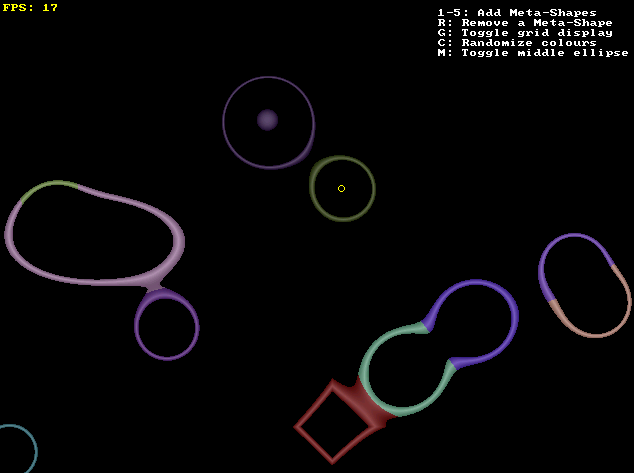
(Playing with several Meta-Shapes.) Download Meta Playground (Win32 Binary)
Download Meta Playground (Source Code CPP File) [No resources included; get from Win32 Binary]
[/url]
References
The following websites were used for ideas and/or understanding of the theory behind metaballs, isosurfaces, and level sets, as well as some of their applications.
Related Tutorials

Procedural Generation of 2D Tile Maps in Games
The article explains how to build a procedural 2D cave map generator using cellular automata. It covers map representat…

Localizing A Game Into French — Which Variant Should You Choose?
So, you’re making an awesome indie game, and now you’re thinking about localizing it into French? Great idea! There ar…
 Level Up Translation

How Long Does It Take To Localize An Indie Game?
So you’re planning on localizing your indie game, but you’re not sure how much time to schedule in. While the timing o…
Level Up Translation

Creating game videos: best practices and pitfalls to avoid
Game video production: practical tips on how to create a game trailer or teaser that you can be proud of. Give your aud…
 Alconost

Adopting CI/CD: How Midwinter Entertainment iterates at speed with the help of IMS
Game development was once like one long sprint: a huge effort until you reached the finish line — at which point you co…
 GameDev.net

5 Things to Consider When Making a Video to Promote Your App or Game
How can you show an app or game in your video in a way that attracts new users? Let’s take a look at what to go by when…
Alconost
Discussion
More from Stephen Whitmore
Comparing Shadow Mapping Techniques with Shadow Explorer
New Incentives and a Whole New Platform From The Intel AppUp developer program
The final installment in this series on Intel's AppUp program details additional incentives and opportunities for devel…
The Game Maker
This book excerpt contains the first chapter of the book that introduces beginning game developers to the Game Maker pr…
Discussion