GameDev.net gamedev.net
🔒 Locked

Real-time Global Illumination and Ray Tracing

Started by jcabeleira Dec 12, 2010 at 12:51 PM 22 replies 21.3k views
Original Post
jcabeleira
jcabeleira
Hello, guys! After several years learning from this site I'm glad to give my own contribute to the community.

I'm here to present the work I've done for my master which is a rendering engine called Serenity that combines GPU lighting and ray traced lighting in order to approximate global illumination.
The main idea behind this work is that GPUs have become powerful enough to generate diffuse global illumination effects. However, sharp global illumination effects like reflections and refractions are still hard to generate using rasterization based techniques, in this case ray tracing is better suited.
Therefore, the engine combines the best of two worlds by using rasterization to generate direct lighting and indirect diffuse lighting, and ray tracing to generate reflections and refractions.

In particular, the engine generates direct lighting through phong illumination and soft shadow mapping generated with the Percentage-Closer Soft Shadows technique.
The indirect diffuse lighting is simulated by an implementation of the Light Propagation Volumes technique combined with a technique that I developed, called Sky Lighting Irradiance Volume, which simulates sky lighting and Screen Space Ambient Occlusion.
The ray traced reflections and refractions are generated by an hybrid real-time ray tracer that splits the rendering process between the CPU and the GPU to take advantage of their particular computing benefits (i.e. coherent vs inchoerent processing). All the ligthing is processed on the GPU, even for ray traced effects, by using Deferred Rendering to unify all the lighting. What the ray tracer does is generate G-buffers containing information about the reflected/refracted scene that are uploaded to the GPU to be used for lighting.

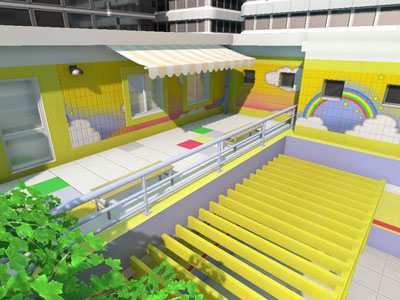
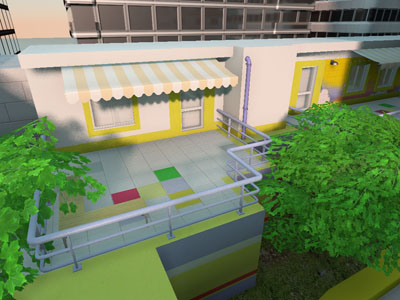
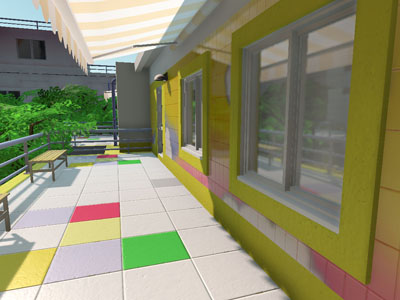
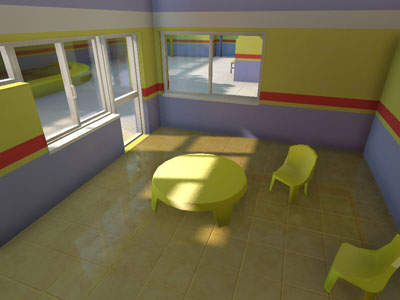
Check my website www.voltaico.net to learn more about the engine. In the Games & Demos section you can download a demo called "Kindergarten" that I created to show its capabilities.

Here is a
">video
of the engine running.

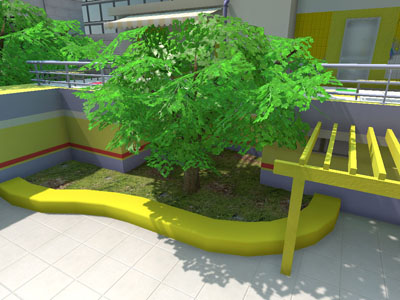
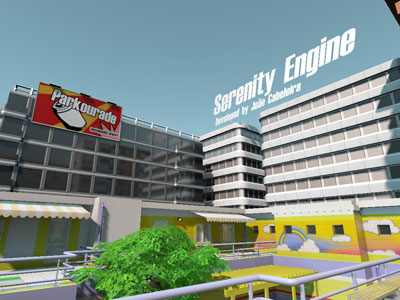
And here are some screenshots:


[Edited by - jcabeleira on December 12, 2010 2:45:00 PM]
ArKano22
ArKano22
This is total WIN.

Is the framerate shown in the video the actual framerate? If so, congrats on making an unbelievable job. If not, congrats on making a believable but still amazing job :).
jcabeleira
jcabeleira
Thanks. :)

Yes, that is the actual frame rate. Around 20 FPS in average, although it can drop substancialy when ray traced effects occcupy the entire screen. The worst case scenario can drop the frame rate to 6 FPS, but it is rare.
tombofsoldier
tombofsoldier
I assume the GI is single bounce, and that the propagation volumes you mentioned are the same ones presented in the Crytek paper?

That being said, DUUUUDE. Great work!
Vilem Otte
Vilem Otte
Wow - good, as I'm also doing research into raytracing, hybrid rendering and such, could you please describe how are you doing raytracing and how are you mixing together GPU and CPU rendering?

It seems you're doing something similar to what am I doing (generating GBuffers multiple times, once on GPU for "primary rays" and once on CPU for "reflected rays")... or? Although reecntly I'm working on realtime raytracing library (for my purposes), so I'm right now doing mostly CPU only rendering.

I'm though using radiosity instead of LPVs to achieve GI (although currently I'm considering crazy idea of another kind of GI in realtime).

May I ask about PCSS? How many samples are you using?

And at last what kind of hardware have you used?

EDIT: I didn't managed to run it... using either Linux and WinE 1.3 (I had to try it :D), or WinXP on Radeon 6800, HD 5470 or HD 2900xt. I've got also older 8800GT from NVidia here, though dunno if it is supported.
Danny02
Danny02
realy impressiv^^

downloaded the demo but it just crashs :-( (q6600, AMD5770)
jcabeleira
jcabeleira
Quote:
Original post by tombofsoldier
I assume the GI is single bounce, and that the propagation volumes you mentioned are the same ones presented in the Crytek paper?

That being said, DUUUUDE. Great work!


Yes, I use the first version of Crytek's technique so it is single bounce only. The second version of the technique can handle multiple bounces but it tends to be visually unstable.


Quote:
Original post by Vilem Otte
Wow - good, as I'm also doing research into raytracing, hybrid rendering and such, could you please describe how are you doing raytracing and how are you mixing together GPU and CPU rendering?


It's hard to explain in a few words, but I'll try. The rays are first created by rendering the reflective/refractive surfaces on the GPU using a shader that calculates the per-pixel reflection and refraction of the view vector. The result is stored on a buffer that represents a reflection and a refraction ray for each pixel.
The buffer is downloaded to system memory where the ray tracer reads the rays of each pixel and performs the traversal and intersection. For each ray that hits the scene, the scene attributes at the intersection point (color, normal, position, etc.) are extracted and stored on one of the two g-buffers according to the ray type (there is one for reflections and another for refractions).
Once they are filled, both the G-buffers are uploaded to video memory to be used for lighting. At this stage, the lighting is computed separately for both reflections and refractions and stored on additional buffers which represent the view of the scene through that particular ray traced effect.
These additional buffers are then added to the final image using any blending effect to simulate the desired reflective/refractive material, usually a fresnel term.
Feel free to read the "Ray Traced Illumination" chapter of my thesis for more details.

Quote:
Original post by Vilem Otte
It seems you're doing something similar to what am I doing (generating GBuffers multiple times, once on GPU for "primary rays" and once on CPU for "reflected rays")


Exactly.

Quote:
Original post by Vilem Otte
May I ask about PCSS? How many samples are you using?


8 search samples and 32 shadow samples.

Quote:
Original post by Vilem Otte
And at last what kind of hardware have you used?


Intel Quad Core 2.66 Ghz and an Nvidia GTX 260.

downloaded the demo but it just crashs :-( (q6600, AMD5770)

Quote:
Original post by Danny02
realy impressiv^^

downloaded the demo but it just crashs :-( (q6600, AMD5770)


I'm sorry but the demo only runs on NVIDIA hardware since I do not have an AMD graphics board available for testing.
Vilem Otte
Vilem Otte
So basically you're doing the thing almost same way, although...

Quote:
The buffer is downloaded to system memory where the ray tracer reads the rays of each pixel and performs the traversal and intersection.

Is not what am I doing, I perform primary raycast on CPU also (but just traversal, intersection and spawn of new ray, no shading or buffer filling involved ... it eats time, lots of it). E.g my ray tracer could be easily extended to perform whole pipeline (e.g. pure ray tracing), although GPU can do much nicer eye-candy shading :P (no computational power on CPU, although dirty SSE and lots of multithreading can make it realtime with shading of course ... like in Arauna ray tracer).

Quote:
8 search samples and 32 shadow samples.

Wow, I often use 16 search and 16 shadow samples without getting that nice results ... tbh I never tried using less search than shadow samples ... it's time to give it a try!

And as for raytracing, feel free to come to ompf.org forums and discuss it here, if you wish. I smell some really fast ray tracing here.
btw. and fyi you mention noisy realtime path tracing, path tracing by nature is noisy, and combining many noisy images together one can get smooth (and converging to physically based result ... it is unbiased solution), e.g. even lots of offline path tracers have noisy results ... although Jacco Bikker did some extensive upgrades of his Brigade and it is much less noisy nowadays (see his minecraft path tracing).
Chris_F
Chris_F
Processor: Intel i5 750
Graphics: AMD HD5850
Drivers: 8.762.0.0
OS: Windows 7 64-bit

All I get it a white screen and "sereniry.exe has stopped working."

Debugger say:

"Unhandled exception at 0x0130f37c in Serenity.exe: 0xC0000005: Access violation reading location 0x00000010."

Hodgman
Hodgman
This is awesome. Thanks for publishing your thesis ;)

Is it possible to run the demo in a lower resolution though? For me it just starts up in full-screen mode at 1680x1050 and runs at 2fps, so I can't really look around :(
Mikmacer
Mikmacer
The demo seems to work only if I run the program as administrator.

BTW, great demo! However, the framerate drop a lot when you look at a surface wich is raytraced(Like the window). This is somewhat expected. I'm getting around 10-25 FPS with my gtx 285, core i7 920 @ 2048/1152.
belfegor
belfegor
I am below minimum req.:
nvidia 9800gt
amd x2 2.7gz
with all options on and scene occupy most of the camera view i got average 10 fps.
luca-deltodesco
luca-deltodesco
phenom X2
9600gt

everything on and about third of the screen occupied by reflective windows i get around 6-10fps
jcabeleira
jcabeleira
Thanks guys for testing the demo, I'm glad to hear that the demo ran at an acceptable performance even for those who tested it on older hardware.
I'm also thankful for your positive replies and glad that you liked it.

Quote:
Original post by ApochPiQ
Interesting stuff.

Any support/plans for caustics? Subsurface scattering? Participating media?


Unfortunately not, that kind of effects is outside the scope of the global illumination approximations that I am using and is more closely related to the classical global illumination algorithms.
However it is perfectly possible to combine the atmospheric model and the cascaded shadow maps to make the atmosphere to act as a participating media, thus creating very accurate god rays effects for foggy scenes. And it is also possible to use the Light Propagation Volumes to simulate participating media as sugested by its authors, although the visual results do not look particularly appealing.

Prune
Prune
Quote:
Original post by jcabeleira
It's hard to explain in a few words, but I'll try. The rays are first created by rendering the reflective/refractive surfaces on the GPU using a shader that calculates the per-pixel reflection and refraction of the view vector. The result is stored on a buffer that represents a reflection and a refraction ray for each pixel.
The buffer is downloaded to system memory where the ray tracer reads the rays of each pixel and performs the traversal and intersection. For each ray that hits the scene, the scene attributes at the intersection point

This sounds very similar to the technique used in "Hardware-Accelerated Global Illumination by Image Space Photon Mapping" There, similar GPU-generated buffers are used for tracing photons. Since you're generating such buffers for ray tracing already, why not extend that to diffuse GI as well, rather than using a completely separate method (light propagation volumes)? It would seem to be a more unified approach.
"But who prays for Satan? Who, in eighteen centuries, has had the common humanity to pray for the one sinner that needed it most?" --Mark Twain

~~~~~~~~~~~~~~~Looking for a high-performance, easy to use, and lightweight math library? http://www.cmldev.net/ (note: I'm not associated with that project; just a user)
jcabeleira
jcabeleira
Quote:
Original post by Prune
This sounds very similar to the technique used in "Hardware-Accelerated Global Illumination by Image Space Photon Mapping" There, similar GPU-generated buffers are used for tracing photons. Since you're generating such buffers for ray tracing already, why not extend that to diffuse GI as well, rather than using a completely separate method (light propagation volumes)? It would seem to be a more unified approach.


Due to performance reasons. The Light Propagation Volumes have a much lower impact on performance than image space photon mapping (although its quality is somewhat inferior). Notice that authors of the image space photon mapping technique used an 8 core processor to perform the ray tracing, which is far from being consumer hardware for videogames.
Darg
Darg
This looks very good, I did a similar project for my masters course last year. I used a hybrid raytracer based around a deferred renderer. I used raytracing only for shadows though not reflection or refraction. My scene doesn't look as impressive as yours I'm afraid, I concentrated on getting it working with large open terrain with dispersed objects.

You can read my thesis here:
http://www.scss.tcd.ie/postgraduate/msciet/current/Dissertations/0910/Christopher.pdf

and watch a video here:


if you want more details :)
Portfolio & Blog:http://scgamedev.tumblr.com/

Topic Locked

This topic has been locked by a moderator. New replies are not allowed.

Sign in to reply to this topic.