GameDev.net gamedev.net
🔒 Locked

[D3D12] DXGI, multi-GPU issues

Started by Jofo Feb 4, 2016 at 12:32 AM 9 replies 4.2k views
Original Post
Jofo
Jofo

Hello everyone!

I'm trying out DX12 (did some work in DX11 and a lot in OGL), but I got some issues.

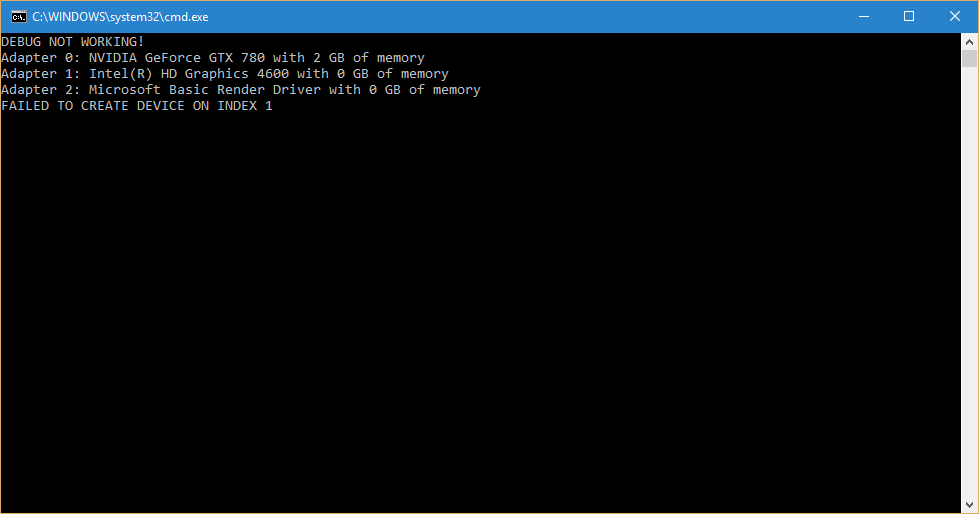
First of all, how to enable debug in DX12? In my code (copied from tutorial)


     ID3D12Debug* debugController;
     if (SUCCEEDED(D3D12GetDebugInterface(IID_PPV_ARGS(&debugController))))
     {
          debugController->EnableDebugLayer();
          std::cout << "DEBUG enabled...\n";
     }
     else
     {
          std::cerr << "DEBUG NOT WORKING!\n";
     }

and it always fails. I tried it event in DX tutorials I got from GitHUB - the same. In DX11 there was this DX Control Panel app, in which I enabled debug, but I cant find it in Win10.

Secondly, I am planning to do some GPU coop, that probably means creating a context on a device with no monitor attached. I have a GTX 780 (monitor attached) and integrated Intel HD 4600. I see the Intel chip among the adapters, but I cannot create context on that card. I even tried to lower the feature level to 10, but it fails anyway. So how to create a multi-GPU context / context for off-screen rendering?
Infinisearch
Infinisearch

Out of curiousity did you need to do anything to get the integrated to show up? I haven't tried enumerating it in D3D12 yet but for me the integrated has no monitor hooked up and doesn't show up in device manager so I didn't try.

-potential energy is easily made kinetic-
Jofo
Jofo

I just enabled it in BIOS (i7 4770K, ASRock Z87E-ITX), I can see it in device manager and it is listed among adapters returned by DXGI factory.

6l8r98fx.png

Dingleberry
Dingleberry


I cant find it in Win10

Try running the github samples with warp on?

s6BRAAE.png

Infinisearch
Infinisearch

And if what Matias doesn't work, try hooking a monitor up to integrated. If you look at your screenshot it says the integrated has no videoram associated with it, maybe it has to do with that. (and maybe plugging in a monitor will solve it)

-potential energy is easily made kinetic-
Jofo
Jofo

Dingleberry and Alessio1989 - you were right! I enabled debug for the app in the panel, then it prompted me to install Graphics Tools. So now the debug output works.

Intel drivers are up to date, I installed them yesterday. And I guess the video ram amount is also OK - because I am querying DXGI_ADAPTER_DESC1.DedicatedVideoMemory, which as of integrated card, has none. Or maybe its because of the monitor, will try...

Infinisearch
Infinisearch

BTW if you resolve this could you please post how you did it. I'm gonna try multi-GPU at some point in the future and will likely encounter the same problem.

-potential energy is easily made kinetic-
Jofo
Jofo

I guess it is sorted, but weird way.

I plugged the monitor into the integrated card, rebooted and indeed I was now able to create context on the Intel chip, even on GeForce which had no output. I plugged it back to the GeForce and now device context can be created on both cards simultaneously.

Infinisearch
Infinisearch

Maybe the driver needed to initialize something one time and plugging the monitor in did the trick.

-potential energy is easily made kinetic-

Topic Locked

This topic has been locked by a moderator. New replies are not allowed.

Sign in to reply to this topic.