
Ultimate Input Manager for Unity
Ultimate Unity Input Manager. Tame the controllers diversity beast. Minimal code that supports even devices that aren't planned to work on designated systems
Input Mapper system to try addressing above issues
if(InputManager.GetInputDown((int)States.Wave)){ Debug.Log("Wave Down"); } if(InputManager.GetInputUp((int)States.MyCustomState)){ Debug.Log(States.MyCustomState + "-Up"); // animator.Play((int)States.Wave); } 3) Saving and restoring user preferences Saving would export your settings to .xml file and States.cs will be generated containing enum of your mapped states. public enum States:int{ Wave=1397315813, MyCustomState=-1624475888, Now you can forget about: // static int idleState = Animator.StringToHash("Base Layer.Idle"); // static int locoState = Animator.StringToHash("Base Layer.Locomotion"); as we are taught in Unity tutorials, but you can use States.[some state]. Library contains a simple component so you can test user perspective right away. Just drag saved .xml and Play. 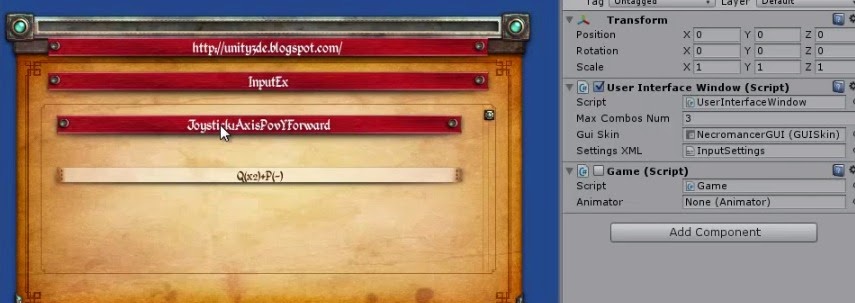
//supporting devices with custom drivers InputManager.AddDriver(new XInputDriver()); Your implementation of custom device driver needs to handle two entry points: (1)public IJoystickDevice ResolveDevice(IHIDDeviceInfo info)... (2)public void Update(IJoystickDevice joystick)... ResolveDevice where HIDInterface provide device info from the OS, you can check VID and PID to decide to handle and init device properties and structures, or not returning null, and Update function to query device by use of provided Read/Write methods and fill the JoystickDevice structures, so they can be accessed by InputManager. Scared about handling few bytes??? :) check XInputDriver.cs. Originally OS implementation of ResolveDevice point is by using Report HID Page from device description, but that restrict using devices that aren't planned to work with that OS, like Wiimote,Xbox Gamepad... In Input Mapper you need simply to extend JoystickDevice Class, which already contains some basic functionality supporting axes and buttons, by adding specialized properties of device you are planning to support. Update point is synchronization point with Unity. System use high level synch and async ReadXXX methods and return buffered byte array. What each of bytes means is easy to decipher as there are many web sites about any devices. Developer task is to fill JoystickDevice structure with values processed from byte array returned. Write methods are used for setup the device...like light leds, start FFD, enable disable.... Still want to use Unity InputManger as backup??? InputManager.AddDriver(new UnityDriver());//(-1 to 1 to -1) Swap your InputManger.asset with InputManager.asset from github source code. 6) Handling input axis and buttons as digital or analog Second abstraction is that you can use digital or analog output regardless of whether your real input source is digital or analog meaning for ex. Joystick Axis is counted as analog can produce normalized values from 0 to 1 but also pushed true/false, or key or even mouse button. //using input as digital(similar to Input.GetKey) bool bHold=(InputManager.GetInput((int)States.Walk_Forward,false)); //using input as analog value(similar to Input.GetAxis) float analogValue=InputManager.GetInput((int)States.Walk_Forward,false,0.3f,0.1f,0f); 7) Create combination of inputs that would trigger action/state By just clicking keys/mouse/buttons or moving joystick, as SINGLE, DOUBLE and LONG. Primary and secondary. In the example below I've mapped Wave state combo of Mouse1 double clicks + Joystick1AxisYForward (Long push forward of the Joystick) + double click of letter Y. //atOnce (default=false) //Function returns true when combination pressed in row, If atOnce set to true, function return true //when all keys/buttons in combination are pressed. bool bCombo = InputManager.GetInput((int)States.Click_W+C_State, atOnce); You can set modifier format or clicks sensitivity. 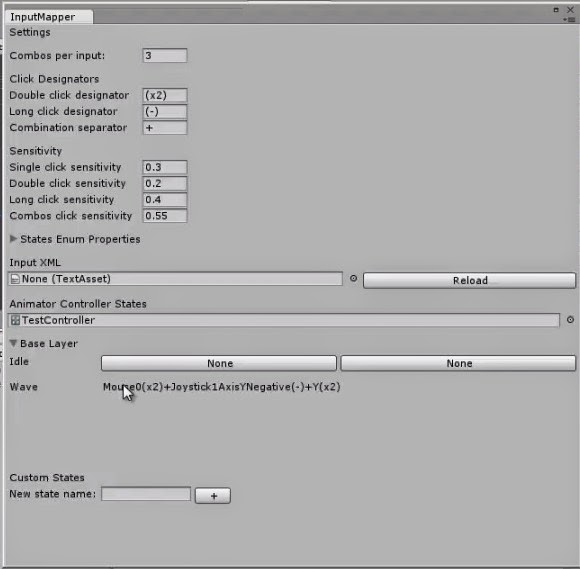
//Event Based input handling InputEvent ev = new InputEvent("Click_W+C_State"); //InputEvent ev = new InputEvent((int)States.SomeState); ev.CONT+=new EventHandler(Handle1); ev.CONT+= new EventHandler(Handle2); ev.UP += new EventHandler(onUp);//this wouldn't fire for combo inputs(single only) ev.DOWN += new EventHandler(onDown);//this wouldn't fire for combo inputs(single only) void onUp(object o, EventArgs args) { Debug.Log("Up"); } void onDown(object o, EventArgs args) { Debug.Log("Down"); } void Handle1(object o, EventArgs args) { Debug.Log("Handle1"); } void Handle2(object o, EventArgs args) { Debug.Log("Handle2"); } Hardcore developers can manually map input to states and even mix with loaded settings. InputManager.loadSettings(Path.Combine(Application.streamingAssetsPath,"InputSettings.xml")); //adding input-states pairs manually InputManager.MapStateToInput("My State1",new InputCombination("Mouse1+Joystick12AxisXPositive(x2)+B")); InputManager.MapStateToInput("Click_W+C_State", KeyCodeExtension.Alpha0.DOUBLE,KeyCodeExtension.JoystickAxisPovYPositive.SINGLE); In KeyCodeExtension all KeyCode stuff are supported plus additional for Joystick Axis mapping. 9) Plug and play instead of plug and pray. Attach or remove/switch controllers while game is running, remap inputs and continue playing. 10) Profiles - Layouts Your homework. Devices used during testing: XBox360W controller, ThrustMaster Wheel FFD, Wiimote + Nunchuk. One classic Gamepad controller, one Wheel and complex controller. 19.08.14 Thrustmaster wheel RGT FFD demo WIN+DROID Related Tutorials
Balancing Game Development and Creative Direction in Indie Production
A practical look at how indie developers can balance creative direction with hands-on game development. This article co…
 huseyin_onur
My Unreal Engine Development Process: From Core Idea to Playable Build
A practical overview of my Unreal Engine development process, covering how I move from a core game idea to a playable b…
huseyin_onur

Introducing LaneGraph: The Ultimate Road Network Solution for Unity
Discover the power of LaneGraph, a lightweight and flexible lane-based navigation system for Unity. LaneGraph makes it…
Retargeting Mixamo Characters with Root Motion In Unreal Engine 5.4.
I have always found Retargeting Mixamo Characters To have Root Motion is a serious lengthy Tast, Recently I stumbled up…

How To Make A SIMPLE Main Menu In Unity
In this tutorial for unity, i go over how to make a simple main menu for unity, it's an unlisted video because i do not…
 FlipThaSwitzh

Guide to Gameplay Balance
A perspective on competitive gameplay balance, from a background of "shooter" sandbox design.
 Tucker933
Discussion