
Cover system in games
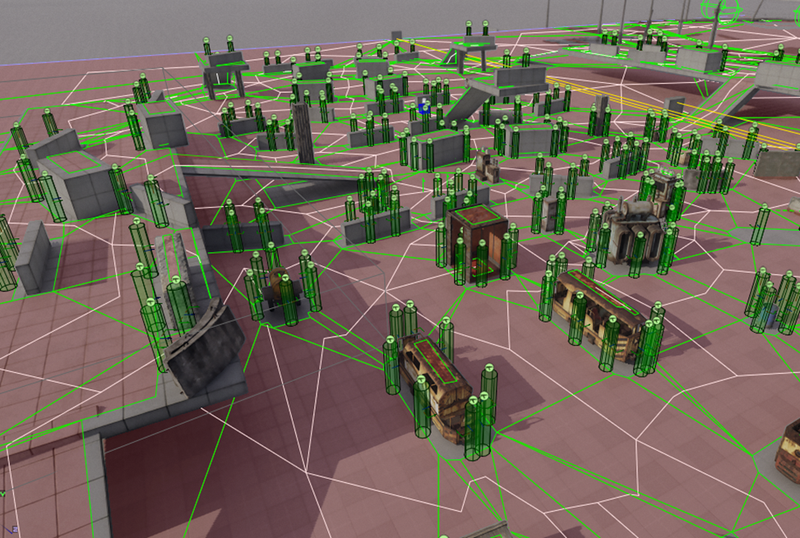
In gaming worlds, battles, NPC interactions, and strategic maneuvers often lead to the need for finding protection or cover points. In this article, I will explore an essential aspect of game mechanics – creating such a cover system based on environment analysis. Various aspects of the cover generation algorithm will be discussed, allowing players and AI to effectively and efficiently engage in battles across different gaming scenarios, enhancing the overall dynamic of the gaming experience.
Usually, a cover system consists of two modules: cover creation and cover searching. In most modern games, cover creation is performed during level design, while cover searching occurs in real-time during gameplay. When placing cover points (covers) in the level, the designer is guided by their own vision of the potential use of static objects in the level and the surrounding geometry, which adds a certain level of creativity to this process.
This approach works well for small areas like rooms, floors, or buildings. However, the necessity of manual placement on larger spaces can lead to positioning errors and sheer fatigue from repetitive tasks. The situation becomes even more complicated when there are changes in geometry or object placement within the level. But don't think that a static cover system is bad or outdated. On the contrary, it allows designers to capture specific interesting solutions or guide the player to scripted narrative scenes since the game is a one-player theater.
Cover system design
Creating an algorithm for generating a cover system may initially seem like a daunting task if you rely solely on observations from experienced level or AI designers because they evaluate dozens or even hundreds of level and environment parameters. However, if you break down their actions into a sequence of simpler steps, the task becomes much less intimidating. I'll use screenshots from the 4A Engine editor for examples, but the algorithm itself can be implemented for any game engine, whether it's Unity or Unreal Engine 4/5, as the fundamental principles of the algorithm are consistent and differ only in technical implementation.
Designing a cover system can be broken down into several tasks:
1. Cover Points Generation
2. Storing the Results
3. Using Cover Points
The tasks of data generation and usage are closely linked, so the use of cover points precisely determines under what conditions they can be generated. Since this article does not aim to create or update cover points in runtime, performance issues can be considered relatively unimportant. However, it's essential to remember the need for optimizing the approach to each of these tasks.
As a fundamental step, it's worth considering the work of a level designer who places cover points in the level. Typically, the designer analyzes the edges of objects, their positioning relative to others, visibility from shooting points, and then estimates the possibilities of specific NPC actions in that location (shooting from behind cover, blind firing). Finally, they assess the point's protection provided by environmental elements and static objects. For example, a simple scenario involves a designer placing covers around a particular object.
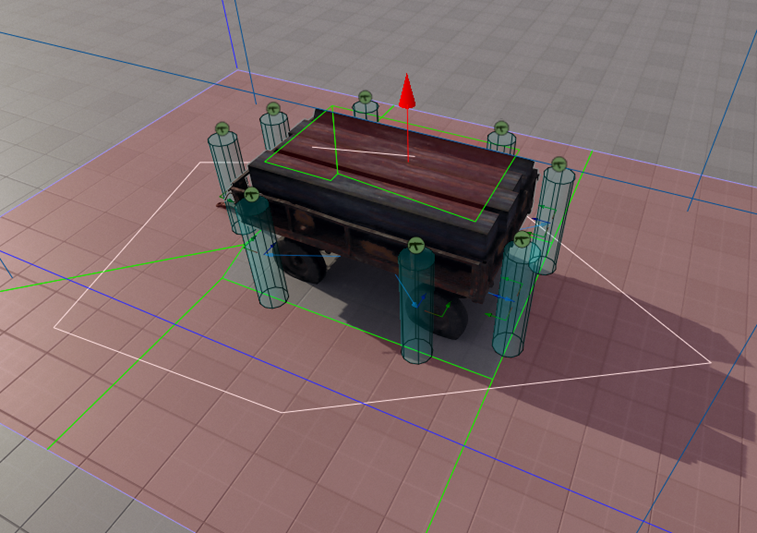
If we trying to split these actions into simpler steps, we can start with the sequential traversal of the edges of the navigation map and checking if there is any geometry on either side of the edge. In general, it doesn't matter whether we traverse clockwise or counterclockwise; what matters is knowing the start and end of the segment. Why do we use the map's edges instead of uniformly checking points within a polygon? The map's edge forms where the volumes of objects intersect (AABB or OBB), and inside the polygon, we would perform inherently failed geometry tests. Otherwise, there wouldn't be a navigation map there.
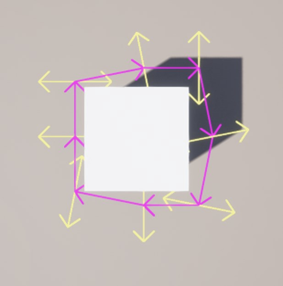
Using the results of geometry checks also allows storing custom cover data, such as cover material (stone, hay, brick), height, health, and more, with fast and efficient access to them when needed. This way, NPCs can promptly obtain information about each cover point during the game, reducing the number of geometries checks around them (ray picks, EQS) and increasing the informational richness of the level for various types of spatial searches.
In addition to everything mentioned, you can implement a system for actively updating cover properties in the game, which uses this data. For example, it can adapt to the degree of destruction of objects in the vicinity. All of this is crucial for making effective and timely decisions in the context of dynamic combat and elevates game AI to the next level of realism and interaction with the environment. To predict the direction from which NPCs might expose themselves from cover to open fire, it's necessary to determine the degree of openness or closeness of the space at the peeking (shooting) point. However, doing this in real-time can put a significant load on the engine due to a lot of ray picks in a single frame.
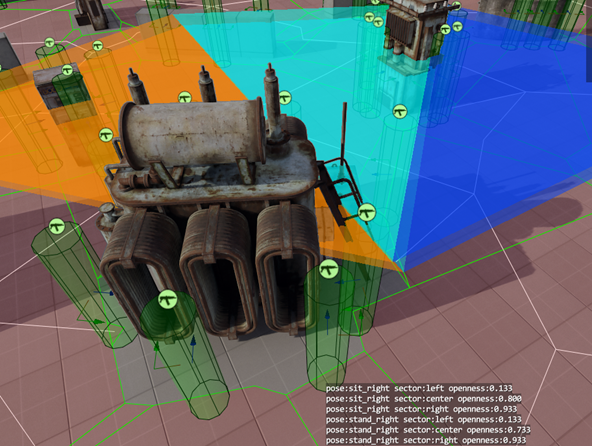
Analyzing a lot of battles with NPCs, you may notice that only about 20% of the environment is subject to complete destruction, meaning that 80% of the work remains relatively constant during runtime. This statement may not hold true for games where destructibility is a core mechanic, but in other cases, you can save resources by performing offline calculations and recording the values in cover properties. This way, we gain another aspect of the cover system, allowing NPCs to roughly assess from which side of the cover it's better to shooting: from the left, right, standing, or crouching.
Creating covers
Above, I mentioned two main strategies for creating cover points. The first is based on scanning the surrounding geometry to find points of intersection within a certain volume to create a representation of the quality of cover (let it be some percentage of coverage, where it is considered reliable if it covers more than 50% of thrown ray picks).
To achieve this, we need to create a grid of points along two axes, equally spaced from each other, and perform a ray pick in the direction perpendicular to the navigation grid segment at each point. The second approach involves traversing the edges of the navigation grid and is based on the property of the navigation mesh that, in most cases, if a point on the map is NOT covered by navigation polygons, it is occupied by something large enough to serve as cover.
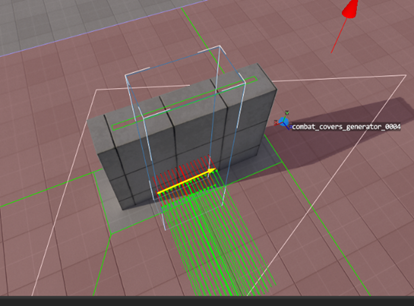
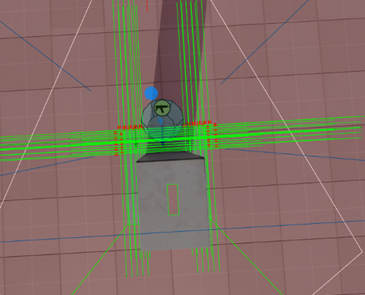
These two strategies complement each other nicely and allow for the processing of reasonably large level areas within an acceptable time frame (seconds of waiting for a huge volume(50m x 50m x 50m). To avoid unnecessary geometry checks at every point within a segment, we must first determine whether that point is suitable for cover.
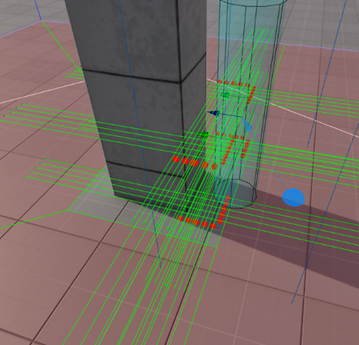
Usually, to achieve this, two raycasts in opposite directions perpendicular to the segment's direction are sufficient to determine whether a point (red points) is in open space, and we discard such points immediately. Additionally, two raycasts at the level of a human/monster's midsection are performed to determine if the point is suitable for crouching cover (green points).
If both of these checks pass, we further filter the grid points and send a ray from two points (at the distance of outstretched arms in a T-pose) downward towards the ground to eliminate edges and cliffs that NPCs would have to step onto for shooting. If the points intersect with geometry closer than half the height of the body, we mark them as invalid and move on to the next one. This is done to eliminate "false" cover positions on broken geometry and in corners.
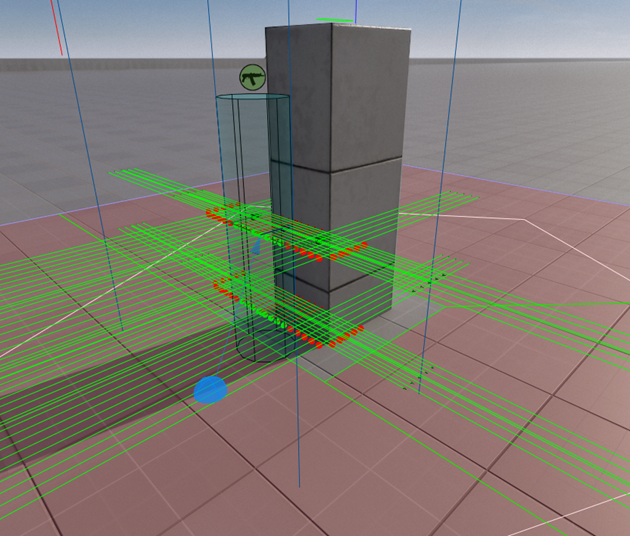
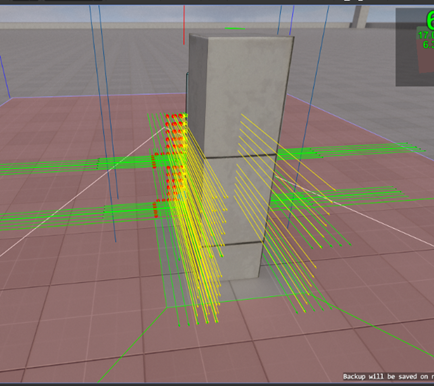
After all these checks, there are very few potential cover points left, and these need to undergo detailed geometry scanning. The rejection rate at this stage accounts for approximately 85-90% of all the possible points. As shown in the images below, the results of this algorithm's work do not depend on the rotation of the object, but rather on the presence of a sufficient protective area.
It is suitable for any type of geometry, and you no longer need to manually place cover points on the level, freeing up more time for designers. Of course, it won't free them from fixing algorithm errors, but it will make it significantly faster. As you probably noticed, these tasks parallelize well, allowing you to fully utilize available resources. You can break down tasks into separate ones, such as traversing the navigation map segments and detailed geometry scanning at cover points. Let's take a closer look at the edge-walking strategy, as it will be fully sufficient for certain games or cover 90% of the cover system's needs, simply due to the nature of navigation map generation.
Mesh edges walking
Creating cover by edge-walking is actually a very simple and effective solution. In its simplest form, you take three points on a segment, cast a ray perpendicular to the resulting direction in both directions, see if the ray hits something, and if it does, you've found cover.
Edge-walking was chosen because it's a more efficient approach in terms of computation time. Full-scale scanning of all navigation mesh polygons or evenly spaced point sampling would be computationally expensive and not significantly different in terms of the results achieved. Edge-walking provides a good balance between efficiency and accuracy.
Exactly, most points within the navigation mesh represent walkable areas, so they wouldn't make suitable cover points. Focusing on the edge points is a more efficient strategy because they are more likely to represent actual cover opportunities, given that they are positioned at boundaries where collisions are more common.
Correct, the number of polygons in the navigation mesh typically doesn't increase significantly with the size of the object, and the bounding volume of the object doesn't influence the number of navigation mesh polygons. The navigation mesh is more affected by the walkable space on the object, which could result in a few hundred polygons even for complex objects. If there are many small details on the surface, it may affect navigation mesh generation, but in most cases, this shouldn't be a major concern compared to the number of 3D grid points required for scanning such an object.
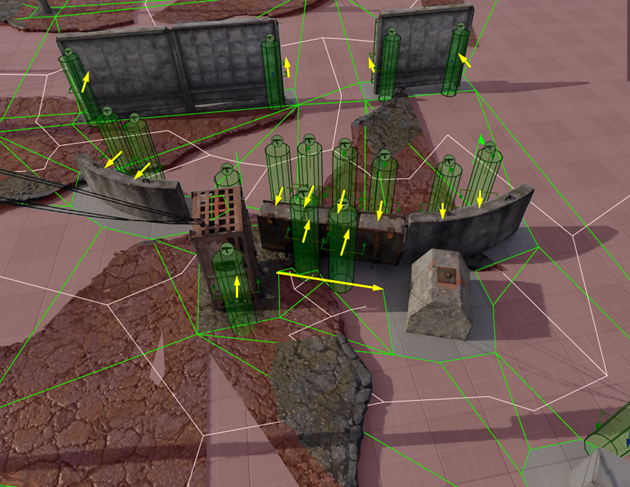
Absolutely, you can limit the search area for cover points or divide it into smaller regions. Even if you manage to create a massive object, the number of navigation mesh polygons is likely to be much smaller than the number of 3D grid points required for scanning. This emphasizes the efficiency of navigation mesh-based cover generation compared to grid-based methods, especially when dealing with large, complex objects.
Two steps deeper…
Even with just 20% of the level covered by destructible geometry, the need for runtime data updates remains relevant. This allows NPCs to react to changes in the environment, making their responses to destruction more realistic and improving player interaction with the world. Addressing this issue involves updating cover data in a small portion of the map, typically in a parallel thread. While it has some points of intersection with the cover generation system in terms of searching and geometry analysis, it falls outside the scope of cover point generation itself.
Issues
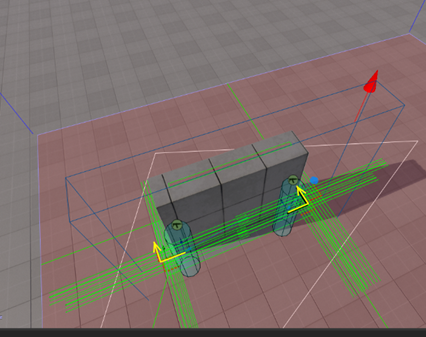
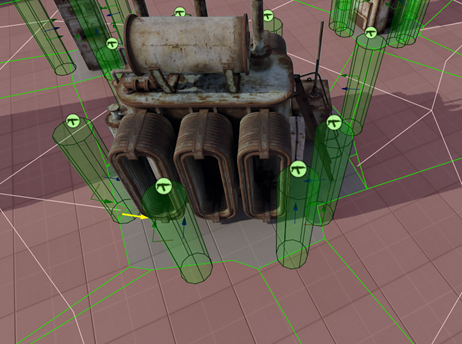
Edge traversal is not without its drawbacks, and in most cases, this manifests in strange artifacts at the edges of segments, especially when objects have complex shapes. Dealing with these artifacts can be challenging, and the typical solution is to remove them during generation by moving away from the segment's edge and prohibiting generation on short segments.
Cover evaluation
Having an array of cover points on our map allows us to work without significant regard to the level's geometry. Furthermore, if this array remains unchanged for a certain period (in the case of pre-generated covers, this duration would be the level's lifespan), we can use it for distributed searching for each NPC independently according to their logic. This approach avoids overloading the game engine with excessive raycasts, ideally not needing them at all, and instead relying solely on the data from cover points.
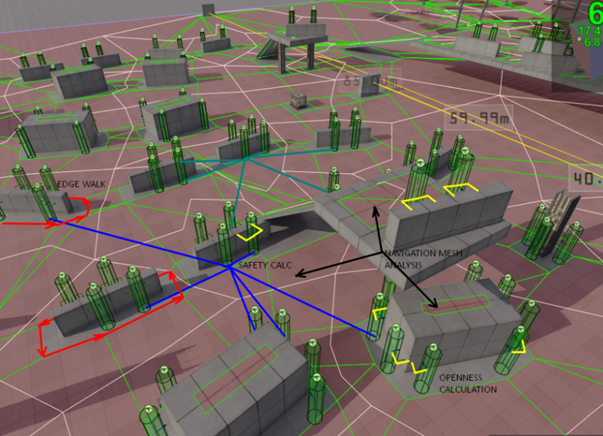
For example, we can create an algorithm (a task) that assesses the distance from the player to each cover point within a certain radius. It then selects the nearest cover point, and the NPC will move to that point. From there, it can perform actions available in that location, like shooting, peeking, or throwing something at the player.
Or something more complex, like creating a task (cover evaluator) that selects the best available cover point based on various conditions. This might involve finding a shooting point behind a tall crate or column, considering factors like:
1. No possibility to shoot from the top of the cover.
2. The ability to shoot from the sides.
3. Line of sight isn't blocked by other NPCs or objects.
4. The NPC can reach this point.
5. This approach allows for dynamic and strategic use of cover points in response to the player's actions.
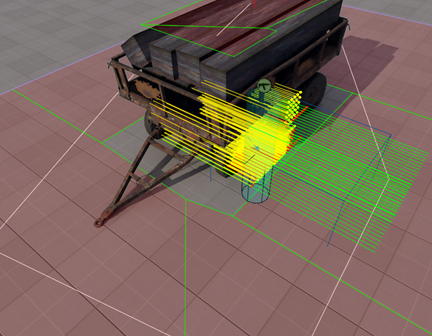
To check if an NPC can hit an enemy while peeking or leaning out from cover, you can use a raycast from a point that is offset from the center of the cover. The yellow lines in the screenshot indicate the spots from which it can safely attack, along with available potential paths (blue). This system allows NPCs to make intelligent decisions about when and how to attack from cover while ensuring that they have a safe line of sight to the enemy.
Conclusion
The cover system employs two distinct methods for generating cover: environmental scanning and navigation grid edge-walking. The first method is more effective at finding cover suitable for specific locations on the level, while the second method speeds up the cover search and enables building a system on complex geometry within a manageable timeframe. Environmental scanning involves assessing the geometry at a specific point through the engine or game subsystems, and it can be extended to detect protrusions, balconies, and corners. With some modifications, it can be executed in real-time, supporting dynamic recalculation of cover points when necessary.
I hope this article has been helpful for clarify the principles and organization same systems in your project. If anything is unclear or if you have questions, please don't hesitate to ask in the comments.
Discussion