GameDev.net gamedev.net
🔒 Locked

Download a file from an FTP server

Started by .chicken Oct 10, 2014 at 12:05 PM 14 replies 5.5k views
Original Post
.chicken
.chicken

Ok, what I thought would just be a tiny program, done in an hour or so, again gives me a bit of a headache.

All I'm trying to do is open a connection to an FTP server and get a list of files/download a file.

Connection seems to work fine.


LPCWSTR user, password,...
LPCWSTR folder = "\xyz";
	
FTPOpen = InternetOpen(LPCTSTR("Title"), INTERNET_OPEN_TYPE_DIRECT, NULL, NULL, 0);
if (!FTPOpen)
	return false;
std::cout << "Internet connection opened" << std::endl;

FTPConnect = InternetConnect(FTPOpen, url, 5553, user, password, INTERNET_SERVICE_FTP, INTERNET_FLAG_PASSIVE, 0);
if (!FTPConnect)
	return false;
std::cout << "Connected to FTP server" << std::endl;

if (FtpSetCurrentDirectory(FTPConnect, folder) == FALSE)
	return false;
std::cout << "Moved to folder." << std::endl;

return true;

This works fine (it also works if folder ist just "xyz" or "/xyz").

Now when I try to download a file or use FtpFindFirstFile(...), it always fails.


        WIN32_FIND_DATA dirInfo;
	HINTERNET hFind;
	DWORD dwError;
	BOOL retVal = FALSE;
	TCHAR szMsgBuffer[FTP_FUNCTIONS_BUFFER_SIZE];
	TCHAR szFName[FTP_FUNCTIONS_BUFFER_SIZE];

	if (FtpGetFile(FTPConnect, L"filename.zip", L"C:\filename.zip", FALSE,
		FILE_ATTRIBUTE_NORMAL, FTP_TRANSFER_TYPE_UNKNOWN | INTERNET_FLAG_RESYNCHRONIZE, 0) == FALSE) {
		dwError = GetLastError();
		if (dwError == ERROR_INTERNET_EXTENDED_ERROR) {
			DWORD code;
			DWORD size_needed = 0;
			InternetGetLastResponseInfo(&code, NULL, &size_needed);
			char *message = (char*)malloc(size_needed + 1);
			InternetGetLastResponseInfo(&code, LPWSTR(message), &size_needed);
			std::cout << "ERROR FtpGetFile(): " << message << std::endl;
			
		}
		std::cout << "Fileload not successful." << std::endl;
	}
	hFind = FtpFindFirstFile(FTPConnect, L"*", &dirInfo, INTERNET_FLAG_DONT_CACHE, 0);
	if (hFind == NULL)
	{
		dwError = GetLastError();
		if (dwError == ERROR_NO_MORE_FILES)
		{
			StringCchCopy(szMsgBuffer, FTP_FUNCTIONS_BUFFER_SIZE, TEXT("No files found at FTP location specified."));
			retVal = TRUE;
			goto DisplayDirError;
			return;
		}
		DWORD code;
		DWORD size_needed = 0;
		InternetGetLastResponseInfo(&code, NULL, &size_needed);
		char *message = (char*)malloc(size_needed + 1);
		InternetGetLastResponseInfo(&code, LPWSTR(message), &size_needed);
		std::cout << "ERROR FtpFindFirstFile(): " << message << std::endl;

		StringCchCopy(szMsgBuffer, FTP_FUNCTIONS_BUFFER_SIZE, TEXT("FtpFindFirstFile failed."));
		goto DisplayDirError;
		return;
	}

The error message I get from InternetGetLastResponse() is "2", which - according to msdn - is "FileNotFound". I'm sure the file exists though, and at least FtpFindFirstFile() shouldn't return that same error. hFind is always NULL.

I googled alot already, but just can't find out what I'm doing wrong. Can anyone help please?

Thanks so far.

Nik02
Nik02

-Are you sure you can write to c:\ root?

-It may be forum software's fault, but a backslash should be escaped \\ in C and C++ (and in almost all languages which share the same syntax ancestry).

Niko Suni
.chicken
.chicken

Im pretty sure I can write to c..I tried it with "\\" now, but it didn't change anything...:(

frob
frob

Im pretty sure I can write to c.

I'm pretty sure you shouldn't be able to. You should pick a different directory.

As you've already shown it as Windows development, writing to the root folder on a protected drive like "C:\filename.zip", should be disabled.

Just open a command prompt and try to create the file. Here's what I get when I try to write to a file test.txt:

cd \

echo foo > test.txt

Access is denied.

Permissions on the root directory are disabled by default.

If you're able to write the file, then you're running with UAC disabled on an administrative account, or running the process as administrator after UAC, or you've messed up your permissions, or you're running on a pre-2000 Windows OS.

Try changing the file name to somewhere you do have permissions, and that particular error should go away.

.chicken
.chicken

Ok, I'm embarassed I didnt know that. Unfortunately it still doesnt work. I tried the desktop folder, I tried "c:/test/", all of it doesnt work. I also changed every "\" to "/". Didnt changed anything either...still the same error...and I'm really running out of ideas here...I'm connecting via Port 5553, could that give any problems? I tried it with deactivated firewall already, doesn't make a difference, either.

Thanks so far.

AnnaMarie
AnnaMarie

Are you sure whatever you are connecting to is running an FTP server on port 5553? Most of the FTP servers I have seen use the default port of 21, though this doesn't mean every FTP server will use that port. For a quick check perhaps download a simple FTP program such as filezilla and make sure you can connect using that?

.chicken
.chicken

Yes, I'm sure. I can connect to it via Filezilla.

.chicken
.chicken

No more ideas? :S I still couldn't get it to work...I tried using QFTP, but that doesnt come with QT5 and I couldn't get it to work...

ApochPiQ
ApochPiQ

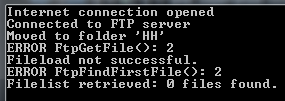
In all this time you've never actually mentioned what your program outputs. That would be very useful, otherwise we're just going to be guessing blindly.

.chicken
.chicken

Hmm as I mentioned in the first post, the error I get is from "InternetGetLastResponseInfo" is 2.

aa893a9357d0c5819bd476c6861669e3.png

According to msdn this is the "File Not Found" error. What I'm trying to do, is simply download all files from the server, which match a certain filename-pattern. But right now, I can't even download any file.

Buckeye
Buckeye


I also changed every "\" to "/".

Are you sure your filepath strings are correct? You shouldn't be using single backslashes (as mentioned) as that's an escape.

Have you tried hardcoding both source and destination strings? e.g., from: "remote-server\\dirXYZ\\file.zip" to "c:\\existing-directory\\saveFile.zip" ?

Please don't PM me with questions. Post them in the forums for everyone's benefit, and I can embarrass myself publicly. You don't forget how to play when you grow old; you grow old when you forget how to play.
Nik02
Nik02

I still think that the error is caused by an invalid local path, not the ftp aspect (assuming that you have the correct port).

Remember that if you define string literals in code, you have to escape the backslashes; but if you take them in from the command line, escaping is not required.

Some old libraries may not recognize forward slashes as directory separators, so for safety, you should use backslashes anyway.

If you're on Windows 7 or later, your Documents folder is, by default, at c:\users\yourusername\documents (replace yourusername with your actual login name). Your user profile should be write-accessible to yourself in any case, so writing the file there should work.

Niko Suni
.chicken
.chicken

FtpGetFile(FTPConnect, L"test.zip", L"c:\\users\\johannes\\documents\\test.zip", FALSE,
		FILE_ATTRIBUTE_NORMAL, FTP_TRANSFER_TYPE_UNKNOWN | INTERNET_FLAG_RESYNCHRONIZE, 0) == FALSE)

this isn't working.

I tried all possible combinations now..I really don't know what I'm doing wrong


FtpFindFirstFile(FTPConnect, L"*", &dirInfo, INTERNET_FLAG_DONT_CACHE, 0)

This is giving me the same error, and that can't be because of an invalid local path.


	FTPOpen = InternetOpen(LPCTSTR("FileLoader"), INTERNET_OPEN_TYPE_DIRECT, NULL, NULL, 0);
	if (!FTPOpen)
		return false;
	std::cout << "Internet connection opened" << std::endl;

	FTPConnect = InternetConnect(FTPOpen, url, 5553, user, password, INTERNET_SERVICE_FTP, INTERNET_FLAG_PASSIVE, 0);
	if (!FTPConnect)
		return false;
	std::cout << "Connected to FTP server" << std::endl;

	if (FtpSetCurrentDirectory(FTPConnect, folder) == FALSE)
		return false;
	std::cout << "Moved to folder 'HH'" << std::endl;

	return true;

this is returning true, so I don't think the error is here.

The port 5553 is the same port I enter in Filezilla, there I can connect and download just fine.

.

ApochPiQ
ApochPiQ
Look up FTP Passive Mode and make sure you understand what happens when you use INTERNET_FLAG_PASSIVE.
.chicken
.chicken

Ok, that makes sense, thank you. I changed that to "0" now, but unfortunately it still doesn't work (I turned off the firewall and opened the port in the router). I really thought this app would only take me a few hours...

Topic Locked

This topic has been locked by a moderator. New replies are not allowed.

Sign in to reply to this topic.