
GameDev.net gamedev.net
🔒 Locked 🎮 Unity

My Interactive Real-Time Water Simulation ( Video and Download )

Started by gfxbean Oct 21, 2014 at 4:03 AM 9 replies 12k views
Original Post
gfxbean
gfxbean

Hi there,

Been working on an SPH ( smooth particle hydrodynamics ) water simulation to test out a simulation throttling system for my shader development tool ( ShaderFlex ) and I got a little carried away with the water. Here's a link to the video for version 2. You can download version 1 now to play around with, but it doesn't look nearly as cool as version 2 which I plan on posting soon.

http://www.shaderplay.com/sandbox/superfluids2/superfluids2.html
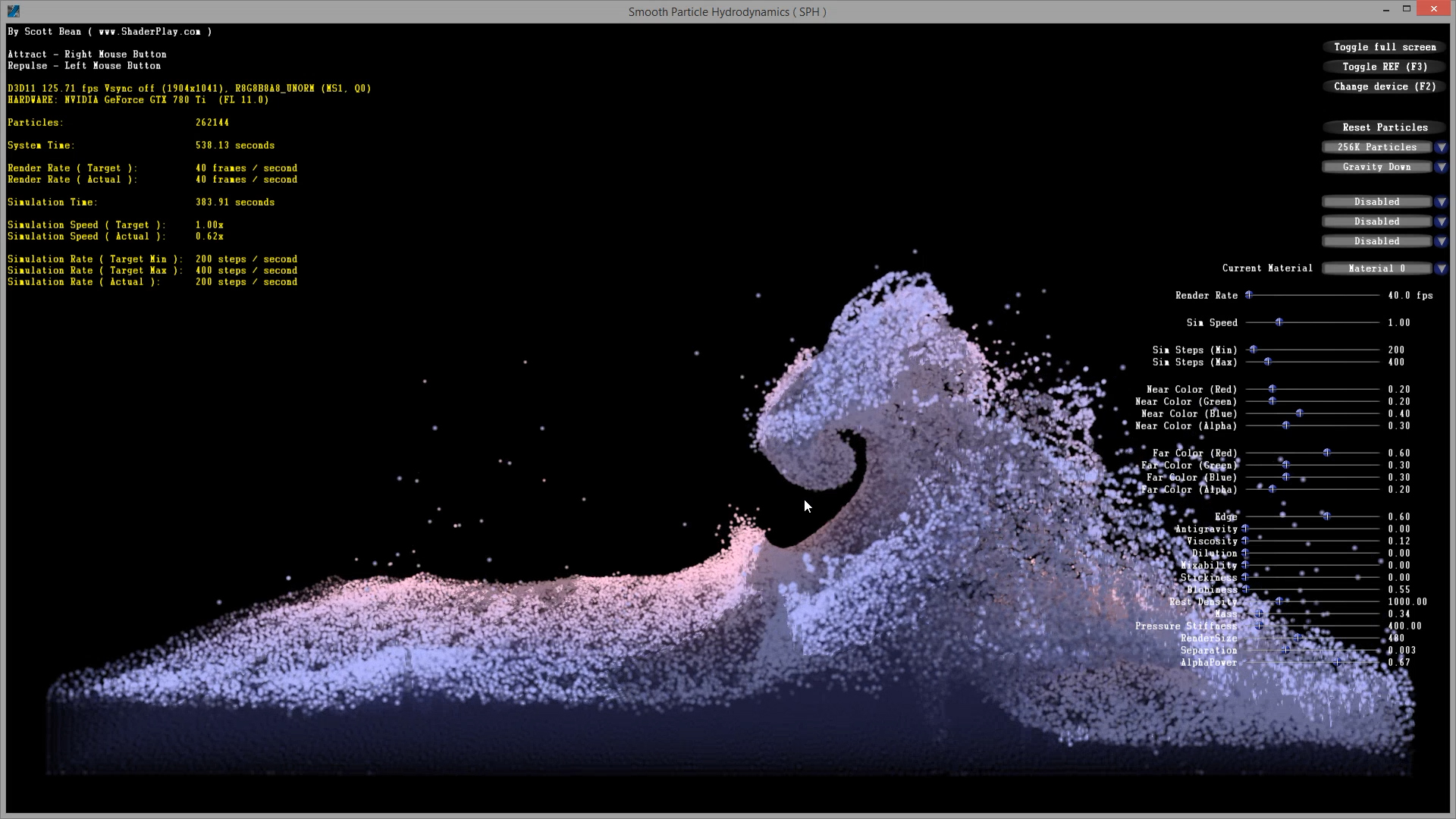
screenshot.jpg

It can simulate up to 1 million particles at roughly 25% real-world speed on a GTX 780 TI, and 256k particles at full speed. The rendering and simulation are independent from one another and it can render at full speed but I lock it to a fixed frame rate so the simulation shaders have more horsepower. The algorithm is meant for mostly non compressible fluids, but with some changes I'm able to simulate things like goo, sand, snow, cotton, milk, blood, and actually have them interact together. There's a couple of videos on my channel that show multiple materials.

http://www.youtube.com/channel/UCEljvElA7sJqMr_wy4Agdcw

It's currently all particles, but I plan on adding a marching cube meta-balls option so I can get some proper reflection/refraction and smoother look.

Version 1 looks 2D because it's rendered orthogonally but its algorithm is full 3D using a dynamic grid cell technique with up to 32bit worth of cells. The size ratio of the confined area is 8x4x2 ( width, height, depth ) but if the wall colliders are disabled the water can roam freely.

Here's some of the options that are or will be exposed

  • stickiness
  • blobiness
  • dilutio
  • shadows
  • weight
  • antigravity
  • near/far color
  • alpha
  • particle texture
  • pressure stiffness
  • rest density
  • viscosity
  • mixability
  • particle size
  • sim and render speeds
  • foam options
  • input controls
  • simulation steps
  • wall collider options, etc.
  • back to front sorting with alpha
  • lighting controls ( possibly two lights )

I'd would put in some cool streaking bloom, ssao and dof effects but I probably won't have time.

Let me know if you have any questions and check back at my site for version 2 soon or add your email to my newsletter and I'll send you a link to the download when it's ready.

http://www.shaderplay.com/news/news.html

FGFS
FGFS

Cool, you must have been good in math classes... biggrin.png

I'm working on ocean waves but for a crossplatform OpenGL game, and I guess it would destroy my frames per second.

gfxbean
gfxbean

Not really, I'm a hack with math, I'm just good with figuring out ways to get the results I need. Yup, not enough particles to fill an ocean, but sure fun to play with ;)

Are you using Gerstner Waves? I messed around with this too for fun, computing 4 waves in a vertex shader, do dynamic tesselation with the hull/domain shaders and add some scrolling micro normals and foam in the pixel shader. I'll post it when I get it too look half decent, having problems getting the right values so it looks realistic. The thing I love about simulations is that you just let it do all the work.

d000hg
d000hg

Very nice. It's something I wanted to look at one day but never got round to. Is it essentially a collision system of loads of tiny hard spheres, or a field-based approach? When I was considering it as a fun project I always wondered how you would enforce conservation of volume.

gfxbean
gfxbean

Very nice. It's something I wanted to look at one day but never got round to. Is it essentially a collision system of loads of tiny hard spheres, or a field-based approach? When I was considering it as a fun project I always wondered how you would enforce conservation of volume.

The particles never really actually collide in code, they just attract and repel each other using a combination of field curves, their rest densities, mass and local group density. If you're repelling and attracting force were the same, nothing interesting would happen, but since they are both based on different curves or gradients you get particles that will repel others up to a certain point, until a certain breaking point where they will start attracting them once they are pushed too close. This is how the viscosity plays in, which is using the velocities and distance of both particles to figure out how much to slow them down by adding some more force in the right direction. I base similar forces on other attributes and get some great results. I'm not 100% sure why Muller uses the exact curves he does for his spikey and poly6, but I've added my own forces which allowed me to achieve some pretty neat substances which are more on the compressible side like cotton or snow, but can also achieve more rigid surfaces like sand, but some need more iterations per second. The water is stable at 180 or so, adding certain forces makes it more or less stable depending on the force and other settings. I've had some really weird substances but needed 800 or so iterations per second.

Do a search for Matthias Müller's smooth particle hydrodynamics if you want more information on the algorithm. Also, here's the simple 2D sample I based mine on. FluidCS11. The algorithm is pretty straight forward, and the GPU sorting is the most crucial part. It's pretty compact but requires 20 or so compute passes and lots of special app code to setup the shader constants properly for each compute pass.

https://code.msdn.microsoft.com/windowsdesktop/DirectCompute-Graphics-425de5a8

gfxbean
gfxbean

This would go over my head. I only use the indie opengl ocean:

http://scrawkblog.com/category/water/

in Unity. Still need a way to get foam on waves.

That water looks perfectly fine ;)

I'll try to get my other non simulation based water looking this good and see if I can generate foam and spray dynamically in the geometry shader based on some of the wave's attributes, like how spikey the waves get or something. The Gerstner waves pinch waves horizontally when combined so it's not just a vertical effect.

Dawoodoz
Dawoodoz

I haven't figured out how to make an efficient broad phase for GPU particles yet but I made water in a vector field simulation that allow creating realistic lakes, waterfalls and rivers by removing land where the water is running. It also has support for ground water and ice.

Erosion.png

gfxbean
gfxbean

Cool stuff. This water thing's got me hooked.

I was working on a flocking algorithm and threw in some simple flat water for my birds to fly around over. I was getting sick of my simple water and then gave my GPU gertsner water another go but was such a pain to find good values and it was just too expensive especially with my DK2. I then found a couple old FFT ocean demos and decided to throw a week at it and ended up porting some of NVidia's Ocean water FFT code to my ShaderFlex tool and added a bunch of goodies. Was a lot of work, but the results are even better than I was expecting and I still have a bunch of features left to add. Here's a video.

neroziros
neroziros

Looks amazing! Are you going to release the source code? Would love to see how you got the 3D grid for the simulation

Cheers and again, awesome work

gfxbean
gfxbean

Looks amazing! Are you going to release the source code? Would love to see how you got the 3D grid for the simulation

Cheers and again, awesome work

Thanks! I'm thinking of using the effect, around 2000 lines of setup and shader code for a video tutorial for ShaderFlex. I will also most likely ship the source to my FFT Water, fluids, fur, grass and other tech along with the tool, but that won't be till early 2015.

As for the grid, it was a bit of a headache. So NVidia lays out a bunch of world alighned grids around the viewer at different resolutions and blends between them. I wanted to try the screen space projected grid approach and had some issues. There's another ocean sample using it but their demo fixed the camera to never roll or tilt off the horizon for a reason. The minute you do, everything looks like shit, your triangles get skewed and start sticking out of knowwhere. My solution actually worked out nicely, I rotated my projection of the grid to always align with the horizon and it fixed it all. It was a bit tricky because you have to also do some compensating for the screen's aspect ratio when rotating your -1 to 1 screen space vertices.

If you're not familiar with the approach, you basically generate say a 400x800 grid of vertices, and lay them out from -1,-1 to 1,1 which is my final viewport projection. Then in the vertex shader you use your inverseprojection matrix and you transform each vertex position into world space. You then take the that and the camera position to get the vertices direction vector. You cast a ray from that point into yoru world and calculate an intersection on the water plane and that is your new world space grid position for that vertice. Problems arise when the vertice is then displaced by the FFT effect, the water will ripple in and out of the screen at the edges so you need to extend your -1 to 1 to -2 to 2 for example, it's a bit wasteful, but works. I use more vertices in the vertical because there's usually more vertices needed as they get projected out into the horizon. My code for this is a bit of a mess and not optimized yet but here it is...


float2 Aspect = Surface.TargetSize.xy / Surface.TargetSize.y;
float  AspectRatio = Aspect.x / Aspect.y;
float  GridPadding = 0; <<m_GridPadding.Evaluate()>>;
float  GridFalloff = 0; <<m_GridFalloff.Evaluate()>>;
                    
                   
float3 Up = normalize( mul( float3( 0, 1, 0 ), (float3x3)Surface.ViewMatrix ) );
float Cos = dot( normalize( Up.xy ), float2( 0, 1 ) ); // transform the world's up vector into camera space so you can find out the 2D angle between the horizon and your camera's up vector
float Sign = ( Up.x < 0 ) ? -1 : 1;
                        
Vertex.Position.xz = ssRotateVector( Vertex.Position.xz, Sign * acos( Cos ), true ); // rotate your vertex to align with the horizon
                    
float3 CameraGridPosition = mul( float4( Vertex.Position.xz * Aspect.yx * GridPadding, 1, 1 ), Surface.InverseProjectionMatrix ).xyz; // tranform from screenspace into world space so you cna calculate a direction vector
float3 WorldGridPosition = mul( float4( CameraGridPosition, 1 ), Surface.CameraMatrix ).xyz;        
                    
float3 FinalPosition;
Intersects = ssIntersectLineAndPlane( Surface.CameraPosition, normalize( WorldGridPosition - Surface.CameraPosition ), float3( 0, 0, 0 ), float3( 0, 1, 0 ), FinalPosition );
                    
Interp.Position = ( Intersects ) ? FinalPosition : Surface.CameraPosition * float3( 1, 0, 1 ) + Surface.CameraLook * float3( 1, 0, 1 ) * 100000000; // hack to ignore vertices that can't project to the water plane
                    
// you then read your displacement FFT texture using this world space position and dispace your vertex. There's probably an easier way to do this, but I just wanted to get it working for now.

Topic Locked

This topic has been locked by a moderator. New replies are not allowed.

Sign in to reply to this topic.