Original Post

How to make a calculator with imgui c++. I learned buttons no title bar just this left
How to make a calculator with imgui c++. I learned buttons no title bar just this left
This isn't Google. Put some effort in asking your question. What exactly are you trying to do? What parts have you go out? What have you found on the web? Why was that not the information you were looking for?
@undefined I just want to make a iphone or android calculator with opengl imgui. Buttons beside and under one another and the display box. I learned how to remove title so now I am trying calculator
ImGui::Begin("hello", nullptr, ImGuiWindoFlag_NoTitleBar)
Simple calculator with buttons and display box
@shaanveer How did the Godot tutorial go?
You've returned to this imgui thing once again, and it's fine to not let something go, but you have to understand that forum correspondence likely won't result in easy code for you to copy and paste over in your project.
You've been shown tutorials out there which you can follow, repeat and tinker with to learn. You'll be able to build that calculator, eventually.
@undefined i finished all the goofy tutorials I saw.
I have this just left to make and you were right godot did help a lot
Know I just need to know ho to render multiple buttons and a display box
Calculator
@undefined i didnt mean to say goofy I meant all
Shaanveer said:
I have this just left to make and you were right godot did help a lot
That's great! So with all the Godot tutorials you saw now finished, you're able to position buttons whereever you want, and link their events to your scripts.
They touch on common UI elements here, and a more comprehensive tutorial here.
It's really cool that you took the time to finish them all - now you're able to do so much.
@undefined ya this is the only thing I dont understand and I was surprised u could even positions buttons anywhere with imgui
I wrote a very simple calculator for practice using HTML and JavaScript. Run on playground

Source code:
<!DOCTYPE html>

<html>
  <head>
    <title>Very Simple Calculator. JavaScript, ES6</title>
  </head>

  <body>
    <h1>Calculator</h1>

    Enter the first number: <input id="firstNumber" type="text" />

    Enter the second number: <input id="secondNumber" type="text" />

    <button id="btnSum">Sum</button>

    Result:

    <script>
      // Get the first number element
      const firstNumberElement = document.getElementById("firstNumber");
      // Get the second number element
      const secondNumberElement = document.getElementById("secondNumber");

      // Calculate the result
      let result = 0;
      const btnSum = document.getElementById("btnSum");
      btnSum.onclick = () => {
        // Get numbers
        let firstNumber = parseFloat(firstNumberElement.value);
        let secondNumber = parseFloat(secondNumberElement.value);
        // Result
        result = firstNumber + secondNumber;
        // Output
        const outputElement = document.getElementById("output");
        outputElement.innerText = result;
      };

    </script>
  </body>
</html>
This is very cool but not what I'm talking about. I am talking a about a google or apple calculator with imgui c++ with a display box
Let's make the challenge: buttons and display box with pure OpenGL 3+
@undefined I didn't understand what
Try to write a calculator using pure OpenGL without GUI frameworks.
What why. I just need to know how to render multiple buttons with any shapes and a display box. I know the rest how to remove top. And rest just need to know this.
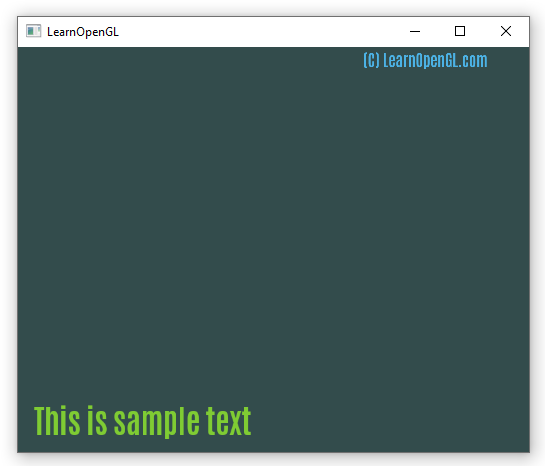
If you know how to draw a texture with OpenGL then you can draw buttons and a text. This tutorial shows how to draw a text with FreeType library: https://learnopengl.com/In-Practice/Text-Rendering You can download the example from the tutorial from GitHub: https://github.com/JoeyDeVries/LearnOpenGL/tree/master/src/7.in_practice/2.text_rendering
I compiled the example with MinGW 32bit (in Qt Creator) and it works:
@8Observer8 Why would I need this when I have imgui. Why are you adding additional things that have nothing to do with the problem. I just need a display box and multiple buttons with any shape(2 things).
@Shaanveer I know this is a bit of topic, but can you make icons instead of buttons that work like buttons. Because I was thinking I could use buttons and icons?
@Shaanveer But back on. All I need is a Buttons, Buttons, Buttons, Display box.
why use openGL? openGL doesn't seem really suited to making a calculator. I can see any use for the functionality that openGL provides such as shaders. I could be mistaken here and not understand what you are trying to do. I
and while imGUI is nice for games and the such, if targeting android and iPhone, aren't there other libraries/frameworks better suited for those platforms?
@undefined Then can you tell me the framework gui library that allows this. I don't want to change opengl but if I have to for better results I will. But I am fine to change gui library. Is it commen or any one no one knows. Try telling me a common on.
As I recall, android phones use a flavor of Java (see here for a list of langauges you can use to program android: https://www.geeksforgeeks.org/top-programming-languages-for-android-app-development/ ), each of these languages has one or more frameworks for developing GUI's with. I'd suggest researching each and seeing what is best suited to you needs. For example here is a calculator app written in C# :https://github.com/JonathanMoreno14/Calculator-App-Xamarin-Android for you to study.
From what I recall, iPhone uses either swift or objective-C. Both these have frameworks for building GUI. You can check out this page https://github.com/JonathanMoreno14/Calculator-App-Xamarin-Android.
Finally for openGL, I'm not sure if either android or iPhone support openGL exactly. Android phones support using openGL-ES (see https://developer.android.com/guide/topics/graphics/opengl#:~:text=Android%20includes%20support%20for%20high,for%203D%20graphics%20processing%20hardware. ). I've never used openGL-ES so I'm not sure how close it is to ‘desktop’ openGL.
On iPhone, the issue is more murky – we have this article from 2018 - https://www.anandtech.com/show/12894/apple-deprecates-opengl-across-all-oses -saying that openGL is deprecated across all apple platforms. While the Apple web site still has documentation on openGL, well exactly openGL-ES, their pages redirect you to the documentation on Metal (https://developer.apple.com/metal/ ).
This topic has been locked by a moderator. New replies are not allowed.
With your permission, GameDev.net uses analytics cookies to understand how people use the platform. You can accept analytics or continue with necessary cookies only. Learn more