GameDev.net gamedev.net
🔒 Locked

Jitter in a “Soft” Follow-Cam

Started by Thaumaturge Aug 7, 2021 at 5:11 PM 22 replies 22.4k views
Original Post
Thaumaturge
Thaumaturge

I’m attempting to implement a camera that follows a target (the player), and specifically one that is not fixed absolutely to the target, but rather that follows the target’s position smoothly over time.

To some degree I have this working. However, I keep encountering terrible jitter when the camera is near to the target, and perhaps at relatively-low frame-rates (~45fps). And thus far I have not managed to entirely get rid of it. (At least not without incurring some other issue.)

I’ve tried a variety of things–rearranging the order of operations (which did help a bit, I think), clamping the camera’s movement so that it doesn’t overshoot, re-working it to use a velocity-vector, or re-working it to draw from a set of samples over multiple rather than a single value. Thus far to little avail, I fear.

Since the actual code in question is a little complicated (involving multiple files and classes), let me describe my current approach to this in partial pseudocode:
(I’m doing so in part off the top of my head, and so may be mistaken in some of the details. However, I believe the below to be at least broadly accurate.)

updateTask = taskMgr.add(updateMethod, "update")

def updateMethod:
    dt = globalClock.getDt()
    updatePlayer(dt)
    return task.cont

def updatePlayer(dt):
    position += velocity * dt
    updateCamera(dt)

def updateCamera(dt):
    diff = targetPos - cameraPos
    scalar = cameraSpeed * dt
    if scalar > 1:
        scalar = 1
    cameraPos += diff * scalar

Does anyone see a problem with my approach here? Or have suggestions as to something that might fix the issue that I’m seeing?

MWAHAHAHAHAHAHA!!! My Twitter Account: @EbornIan
_WeirdCat_
_WeirdCat_

you may try using different dt=>

dt = (lastframedt + nowframedt) / 2.0;

anyway jittering might be caused of inprecision like dt is 0.001 and you musltiply that by some velocity vector that when is close to object has value of 0.0000003, and you get wierdo results swinging through -0.000000x to 0.000000x

you need to check if values aren't too small, can't see actually what happens and what the values are

Thaumaturge
Thaumaturge

Hmm… Now that I didn't think of! Thank you for the suggestion!

Trying it, it seems like it helps a little--but the jitter remains.

Prompted by the idea, I also tried keeping a list of dt-values and taking their average, which again seems to help a little, but not hugely.

This leads me to think, at least, that the issue likely does not lie in spikes in my delta-time.

MWAHAHAHAHAHAHA!!! My Twitter Account: @EbornIan
JoeJ
JoeJ

Try this:

diff = (targetPos - cameraPos) * 0.3f;

Should work if your timestep is fairly consistent. Otherwise i would subdivide the step.

Thaumaturge
Thaumaturge

JoeJ said:
diff = (targetPos - cameraPos) * 0.3f;

That will likely work--but it will also make the camera follow well behind the player, I fear--especially at lower frame-rates. And that I've found to cause problems in both gameplay and the diegetic UI, alas.

(I'm using a variable time-step.)

Sub-dividing the time-step might work, however… The logic involved isn't all that heavy, so it shouldn't greatly affect the frame-rate.

Giving it a shot, I'm surprised to report that it doesn't seem to help: the camera jitters just as before, even if I carve up the dt so finely that it routinely gets 14 to 16 iterations. o_0

I feel like I'm surely doing something wrong somewhere to be having so much trouble with the camera--but I don't know where! :/

MWAHAHAHAHAHAHA!!! My Twitter Account: @EbornIan
Gnollrunner
Gnollrunner

I use a spring/damper equation and it works pretty well. Here's an old code snippet (hopefully I can remember what everything is , LOL)

   // Calculate asimuth delta 
   // For the left-handed rotation from Va to Vb: atan2(Vn . (Vb x Va), Vb . Va)
   double fADelta = atan2(m_clTarget.clUp.DotProduct(m_clTAzimuth.CrossProduct(m_clCAzimuth)),m_clTAzimuth.DotProduct(m_clCAzimuth));
   // Calculate asimuth acceleration
   double fAAccel = (-m_fASpringK * fADelta) - (m_fADampingK * m_fAVelocity);

   // Calculate new asimuth velocity
   m_fAVelocity  += fAAccel * pRenderData->m_fDelta;
   // Calculate new asimuth and right vectors
   double fADist = m_fAVelocity * pRenderData->m_fDelta;

   CDLDblQuaternion clARot(m_clTarget.clUp,fADist,EDLQuatAxisRotate::Yes);
   // Build rotation around up vector for asimuth distance 
   // Calculate new asimuth
   m_clCAzimuth = clARot.Rotate(m_clCAzimuth);
   // Calculate new right
   m_clCRight = m_clCAzimuth.CrossProduct(m_clTarget.clUp);

This is for following a target (character or whatever). This piece just does the camera rotation around the Up vector of the target. The target has Up, Face and Right vectors for convenience. We deal with the elevation of the camera and distance separately but you can do the same sort of thing if you want springs on everything. The full routine actually lets the target move in 3D so it will work with Airplanes and stuff like that.

m_clTarget == Target we are following with clUp, clFace and clRight vectors
m_clTAsimuth == is a vector pointing the opposite of the clFace vector of the target, kind of back towards the camera
m_clTAsimuth == is a vector from the target to the camera projected down into the Face/Right plane of the target (i.e. we ignore the elevation here)
m_fAVelocity == how fast the camera is rotating in radians per second

m_fASpringK == 2 * PI (but you can change this to get different behavior)
m_fADampingK == 2.0 * sqrt(m-FASpringK (this is typical but again you can play with this)

pRenderData->m_fDelta == change in time in seconds from last time step
fADist == angle you moved for this time step.
clARot == Quaternion we use to rotate stuff by fADist around our target's Up vector
m_clCAzimuth == Azimuth vector of camera after our calculation
m_clRight == Right vector of our camera for orientation

I hope I got all that right.

Here is the result but you can ignore most of the video since it's kind of boring.

https://www.youtube.com/watch?v=1fXVoDrktR0


Thaumaturge
Thaumaturge

Hmm… If I understand correctly, you're only applying the spring-effect to your rotations, not to your positions, correct? That's pretty much the opposite of what I'm doing: I (want to) have the camera softly following in position, while matching direction exactly.

That said, looking at your video it seems to work quite well. And the logic should be just as applicable to position as to rotation, I would think.

So, I think that I'll give that a closer look when I'm less tired--it's now pretty late here. Thank you! ^_^

MWAHAHAHAHAHAHA!!! My Twitter Account: @EbornIan
Gnollrunner
Gnollrunner

Thaumaturge said:

Hmm… If I understand correctly, you're only applying the spring-effect to your rotations, not to your positions, correct? That's pretty much the opposite of what I'm doing: I (want to) have the camera softly following in position, while matching direction exactly.

That said, looking at your video it seems to work quite well. And the logic should be just as applicable to position as to rotation, I would think.

So, I think that I'll give that a closer look when I'm less tired--it's now pretty late here. Thank you! ^_^

You can do the same thing with distance, in fact it's probably easier. The key part is this:

double fAAccel = (-m_fASpringK * fADelta) - (m_fADampingK * m_fAVelocity);

Just change things from radians to distance.

JoeJ
JoeJ

Thaumaturge said:
That will likely work--but it will also make the camera follow well behind the player, I fear--especially at lower frame-rates. And that I've found to cause problems in both gameplay and the diegetic UI, alas.

Yeah, but that's solvable, e.g. by modulating the 0.3 depending on distance.

I have used such things successfully in a variable time step game. I did so naively by subdividing the timestep for affected functions so it becomes almost a fixed timestep. Then you can tweak your settings until feels good and it works consistently even if the whole timestep differs wildly.

It's also possible to solve the control problem precisely analytically, with the objective to drive both distance and velocity to zero at some future point in time.
In your snippet for example, you may set distance to zero, but velocity could be high, so you would overshoot in the next step if it were a physics simulation.

Thaumaturge
Thaumaturge

Gnollrunner said:
You can do the same thing with distance, in fact it's probably easier. The key part is this:

Noted, and thank you! ^_^

JoeJ said:
Yeah, but that's solvable, e.g. by modulating the 0.3 depending on distance.

I mean, that's pretty much what I'm doing by multiplying by the difference between the target and the current position: when the difference is great, the resulting multiplier will be great, and when it's small, the multiplier will be small.

JoeJ said:
I have used such things successfully in a variable time step game. I did so naively by subdividing the timestep for affected functions so it becomes almost a fixed timestep. Then you can tweak your settings until feels good and it works consistently even if the whole timestep differs wildly.

As I noted above, it doesn't seem to be working in my case. :/

JoeJ said:
In your snippet for example, you may set distance to zero, but velocity could be high, so you would overshoot in the next step if it were a physics simulation.

In all fairness, my snippet above doesn't use a velocity-based approach, so there should be no overshooting the target--at least as far as I see.

JoeJ said:
It's also possible to solve the control problem precisely analytically, with the objective to drive both distance and velocity to zero at some future point in time.

I do hope that it doesn't come to such a thing, however. ^^;

MWAHAHAHAHAHAHA!!! My Twitter Account: @EbornIan
JoeJ
JoeJ

Thaumaturge said:
In all fairness, my snippet above doesn't use a velocity-based approach, so there should be no overshooting the target--at least as far as I see.

That's why i said ‘if there were a physics simulation’. Ofc we expect to see physically plausible behavior even if no simulation backs it, so keeping track of velocity might help if you can't solve it otherwise.

I do hope that it doesn't come to such a thing, however. ^^;

I could share the controller code - it's not much of it. But it's years since i made and used this, so would probably fail to explain how it works, and i have to see what's the most recent version i did.
IIRC, input is current position and velocity, target position, and output is new velocity and time till we hit the target. The bound is a given constant acceleration, which defines how quickly the camera can change it's movement. Resulting motion is very natural. But i have no bound on max velocity in this controller. Should work to just clip the output, but surely some work for you without knowing the result will be like what you want.

Thaumaturge
Thaumaturge

JoeJ said:
That's why i said ‘if there were a physics simulation’.

Ah, fair--my apologies, then!

JoeJ said:
Ofc we expect to see physically plausible behavior even if no simulation backs it, so keeping track of velocity might help if you can't solve it otherwise.

Alas, I did try a velocity-based approach, to similar effect: When the camera was overly loose, all was pleasantly smooth; when the camera was kept as close to the target as intended, jitter appeared.

(As I recall, I added the current offset between target and camera, multiplied by delta-time and a scalar, to the current velocity. I further applied a friction force (without which the camera oscillated endlessly, of course). This velocity was then applied to the camera's current position, multiplied by delta-time.)

JoeJ said:
I could share the controller code - it's not much of it. But it's years since i made and used this, so would probably fail to explain how it works, and i have to see what's the most recent version i did. IIRC …

It's tempting, I will confess.

But I haven't yet tried Gnollrunner's suggestion (hopefully tomorrow!)--we'll see if that doesn't perhaps do to the job!

I suppose that at this point one more question might be: is there something that I might be doing somewhere in my code that might be resulting in otherwise-sound approaches failing? Some oversight in how I handle… target-velocity, or camera-placement, or… something?

Just to check that there isn't some problem outside of the current approach to camera-following that might be undermining all attempts.

MWAHAHAHAHAHAHA!!! My Twitter Account: @EbornIan
_WeirdCat_
_WeirdCat_

I would like to see dt and position values and camera player positions in a log with a mark where jitter starts, however issue may be with newtonian motion instead you want to use range kutta 4th movement

We can only speculate on what you reply to us so we can't confirm anything

What struggels me mostly is how the camera follows the object, code seems like have realtime follow with no stack that is followed, fo me updating camera should be unattached, in ex put in a thread following changes of object position. I can clearly see a misunderstanding. For now it seems it's strictly attached to object position, so maybe object jitters not the camera, however….too less details to answer anything

JoeJ
JoeJ

A video would help as well if possible.

Thaumaturge
Thaumaturge

_WeirdCat_ said:
I would like to see dt and position values and camera player positions in a log with a mark where jitter starts …

JoeJ said:
A video would help as well if possible.

Sure--if experiments based on one or more suggestions given earlier in the thread don't work out, I'll try to remember to post those things. (It's rather late here, and I'm not working on the project today.) I will note that dt-values have been fairly stable when I've printed them out, as I recall.

_WeirdCat_ said:
… however issue may be with newtonian motion instead you want to use range kutta 4th movement

I'll confess that I don't think that I've ever heard of “kutta 4th movement”. I may look that up, thank you!

_WeirdCat_ said:
We can only speculate on what you reply to us so we can't confirm anything

Of course! I suppose that I was just hoping that there was some obvious flaw in my design, or some well-known pitfall that might be causing trouble.

_WeirdCat_ said:
What struggels me mostly is how the camera follows the object, code seems like have realtime follow with no stack that is followed, fo me updating camera should be unattached, in ex put in a thread following changes of object position. I can clearly see a misunderstanding. For now it seems it's strictly attached to object position, so maybe object jitters not the camera, however….

I'm… not sure that I follow what you're saying here. (In all fairness, it is late here, and I'm rather tired.)

The camera isn't directly attached to the target, at least in the sense of being connected below it in the scene-graph. The target and the camera are two separate scene-graph nodes.

That said, I have checked the positions of both the target and the diegetic UI, and they've seemed as expected, so I doubt that the jitter comes from them.

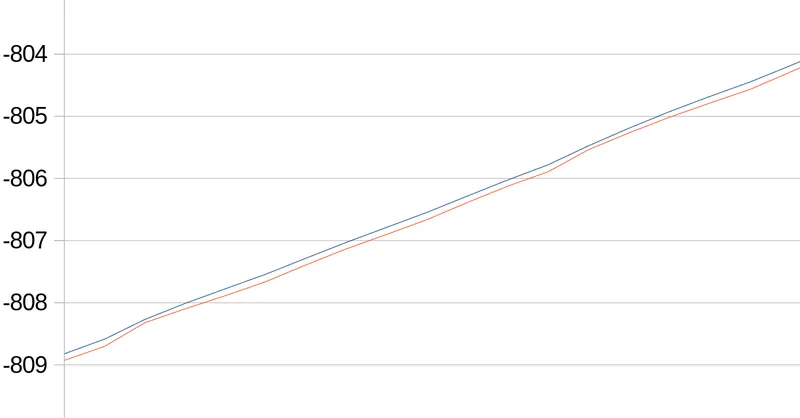
Which brings to mind: one thing that I have to hand right now is a graph that I generated.

It shows the y-axis positions (the numbers on the left) of both the target and the camera. (I tried to hew close to the y-axis for the experiment that generated its data.)

If I'm not much mistaken, this data was taken under constant motion, with effectively little or no acceleration.

Alas, I forgot to check before closing the spreadsheet which line was which, but I think that the red line is the camera, and the blue the target.

I'm guessing that the jitter is those points at which the red line approaches the blue, then falls away.

MWAHAHAHAHAHAHA!!! My Twitter Account: @EbornIan
_WeirdCat_
_WeirdCat_

def updateCamera(dt): diff = targetPos - cameraPos scalar = cameraSpeed * dt if scalar > 1: scalar = 1 cameraPos += diff * scalar

This is definetly causing the problem, first you move object then camera, causing it explictly to sometimes match the object postion.

When object stops moving camera does not, it reaches object position, then my bet it jitters due to float inprecision.

And instead reaching object position you get diffrence between -0.5e7 to 0.5e7

You need to damp the movement of camera when its too close by if (vectorlength(diff) ≤ threshold scalar = 0.0; → this is wrong damp but may work i rather go with damp(diff*dt)

Where damp function is if diff*dt ≤ threshold then do not update cam pos. This won't let you reach object position.

But still you move by distance of the object through dt, you might use

Normalized diff vector which gives you direction of where camera needs to go then multiply that by object last frame velocity dt and add that to camera position, with checking if camera aint too close if it is then stop movement this may require intensity damping this means the closer camera gets damping gets bigger,

Dont read the quote

however with this approach you update velocity vector by adding force (acceleration) normalized(diff) *dt

In summary your camera needs velocity vector and position vector

Where accel is your diff vector

vel = vel + damp(accel)*dt;

pos = pos + vel*dt;

Then you render the scene. From my understanding you want camera to smoothly follow object (like from third person camera)

However i see a revelant bug here with forcing camera to follow object pos each frame but i don't see it yet, my guts are telling me that…

Just tell me what you expect that camera will do when object moves forward and then rapidly to the left and continues movement in left direction. What happens at this rapid directio change) Do you want camera to follow the path, or is camera positioned behind object and rotated towards object and you want it to move smoothly through a curve. It's unclear on: how do you expect/want it to behave. Tell us and youll get your answer

Gnollrunner
Gnollrunner

BTW how far are you from the origin? If you are using float and are much more than a dozen or so km, you can start to have precision issues which might be what's causing your problem.

Thaumaturge
Thaumaturge

_WeirdCat_ said:
When object stops moving camera does not, it reaches object position, then my bet it jitters due to float inprecision.

The thing is, this is happening under constant motion. Indeed, it primarily happens under constant motion, from what I've seen.

In addition, the jitter looks to me, at least, to be rather larger than of the order ~10^-6.

Gnollrunner said:
BTW how far are you from the origin? If you are using float and are much more than a dozen or so km, you can start to have precision issues which might be what's causing your problem.

That is a thought that has occurred to me, indeed. However, I'm only about 800 world-units out, and have had the issue appear much closer to the origin, as I recall.

However! I think that I've done it!

Earlier in the thread, it was suggested that I divide my time-step. And at the time I did so, and found that it didn't help.

But in that attempt I only applied this division to the camera's update--not to the target's. It then occurred to me last night (I think that it was) that perhaps applying it to the target--thus changing the relationship between camera and target over the course of the divided time-step--might be important.

So just a short while ago I tried it--and indeed, the jitter seems to have disappeared as a result! :D

In short, what I did is as follows: In the semi-pseudocode that I included in my first post, I changed “updatePlayer” to be something like this:

def updatePlayer(dt):
    newDt = dt

    while newDt > someVerySmallValue:
        # Update both target and camera by a small, fixed increment
        position += velocity * someVerySmallValue
        updateCamera(someVerySmallValue)
        # Keep doing so until the total delta-time for the frame is all-but
        # used up
        newDt -= someVerySmallValue

    # Perform the update one more time, using whatever delta-time remains
    position += velocity * newDt
    updateCamera(newDt) 

My thanks to all of you who helped in this thread! It has been rather appreciated! ^_^

MWAHAHAHAHAHAHA!!! My Twitter Account: @EbornIan
JoeJ
JoeJ

Thaumaturge said:
It then occurred to me last night (I think that it was) that perhaps applying it to the target

Glad you did it : )

Yes, if you subdivide timestep, you should apply this to all variables affected from this timestep. Likely by linear interpolation or extrapolation on the target as you did.
Though, currently you will still have some timesteps being much smaller due to division reminder. You could improve this further:

const float defaultSubstep = 1/120.f;
int substepCount = max(1, (int)round(timestep / defaultSubstep ));
float currentSubstep = timestep / float(substepCount); // this way we have slightly variable step sizes, but no reminder so no outliers
for (int i=0; i<substepCount; i++) Update(currentSubstep);

Edit: Looking more closely i see you have no smaller timestep, because you ignore the reminder of dt/someVerySmallValue.
But this way your whole camera should go slightly out of sync with realtime, as the reminders are not integrated. May be noticeable, may be not.

Thaumaturge
Thaumaturge

JoeJ said:
Edit: Looking more closely i see you have no smaller timestep, because you ignore the reminder of dt/someVerySmallValue.

I'm not sure of what remainder there would be: I'm not using division, and even if I was, it would be floating-point division, and thus include the remainder.

(There might be some loss to floating-point precision, but that should be minimal, and be accounted for in subsequent steps due to the target-distance being slightly higher or lower than it should be.)

JoeJ said:
Yes, if you subdivide timestep, you should apply this to all variables affected from this timestep.

One thing that I'll note here is that I'm not applying the division to all objects. For example, enemies do not use the divided time-step. It's currently only used for the player's (and thus the target's) position and velocity-handling (excluding player-control), and for the camera's position.

Thus far I haven't seen any ill effects of this, at least.

MWAHAHAHAHAHAHA!!! My Twitter Account: @EbornIan

Topic Locked

This topic has been locked by a moderator. New replies are not allowed.

Sign in to reply to this topic.