GameDev.net gamedev.net
🔒 Locked

How was Empire Earth able to render hundreds of 3D models on the screen when it had no access to shaders?

Started by yaboiryan May 22, 2022 at 7:12 AM 23 replies 32.7k views
Original Post
yaboiryan
yaboiryan

Empire Earth was a great game, and it is definitely one of my favorites. In fact, I am developing my own Real Time Strategy game at the moment. The best part about Empire Earth is that there are no set strategies that one could follow. My personal favorite has always been to overrun my opponent until they run out of resources. I continued to add more features in the game until I had a unit class of my own in my game. I trained 40 troops, and the framerate dropped to the point that the game was unplayable on my PC. How was Empire Earth, which is an old game that was meant to be played on Windows 98/Me/2000, able to render hundreds of units on the screen without significant framerate drops while my own program is only able to render around 60 models before it starts to slow down?

The weirdest part is that EE was programmed in DirectX 7, which is an older version of the DirectX version I am using by a few years AND it does not allow the user to utilize shaders for more efficient drawing.

Is there a drawing technique that would allow me to imitate this speed?

-rydog

JoeJ
JoeJ

yaboiryan said:
while my own program is only able to render around 60 models before it starts to slow down?

Probably you do some things inefficiently, so you want to provide more details about your rendering pipeline.

Do you sort by model and texture, and draw batches for each model? Maybe you do skinning on CPU? Do you upload vertices just once, or do you upload them every frame? How many vertices has your average model? Frustum culling for terrain and units? What DX version do you use? Do you use some gfx profiling tool?
Things like that.

yaboiryan
yaboiryan

@JoeJ To answer all your questions:

I am not sure about what exactly you mean about this, though I am quite sure I do what you are asking.

And yes I do do that.

I upload them all at once when the game is initialized.

Each model has probably around 600-700 triangles.

I am doing so only for units, not for the terrain.

I use Directx 8 (this game was started for the purpose of retrodev, and DX8 met the qualifications)

The only profiling tool I use is the VS '17 CPU profiling tool.

dpadam450
dpadam450

I took a look at the game. Are you certain all the units are actually rendered in 3D and not pre-rendered 2D sprites? Other than that I don't recall what might be in that old API and it seems way to counter productive to use such old tech. You are talking about 60K triangles and hundreds of draw calls. Try dropping each unit to be 2 triangles (vertex limited possibly). Then do the opposite, 1 draw call with 60K triangles. Draw calls and verts are likely both killers.

I use Directx 8 (this game was started for the purpose of retrodev, and DX8 met the qualifications)

You can still use 32x32 pixel textures to make your game look old but run on modern hardware. Not sure I understand the reasoning here. Compatability for someone that might ever play your game: its2022, nobody has DirectX 8. 2D Mario games still make money and look the same as SNES versions using modern API's. Minecraft looks dummed down. Just switch. Aesthetically graphics don't make or break a game, so you shouldn't even need to dumb it down to look old an pixelated (my opinion).

NBA2K, Madden, Maneater, Killing Floor, Sims 
frob
frob

You'd have to talk to the people who worked on the game to be certain what they did, but a fairly common technique in the era (which we used in several games) was blending 2D and 3D. 2D items like trees could be drawn by creating a flat sprite and also writing depth information, so it interacts with other 3D rendering effects like the z-buffer. Other details are keeping models extremely simple which the hardware supports, like only 4 or 8 bones that hardware of the era supported. Details of how they batch the rendering make an enormous difference, too.

But you aren't developing on 2001's graphics hardware, you're developing on 2022's graphics hardware.

What worked in older games won't work in modern games. If you make a game that tries to copy what 1980's sprite-based hardware did, you'll likely end up drawing quite slowly. The old hardware worked on sprites, you made sprite ID's, you set some flags to rotate and flip the sprites, and you drew them by id. That's not how modern hardware works, so unless you jump through a lot of hoops you can't do it well. Similarly with the early 1990's hardware it was optimized around 2D hardware acceleration, but we don't have that same hardware acceleration, so if you try to copy it in 2022's hardware you'll have an awful lot of work to do.

2022's hardware is optimized around rendering fancy point clouds and heavy instancing, particle system rendering, moving not just models and textures but also processing a lot of data to the card, doing a lot of processing in shaders, and so on. Use tools like Nsight to find bottlenecks and processing gaps and find ways to spread the work around.

yaboiryan
yaboiryan

@frob Good point. Empire Earth does run rather slowly at certain points during gameplay. And given what you mentioned, it is even more surprising about the frame rate.

JoeJ
JoeJ

yaboiryan said:
I use Directx 8 (this game was started for the purpose of retrodev, and DX8 met the qualifications) The only profiling tool I use is the VS '17 CPU profiling tool.

A GPU profiler would show you a timeline of the frame so you can see how long certain draw calls take, how underutilized the GPU is and why.
Not sure if Nsight works for DX8, but i would give it a try. Such tools are often hard and tedious to set up, but it's worth it. Without it, you're basically working blind folded and guessing is all you can do.
Visual Studio also has a built in GPU profiler. But i never used it and don't know what to expect.

If you target current day hardware, i would do the work of porting to DX11 if only for the reason to be able to use profiling tools if needed, and you get a lot more options to optimize as well. It can still look as retro as with using DX8.

alexpanter
alexpanter

dpadam450 said:

I took a look at the game. Are you certain all the units are actually rendered in 3D and not pre-rendered 2D sprites? Other than that I don't recall what might be in that old API and it seems way to counter productive to use such old tech. You are talking about 60K triangles and hundreds of draw calls. Try dropping each unit to be 2 triangles (vertex limited possibly). Then do the opposite, 1 draw call with 60K triangles. Draw calls and verts are likely both killers.

I know for a fact that Age of Empires II originally implemented this technique - they would have 3d models for all their units, and then “screenshot” them from 3 different angles and mirror these vertically yielding 6 sprites in total per model.

@yaboiryan Did you try batched rendering, ie. sending a single draw call to render all units? Or perhaps instanced rendering might help you.
I don't think we live in a time anymore where you have to create 2d sprites manually..
You might also have problems with constant memory allocations - if you call malloc/new/whatever, everytime you create a new unit or update its position or something, then you are bound to run into trouble.

dpadam450
dpadam450

@alexpanter He said in a reply that he is using DirectX8, so its hard to know if/what type of instancing was available.

NBA2K, Madden, Maneater, Killing Floor, Sims 
Geri
Geri

OpenGL with ancient video cards on 1-2 ghz-ish processors, due to the limitations of the AGP (2x) bus, the memory bandwidth, the cpu, the os, the gpu itself, was able to push out about ~30k polygons per frame (before turning into a stuttering mess) when using the traditional glbegin/glvertex3f/glend pipeline.

There are multiple reasons for this, the most obvious is the max bandwidth of the agp port. The performance of this method haven't increased very drastically ever since.

In those times, i used OpenGL, so i don't have such precise numbers for directx. I have noticed that beginning and ending the pipeline in directx (9) hogs the rendering far more than in opengl.

Being able to load the geometry to the video card and render from there (vertex buffer object) only appeared after 2000, a similar and not so efficient feature called gllists was available tho.

Before you would overthink it, the technique used in the games of this era (if multiple 1000s of models were needed) was called LOD (which dpadam referred as instancing). This means that they had low-poly count models to use, and only near models were rendered in high resolution. The very far characters was just textured planes.

Similar thing goes on with mipmapping, where far objects are being rendered with smaller blured textures. So they pretty much did the same with the geometry too.

yaboiryan
yaboiryan

@alexpanter I considered that, but what about rendering the model every frame? It seems like the model would get drawn over every frame by the terrain.

yaboiryan
yaboiryan

@Geri Are there algorithms for this LOD technique, or do I have to lower-poly the models myself?

yaboiryan
yaboiryan

@JoeJ I would do that, but it has to be able to run on Windows 98, at least.

Geri
Geri

yaboiryan said:

@Geri Are there algorithms for this LOD technique, or do I have to lower-poly the models myself?

The algorithm called Mesh Optimize. I dont know if there are trustable free source snippet of it online, so likely you have to come up with your own implementation. I am sure it can be done from like 50-100 lines of code.

JoeJ
JoeJ

Probably the most widely used mesh reduction methods build on quadric error metrics: http://www.cs.cmu.edu/~garland/Papers/quadrics.pdf​

UE5 Nanite preprocessing uses this too afaik, for example.

But i don't think you want to do this automatically, and for a RTS, LOD should not be needed at all.
LOD means ‘Levels (plural) Of Detail’, but if your zoom factor does not change wildly, and your view is top down, you likely want only one level, to keep things simple.
This is enough because your characters will always have about the same size on screen.

So if your models have too many triangles, you get the best quality if you do the reduction manually, eventually by remodeling them. This is especially true if your models are already low poly,
Modeling tools also have built in options to reduce meshes, which you want to try first ofc. There really should be no need for you to develop such reduction algorithm yourself.

Geri said:
I am sure it can be done from like 50-100 lines of code.

No way. You need a mesh data structure with adjacency information. You need editing functions to collapse edges or vertices. You need to deal with UV islands and boundary issues. That's no easy stuff and takes serious time and effort. At least weeks just for that.

Geri
Geri

@JoeJ might i do it if i am really bored. thinking on it, it would be a handy feature in future games of me. i am pretty sure it will not take more than a few hours.

alexpanter
alexpanter

@yaboiryan If I understand your question correctly, that would be about enabling/disabling the depth test at the right times. And perhaps draw terrain first, then units. Some mixture of that should work fine.

Geri said:

yaboiryan said:

@Geri Are there algorithms for this LOD technique, or do I have to lower-poly the models myself?

The algorithm called Mesh Optimize. I dont know if there are trustable free source snippet of it online, so likely you have to come up with your own implementation. I am sure it can be done from like 50-100 lines of code.

How about this one: https://github.com/zeux/meshoptimizer​ ? I have never used anything like this, but it seems to have a lot of starts and forks. Also website: https://meshoptimizer.org/​ .

Geri
Geri

Alexpanter: As this is probably an essential feature for him, in his place, i wouldnt trust it on such a complex third party code like this. But its his decision what he does.

Geri
Geri

@joej

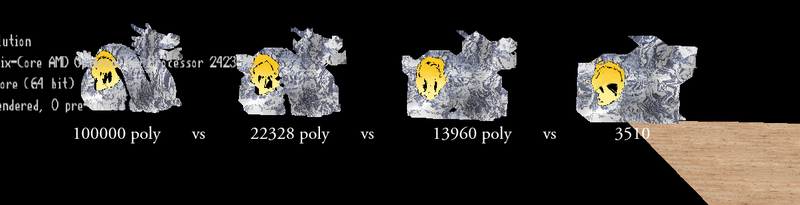
Actually i had some time today, and decided to try implementing it, to see if it really can be done within a few hours, and i was able to do it.

I have cheated a bit, as i have reused some of my old codes.

The end result is 500 lines of code (plus additional generic code later on to remove duplicated polygons and flat surfaces) however there would be room to significantly decrease that (which i will probably not do).

I am not yet satisfied with the result, because it outputs too much polygons for the given quality, probably some caves are being formed internally in the models in the process, but it does its thing.

One thing i am concerned about is the speed, this 100k poly dragon takes like 10 seconds meanwhile it should be below 0.1s according to my previous experiences. I know what i messed up, but no more time, so thats it for today.

JoeJ
JoeJ

Geri said:
probably some caves are being formed internally in the models in the process, but it does its thing.

Beside that, it also looks like merging surfaces which are close in euclidean space, but have large geodesic distance (distance over the surface).
So if i would put my right finger on my left arm, your algorithm would join my limbs to form a connected cycle, which breaks the topology of my body.

UVs are distorted and warped. There are degenerate cases breaking manifold property.

I see you can do this in short time, likely you did just cluster vertices which are close. But you can mask the issues only because the input already looks bad. No lighting, bad UVs.
If you want quality (using this in a game), or if you want to do other geometry processing tasks on the output (e.g. fixing UVs), you're in bad luck imho.

Still interesting, but that's usually just the first step on a path of failures until you would figure out something proper. Though, you could use a library as suggested above, or Blender.

That's not meant badly! But i'm convinced people need a really good reason if they intend to go down the rabbit hole of geometry processing.

Topic Locked

This topic has been locked by a moderator. New replies are not allowed.

Sign in to reply to this topic.