GameDev.net gamedev.net
🔒 Locked

generate vertex colors for a mesh

Started by convert Apr 18, 2025 at 6:04 PM 30 replies 7.4k views
Original Post
convert
convert

I have mesh and would like to generate vertex colors for the mesh, but have found no solutions, atleast for C++. The mesh looks like this:

//Vector3F is float[3], Vector2F is float[2] and Triangle is unsigned short[3]
    class Mesh{
        Vector3F* positions;
        Vector3F* normals;
        Vector2F* uvMap1;
        Triangle* triangles;
        unsigned int numVertex
        unsigned int numTriangles;
        
    };

JoeJ
JoeJ

Just add per ver vertex color as you do with positions, normals, etc.
The problem is not on the C++ side, but about the graphics API. You need to tell it which components a vertex has, e.g. additional color, or a second channel of texture coords.

convert
convert

JoeJ said:

Just add per ver vertex color as you do with positions, normals, etc.
The problem is not on the C++ side, but about the graphics API. You need to tell it which components a vertex has, e.g. additional color, or a second channel of texture coords.

Sorry looks like I was completly misunderstood. Let say I have read a mesh from an obj file into my mesh structure. Unfortunatelly obj files store only positions, normals and texture coords, but no vertex colors. This has nothing to do with the graphics API. Just need to generate for the mesh the vertex colors, which were not present.

So what I am asking, is some kind of algorithm, which creates for every vertex a coresponding color.

JoeJ
JoeJ

Ah ok. But what gives you the ‘coresponding color’?

I assume you want to paint the color in some modeling tool like Blender? If so, you could export using a file format which supports vertex colors, and you would also need a new importer for that file format. (Not sure about file formats, but i can confirm the AssImp library, which supports many formats, also supports up to 8 color channels per vertex.)

If you instead want to generate the colors using some algorithm, you probably want to learn about ‘procedural texturing’, for example perlin noise, voronoi cells, or similar patterns.
Related resources are the old but good book ‘Texturing and Modeling: A Procedural Approach’,
or Inigo Quilez website, for example: https://iquilezles.org/articles/voronoilines/
or the many examples on ShaderToy

Those procedural techniques can be used to generate texture colors but also vertex colors.

taby
taby

Well, you can go with 3-D binary Perlin noise, to make cow colouring:

https://github.com/AnthonyNystrom/Julia-4D/blob/f1d743be8bd619c3f2d70d8d6514f5bc0bb98759/utilities.cpp#L285

You can also do dot product based colouring:

https://github.com/AnthonyNystrom/Julia-4D/blob/f1d743be8bd619c3f2d70d8d6514f5bc0bb98759/utilities.cpp#L196

Also, there is rainbow colouring based on the distance from the origin:

https://github.com/AnthonyNystrom/Julia-4D/blob/f1d743be8bd619c3f2d70d8d6514f5bc0bb98759/utilities.cpp#L79

convert
convert

I assume you want to paint the color in some modeling tool like Blender?

I would like to do it like in some modeling tool, but in my own code. Importing every single model into modeling tool then manualy paint the color and reexporting the model in some new format suporting vertex colors is a big pain in the as.

JoeJ
JoeJ

convert said:
I would like to do it like in some modeling tool, but in my own code. Importing every single model into modeling tool then manualy paint the color and reexporting the model in some new format suporting vertex colors is a big pain in the as.

A warning from my personal experience: You can spend lots of time on your own tools, but chances are you will still end up using Blender & co, because overall those professional tools still offer more.
Import / export can be automated, requiring a fraction of work compared to making your own mesh editing / painting.

The real problem is probably the painting itself. No matter how good tools and asset pipeline is, you still need to do that manually.
Eventually for a huge amount of models or levels. And because you didn't tell which kind of content you want to make, we can only give very broad proposals about procedural content generation methods aiming to replace manual work.

Beside procedural patterns already mentioned, here are some other things which might help:
Wavefunction collapse algorithm (can do procedural textures, but also procedural placement of modular geoemtry, up to entire levels.)
Baking global illumination (place few lights and get beautiful color gardients everywhere without painting)
Terrain simulation (erosion can give natural mountains and rivers)

Maybe there is some magic algorithm which would generate good colors for your specific content, but there surely is no such algorithm working for anything (charaxcters, architecture, terrain, …).
So you may want to tell more about your actual goals.

convert
convert

JoeJ said:

convert said:
I would like to do it like in some modeling tool, but in my own code. Importing every single model into modeling tool then manualy paint the color and reexporting the model in some new format suporting vertex colors is a big pain in the as.

A warning from my personal experience: You can spend lots of time on your own tools, but chances are you will still end up using Blender & co, because overall those professional tools still offer more.
Import / export can be automated, requiring a fraction of work compared to making your own mesh editing / painting.

The real problem is probably the painting itself. No matter how good tools and asset pipeline is, you still need to do that manually.
Eventually for a huge amount of models or levels. And because you didn't tell which kind of content you want to make, we can only give very broad proposals about procedural content generation methods aiming to replace manual work.

Beside procedural patterns already mentioned, here are some other things which might help:
Wavefunction collapse algorithm (can do procedural textures, but also procedural placement of modular geoemtry, up to entire levels.)
Baking global illumination (place few lights and get beautiful color gardients everywhere without painting)
Terrain simulation (erosion can give natural mountains and rivers)

Maybe there is some magic algorithm which would generate good colors for your specific content, but there surely is no such algorithm working for anything (charaxcters, architecture, terrain, …).
So you may want to tell more about your actual goals.

Some time ago, about 10 years, have read somewhere that in a modeling tool it is posible to place light(s) and then the tool wil generate colors afected by that light(s). In this case all I need to do is to play with some lights, but posibly I remember it wrong.

JoeJ
JoeJ

convert said:
Some time ago, about 10 years, have read somewhere that in a modeling tool it is posible to place light(s) and then the tool wil generate colors afected by that light(s). In this case all I need to do is to play with some lights, but posibly I remember it wrong.

Yeah, that's possible. But there are potential issues, since you're baking lighting whioch the observer will identify as such:

If you bake lighting this way, it is static. We would assume the lighting to change if objects move. Shadows should move with them, but they won't. Also, if you also bake lighting to dynamic models like characters, and then place them into a level with baked lighting as well, they may not fit together, looking wrong.

The usual solution to this problem is:
Bake only to the static level geometry, and only indirect lighting (indirect = light reflected from walls, but not directly from the light source itself).
Then at runtime we calculate the direct lighting in realtime, adding it to both the static and the dynamic models. Eventually with shadows.

The baked light is usually stored in textures ('lightmaps'), not vertices. This enables details also on large triangles. But baking per vertex is possible as well. (Usually any 3D modeling tool can be used to bake lighting to geometry.)

So if you want to do this, you probably need to learn more about lighting as well.
Or you ignore all the errors of incorrect lighting, which can be acceptable if your light palecement aims to add colors everwhere instead achieving realistic lighting. Maybe you even want to disable shadows to avoid the problematic realism.

JoeJ
JoeJ

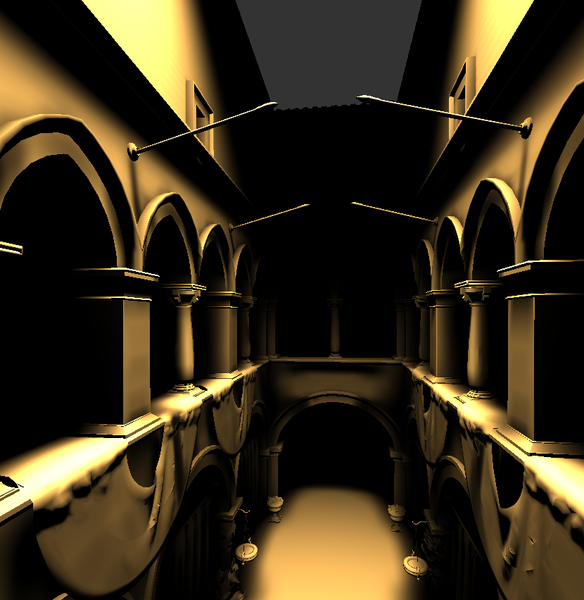
But maybe using only direct lights in realtime is an option too. Can look like this:

No textures, no vertex colors, and only one shadowed spotlight is used.

JoeJ
JoeJ

But maybe, adding some realtime lights is all you would need?

Here i have Sponza scene without any textures or vertex colors, lit by one shadowed spotlight:

It's at least enough so we can see the scene.

convert
convert

JoeJ said:

Yeah, that's possible. But there are potential issues, since you're baking lighting whioch the observer will identify as such:

If you bake lighting this way, it is static. We would assume the lighting to change if objects move. Shadows should move with them, but they won't. Also, if you also bake lighting to dynamic models like characters, and then place them into a level with baked lighting as well, they may not fit together, looking wrong.

The usual solution to this problem is:
Bake only to the static level geometry, and only indirect lighting (indirect = light reflected from walls, but not directly from the light source itself).
Then at runtime we calculate the direct lighting in realtime, adding it to both the static and the dynamic models. Eventually with shadows.

The baked light is usually stored in textures ('lightmaps'), not vertices. This enables details also on large triangles. But baking per vertex is possible as well. (Usually any 3D modeling tool can be used to bake lighting to geometry.)

So if you want to do this, you probably need to learn more about lighting as well.
Or you ignore all the errors of incorrect lighting, which can be acceptable if your light palecement aims to add colors everwhere instead achieving realistic lighting. Maybe you even want to disable shadows to avoid the problematic realism.

I see the conseqences and I acept them. So is there a way to do that baking lighting but without modeling tool?

JoeJ
JoeJ

So is there a way to do that baking lighting but without modeling tool?

Sure. Implement an editor to place lights in the scene, implement a lighting system, sample per vertex and store.

Lighting can be as simple as unshadowed point lights, up to as complex as path tracing.

taby
taby

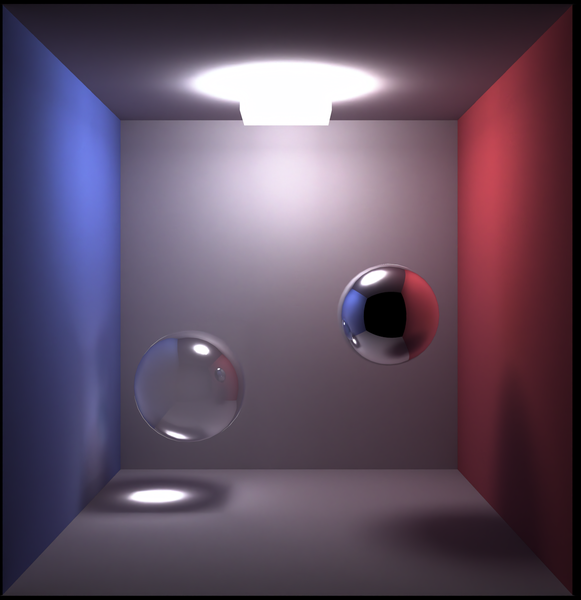
This is path tracing:

convert
convert

JoeJ said:

Sure. Implement an editor to place lights in the scene, implement a lighting system, sample per vertex and store.

Lighting can be as simple as unshadowed point lights, up to as complex as path tracing.

Don't need an editor, just would like to implement something like:

void genColors(const Mesh& mesh, Color* colors) {...}

Color could be unsigned char[3], unsigned char[4], float[3] or float[4].

JoeJ
JoeJ

convert said:
Don't need an editor, just would like to implement something like:

void genColors(const Mesh& mesh, Color* colors) {...}

Well then let's assume you calculate bounding box if the mesh, then you place lights randomly but at somewhat uniform density.
To avoid unwanted shadows from lights which do nto really exist, you don't implement shadoes at all, also to keep it simple.
To avoid dark spots on surfaces which do not point towards any lights, you also ignore surface normals, considering only the distance from avertex to a light. Again very simple.

What i'm trying to get at is: Such an algorithm does nto fake any lighting. It is actually a procedural texturing approach as mentioned earlier.
A typical voroni cell noise function works like so: We define some space, e.g. from your boundign box, and we attach some regular grid to this space.
Then, per vertex the algorithm works like so:
Calculate the grid coordinates of the vertex, giving for example (3,5,8).
Using this grid cell as the center, we iterate a 3x3x3 region of neighboring cells.
For each cell of the region, we calculate one random point with a random color in the cell. (Using pseudo random numbers obtained from the grid coords.)
In other words we iterate 27 nearby random points, and we take the onhe closes to the vertex. Then we give the vertex its random color.

It's pretty simple, and we can also consuider the N closest points to blend multiple colors, which then gives us the same result as the approach based on lighting from above.

Ofc. you can also use a user defined color pallette or gradient to have art control over colors, which might be a good idea.

So you want to look up resources on procedural texturing, not lighting, i guess.

Though, i see an even simpler alteranitve. It's slower but may not matter if you precompute:

Gerneate N random points in the bounding box.
For each pont, iterate all vertices, and accumulate the distance weighted color to any vertex.
Finally normalize and done.

Pseudo code:

void PoorRembrandt (std::vector<Vertex> &vertices, const std::vector<ColorPoint> &points, const float falloff)
{
	// init to zero
	for (auto &v : vertices) v.color = vec4(0,0,0,0); // we'll use alpha for the accumulated weight
	
	// accumulate
	for (auto &p : points)
	{
		for (auto &v : vertices)
		{
			float distance = length(p.pos - v.pos);
			float weight = falloff / (falloff + distance * distance);
			v.color += vec4(p.color.xyz * weight, weight);
		}
	} 
	
	// normalize
	for (auto &v : vertices) 
	{
		float wsum = v.color.w;
		if (wsum != 0.f) 
			v.color = vec4 (v.color.xyz / wsum, 1.f);
	}			
} 

Yeah, that's much simpler than anything. The larger the falloff, the more blurry the resutls should be.

convert
convert

JoeJ said:

, you also ignore surface normals, considering only the distance from avertex to a light.

And what about vertex normals?

dpadam450
dpadam450

What are the vertex colors used for? Just visual data or some engine specific data to tell you which vertices are flagged for some specific reasons?

Visually I think you can unwrap your model and use the bake to texture feature which might be able to bake the vertex colors in blender into an image with some smoothing. Then you can simply apply the texture on the model.

You could do this offline as well. Read the image on the CPU, take each vertex texture coordinate, find what pixel it maps to in the image. Set the vertex color to the color at that pixel from the image.

Your alternative would be to stop using obj and make your own file format. Blender python scripting is something useful to learn. I extract tons of information and use Blender as my main level editor for all my work for 20+ years.

NBA2K, Madden, Maneater, Killing Floor, Sims 
convert
convert

JoeJ said:

Pseudo code:

void PoorRembrandt (std::vector<Vertex> &vertices, const std::vector<ColorPoint> &points, const float falloff)
{
	// init to zero
	for (auto &v : vertices) v.color = vec4(0,0,0,0); // we'll use alpha for the accumulated weight
	
	// accumulate
	for (auto &p : points)
	{
		for (auto &v : vertices)
		{
			float distance = length(p.pos - v.pos);
			float weight = falloff / (falloff + distance * distance);
			v.color += vec4(p.color.xyz * weight, weight);
		}
	} 
	
	// normalize
	for (auto &v : vertices) 
	{
		float wsum = v.color.w;
		if (wsum != 0.f) 
			v.color = vec4 (v.color.xyz / wsum, 1.f);
	}			
} 

Yeah, that's much simpler than anything. The larger the falloff, the more blurry the resutls should be.

Yes really simple, but as far I can see produces unrealistic results, since it ignores if the vertex is affected by light or not. Gues here normals could help? How do I change the code so that the normals are also taken into account?

taby
taby

JoeJ said:

Pseudo code:

void PoorRembrandt ...

You are one with the chiaroscuro!

Topic Locked

This topic has been locked by a moderator. New replies are not allowed.

Sign in to reply to this topic.