GameDev.net gamedev.net
🔒 Locked

Improved picture sharpness with subpixel antialiasing

Started by RmbRT Oct 2, 2025 at 2:29 PM 34 replies 13.2k views
Original Post
RmbRT
RmbRT

Font rendering often makes use of the RGB subpixel layout of LCDs (or other screens, with different layouts) to create sharper edges with subpixel precision. For example LCDs (at least most of them) have a horizontal subpixel layout of RGB. I think some TV screens have vertical subpixels. Couldn't we use the same as a filter to produce sharper images for arbitrary graphics? I guess you would need a supersampled base image for that, though (although only at twice the horizontal resolution, not twice the vertical). Then if you have a colour gradient within a 2-pixel strip, you can adjust the blended pixel colour's components to make the edge appear in the middle of the pixel. It would distort the colour somewhat, but we also do not notice the distorted colours of anti-aliased text (although maybe that only works properly for black-on-white?)

Did anyone ever try or consider this approach? Of course it would be a bit expensive, but could add additional sharpness that no other method could provide, as to my knowledge, no established method makes use of the screen's subpixels. Ideally, if one could directly access the samples from a multisampled image, and perform the blending manually, that would be even better. But to my knowledge, that's a hardwired algorithm.

CRT graphics via composite cables back in the day did make use of the screen's characteristics via spatial dithering to achieve pixel blending and gradients. That basically improved colour depth despite having a limited palette, but it did not improve sharpness. For LCDs, the equivalent of exploiting the pixel structure IMO would be subpixel edges, and I haven't seen anyone do it.

P.S.: I found the Subpixel Image worsener. This seems to be exactly the process I want, although it only does per-channel downsampling, so channels do not bleed into each other. Interestingly, this also works for partial multiples, such as 1.5x resolution, so one does not have to necessarily double the rendering resolution. I wonder how expensive this is as a post-processing filter, and how far one can take it if colour channels affect each other properly. If the supersampled image is also multisampled, this should improve image quality even further, as this subpixel rendering only affects one image axis, while multisampling improves general quality.


Walk with God.
JoeJ
JoeJ

RmbRT said:
Did anyone ever try or consider this approach?

Likely not. We can not even do proper anti aliasing, so spending effort on display subpixel specifics is a very bad investment at this point, imo.
There may be exceptions, e.g. if a game has a mostly static image. But if it's in motion, nobody will notice an improvement, while some still whine all day about TAA (or now DLSS) artifacts.

Also, with increasing display resolution, those things matter less now than they did before.
My eyes can tell a difference from the images of your link only on the magnified examples. The others look the exact same, even i know what to look for.

Btw, when i worked on shadow maps, at some point i had problems with judging how much of a problem the leaks were.
Depending on my gamma curve, the leaks were either invisible or really bad.
So i tried to improve the gamma curve, by ensuring i see the same details in the inverted image as in the original image.
I found the usual gamma curve implemented with a single pow is completely off. The proposed value of typically 1.8 - 2.2 is correct only at the dark side of the spectrum, but the bright side needed a value much closer to 1. (iirc)
I ended up using 3 values for bright, mid and dark shades.
It's a bit more costly, and users have to adjust 3 values not just one, but it's worth it and the difference is huge.

As a graphics artist i always was very frustrated it's impossible to calibrate displays properly.
Now, a decade later i have found a solution. And i can make an easy calibration process which total noobs can understand and adjust properly with ease in few seconds.
I still need to verify how this works in practice in a game, but this may be an overlooked topic where improvements are indeed worth it.

Aressera
Aressera

I tried this in my GUI renderer for bordered rectangles and text but decided to abandon it for a few reasons:

  • Incompatible with alpha blending or antialiasing. For it to work properly, you need to know both the background color and the image color in the shader, which is not available usually, and regular alpha blending and antialiasing applies the same to RGB. Dual-source blending might help.
  • Requires the user's screen to have the correct orientation. Many people like to turn their monitors 90 degrees into portrait mode. Maybe some manufacturers use a different ordering of the color channels. In these cases it will fail catastrophically.
  • Changes colors in a noticeable way, at least with rectangles. If I have a white rectangle on a black background, there will be a column of blue pixels on the left and a column of red pixels on the right, which is quite noticeable, especially if the rectangle moves and the colors flicker. This problem outweighs any benefit for things with large vertical straight lines. For text this won't be as noticeable.
  • Only relevant on low-resolution screens. Many monitors these days are 2x “retina” resolution (e.g. all macs), people are using 4K displays. On those screens, it's pointless to do sub-pixel antialiasing because the pixels are so small already.
RmbRT
RmbRT

JoeJ said:
The proposed value of typically 1.8 - 2.2 is correct only at the dark side of the spectrum, but the bright side needed a value much closer to 1. (iirc)

https://gamedev.stackexchange.com/a/148088 and https://stackoverflow.com/a/61138576 were quite helpful for me when I last tried to do gamma correction. The correct gamma is 2.4, but the dark sRGB values are actually linear, at 1/13th the intensity. The linked wiki article also has the correct formula. The 1/13th scale is also the reason for the horrible banding when you convert 8-bit linear back to sRGB.

JoeJ said:
But if it's in motion, nobody will notice an improvement, while some still whine all day about TAA (or now DLSS) artifacts.

TAA is horrible when you pan the camera around, though, or when things move. You literally see ghosting going, things leave a trail. It's just as jarring as screenspace reflections when they're done poorly (like in the oblivion remaster, where your view model reflects over distant lakes…).

To be fair, though, you do not really see it. But you also don't have to be able to consciously recognise it. Rendering quality works on the subconscious mind, and even if you can't directly see that something is wrong, it will still affect your experience, just like eating sawdust mixed into your food may not be detectable by you while you eat it, but it will still affect your body.

JoeJ said:
As a graphics artist i always was very frustrated it's impossible to calibrate displays properly.
Now, a decade later i have found a solution. And i can make an easy calibration process which total noobs can understand and adjust properly with ease in few seconds.
I still need to verify how this works in practice in a game, but this may be an overlooked topic where improvements are indeed worth it.

I also have a plan in mind for that. I'd first need to get a proper high-quality sRGB screen to calibrate the calibration test against, though. And then use temporal and spatial dithering to emulate more colour precision (only works at 60+ FPS, though, so you gotta optimise your game or the temporal dithering will backfire instead).

Aressera said:
Incompatible with alpha blending or antialiasing. For it to work properly, you need to know both the background color and the image color in the shader, which is not available usually, and regular alpha blending and antialiasing applies the same to RGB. Dual-source blending might help.

I think the subpixel rendering needs to be a final pass over the entire image, probably, as a downscaling pass. Then, there is no longer a foreground or background that you have to blend. I think the guy of Image Worsener suggested blending the colour channels separately with three alpha values, since a single alpha channel cannot represent 3 distinct, slightly offset pixel positions.

Aressera said:
Requires the user's screen to have the correct orientation. Many people like to turn their monitors 90 degrees into portrait mode. Maybe some manufacturers use a different ordering of the color channels. In these cases it will fail catastrophically.

If you implement this, you need to add an option for RGB and BGR pixels, as well as the ability to specify screen orientation (the same for screens with vertical pixel layout).

Aressera said:
Changes colors in a noticeable way, at least with rectangles. If I have a white rectangle on a black background, there will be a column of blue pixels on the left and a column of red pixels on the right, which is quite noticeable, especially if the rectangle moves and the colors flicker. This problem outweighs any benefit for things with large vertical straight lines. For text this won't be as noticeable.

I just tried this out in GIMP on my laptop screen and on my bigger LCD screen, both at 1080p. The larger 24" screen creates a slightly visible discoloration at the edges, but only if it's a long vertical row. I think that's when additional color correction comes into play, like the font rendering mechanisms do. They slightly weaken the contrast of the subpixel rendering so that on larger pixels, it is less noticeable (although this again introduces a slight blur, but you can probably also come up with a different filter that does not introduce blur, but achieves different properties).

Aressera said:
Only relevant on low-resolution screens. Many monitors these days are 2x “retina” resolution (e.g. all macs), people are using 4K displays. On those screens, it's pointless to do sub-pixel antialiasing because the pixels are so small already.

Well, most laptops are still 1080p, and I don't own a 4K monitor, but even then, isn't better image quality always a win? The subpixel-aware image downscaler I linked produces tangibly better images. At least I could actually tell the difference on the balloon picture. For the others, I could only see the difference in the peripheral vision, like maybe ~2–3° off focus. Having a 4K monitor should be a reason to use subpixel rendering because then it makes it impossible to see the artifacts while still giving you the image quality enhancement. Same with 120Hz and 240Hz monitors. They shouldn't be used for framegen, games should natively render at those framerates at native resolution if you have a good graphics card. And then you can use temporal dithering to create HDR through imperceptibly fast oscillation. Sharper edges and smoother gradients, what more could a man want?

Anyway, I'm of the opinion that upscaling and TAA are out, and software-simulated HDR and supersampled subpixel-aware rendering is in.

Walk with God.
Aressera
Aressera

RmbRT said:
TAA is horrible when you pan the camera around, though, or when things move

That's a poor quality implementation then, not inherent to the technique. Motion vectors are enough to prevent that from happening. The only real problems with TAA are transparency and ghosting from movement. In nearly every other case it is a net win for image quality because it can reduce all forms of aliasing (geometry edges, foliage cutouts, temporal, specular). Good luck doing that with any other single AA technique, even supersampling can't handle temporal aliasing. The reason why TAA is so popular is because it greatly improves overall image quality in a way no other approach can, and the downsides of a proper implementation are not that bad.

RmbRT said:
I think the subpixel rendering needs to be a final pass over the entire image, probably, as a downscaling pass.

Nice, then you just increased your framebuffer memory usage and bandwidth, as well as number of pixels rendered by a factor of 3, at minimum. That won't be any more viable in practice than supersampling is.

RmbRT said:
And then you can use temporal dithering to create HDR through imperceptibly fast oscillation.

HDR is more about having a really bright display with more color bits. You can't just make a LDR display HDR by doing the equivalent of adding more bits, it needs a brighter backlight too. You wouldn't call the original gameboy an HDR device just because it used temporal dithering to create grey from a 1-bit display.

RmbRT said:
software-simulated HDR

That's been around since at least 2005 (Oblivion). Almost any game made since the advent of floating-point textures is using software-based HDR for internal rendering, with a final tone mapping step to convert to display on whatever display you have (LDR or HDR). The tone mapping is where you can play tricks with dithering to avoid banding artifacts.

JoeJ
JoeJ

RmbRT said:
https://gamedev.stackexchange.com/a/148088 and https://stackoverflow.com/a/61138576 were quite helpful for me when I last tried to do gamma correction.

Ah, good to know. I need to compare when i get back to it.

RmbRT said:
TAA is horrible when you pan the camera around

Panning should be pretty fine actually, since preserving sharpness becomes the only problem.
But yes, it breaks down with moving objects, and the ghosting sucks.

The question is just - what else? We can't effort multi sampling.
So imo the only solution is to render without quantization, like e.g. spherical gaussians.

Well, for now i'm happy i'm not affected from TAA artifacts. It feels acceptable to me.

RmbRT said:
I'd first need to get a proper high-quality sRGB screen to calibrate the calibration test against

Hehe, regarding color standards and calibration i am a bit like you regarding division by zero.
I simply don't trust it. Gamuts, profiles, any standards, their calibration promises… it's just total bullshit and does not work at all.
I care a fuck about that s in front of RGB \:D/

Maybe my doubt and disrespect is more based on experience with print media, though.

Anyway, i came back because i had an idea where your subpixel stuff might matter: CRT filters, like often used for retro emulators.
I love CRT filters, and if i would make a pixel art game, i would add a CRT filter for sure.

RmbRT
RmbRT

JoeJ said:
The question is just - what else? We can't afford multi sampling.

Says who? We can literally afford raytracing or whatever they call it these days, but we stopped being able to afford multisampling? We literally for the last about 20 years or so could afford MSAA.

And forward+ also works with MSAA, as far as I heard. So the problem would be the deferred rendering, if anything. First we broke MSAA with deferred rendering, then we needed to somehow get AA back, supersampling is too memory-bandwidth-intensive most of the time, and then we started to use TAA, which in turn allowed us to use aggressive dithering, which then locked us into TAA, then we started to use AI upscaling, and AI frame generation. Since we use aggressive dithering, we cannot turn off TAA, because then everything becomes a flickery mess. And since we rely on dithering for performance, we also don't even want to let go of it. So we are completely stuck inside TAA+dithering, and at that point, framegen and upscaling are also things that weren't needed in older rendering.

So we gave up near-perfect anti-aliasing at native rendering, and replaced it with a huge clusterfuck of stuff that reduces image quality at every step. AI framegen can't handle certain camera movements well, which will look like certain objects detach from their world position and hover weirdly in view-space. Upscaling creates visible artifacts around model outlines in quite a few cases. TAA can't even be removed because of the aggressive use of dithering, which also can't be turned off. No matter how much AI you throw at it, you will not reach the same image quality as a MSAA rendered scene. Which again, we can freely use in forward+, as far as I heard.

JoeJ said:
Hehe, regarding color standards and calibration i am a bit like you regarding division by zero. I simply don't trust it. Gamuts, profiles, any standards, their calibration promises… it's just total bullshit and does not work at all. I care a fuck about that s in front of RGB \:D/

Every screen produces certain characteristical patterns in multi-colour gradients, with different “colour dominance” zones being visible. For example in a plain 2D gradient that scales R on the x axis, and B on the y axis, and has a uniform G value, depending on the screen you use, you will see differently shaped and differently dominant areas of a certain colour. If you can identify what the characteristical shapes should look like on an sRGB screeen, and can take their outlines, you can then display those outlines and display them manually on a non-compliant screen. If the outline areas differ, you can adjust the colour curve to fix it. If the colour curve is too steep in some places and would result in banding, you can dither between two adjacent values using alternating checkerboards patterns (and you invert the dither pattern each frame, so you get a very fast alternating flicker of two colours that are reasonably close together). You can do that by adding the dither noise to the colour before doing the colour curve correction (+-0.5 or something). This also reduces banding when gamma-correcting dark linear RGB to sRGB. You would need a 256-pixel 1D texture as a final fullscreen pass or something to correct the curve.

So basically you take one “reference monitor” which you define as the standard. It wouldn't even have to be a fully sRGB compliant monitor. Then you create benchmark images that let you identify characteristical patterns of its colour behaviour, and then you tune another screen's colour curve until it produces the same patterns. If you run at 60FPS or more, the use of noisy dithering in the colour curve correction function can completely hide any banding it would produce. This means you can perfectly calibrate any screen to match your reference monitor in the way colours behave relative to each other, at least. And that 1D texture lookup is probably not a big deal. You could even cheap out and use a smaller 1D texture and use linear interpolation on it (you should be using linear filtering anyway to make the dithering work best). And again, you can do this as a final post-pass, so that it does not cost you anything extra during regular geometry rendering.

This way, you don't even have to care about sRGB or any other stuff out there. You just work with linear RGB, which you have to use anyway during rendering, and then simply calibrate the user's monitor to match the visuals of your reference monitor that you developed it on. No more gamma slider or any of that b.s., and no sRGB transform needed, because almost no screen out there has true sRGB anyway.

This of course forces the user to make his own colour calibration curve, but the gamma setting in games is actually the exact same thing, just worse, since most people just use it to turn up the brightness. And that doesn't give you any reference point as to what the resulting image should even look like. But if you can give them a clear benchmark image and can mark out the shapes that they should be seeing in a gradient, they have an objective reference that can guarantee almost identical colour profile on all monitors. Actually, the OS should ship that out of the box and you should be asked to do that once for each screen (or screen model) you connect to your PC. Then the game wouldn't have to bother the user with that, and could simply load the user-provided colour calibration from the OS.

JoeJ said:
Anyway, i came back because i had an idea where your subpixel stuff might matter: CRT filters, like often used for retro emulators. I love CRT filters, and if i would make a pixel art game, i would add a CRT filter for sure.

That's how I even got the idea for that to begin with. CRT-era games leveraged the CRT's (and especially the composite cable's) characteristics to create stuff like the semi-transparent waterfalls in sonic, etc. And smooth colour gradients when the palette had no such thing. LCDs don't have that characteristic, and we also don't need to manually produce gradients like that anymore, because we aren't using palette rendering. Although I guess my idea of a screen colour curve calibration would effectively reintroduce something like a palette, due to the potential banding produced by colour correction, just with full 24-bit colour space. It could also be taken further to emulate higher bit depths. We can use my dithering method to produce the perception of at least one or two bits of additional colour depth, after all. So you can regain the bits you lost during correction.

Walk with God.
JoeJ
JoeJ

RmbRT said:
Says who? We can literally afford raytracing or whatever they call it these days, but we stopped being able to afford multisampling? We literally for the last about 20 years or so could afford MSAA.

I can not (or don't want to) afford raytracing. Cost is way too high for what it gives. Any cost. Gaming became a luxury, accessible only to top earners these days. It's not for anyone anymore, and RT is even less.

And MSAA is not multisampling. Only triangle visibility is multisampled, but not shading. Due to the misuse of terms, they now call true multisampling ‘downsampling’.

RmbRT said:
First we broke MSAA with deferred rendering

No, it's MSAA which was broken from the start.
It begun with those Voodoo boards which needed 4 chips just to do lousy 2x2 multisampling (true MS, afaik).
This was when the enthusiast segment started to turn games into unaffordable luxury, causing just envy and disappointment for a minor visual benefit.
No wonder NV bought this company, sharing the exact same mindset of selling luxury snake oil.
Keep in mind: Multisampling begins to actually work at a whopping 4x4 samples. 2x2 is barely better than nothing.

Well, after all that hate against TAA, at least one guy needs to be a bit critical about useless MSAA as well, no? ;D

But let's stop this here. TAA vs. MSAA discussions never move to any agreement or insight. The only proper conclusion is that both sucks and we still need to work on something better.

RmbRT said:
CRT-era games leveraged the CRT's (and especially the composite cable's) characteristics to create stuff like the semi-transparent waterfalls in sonic, etc.

Yeah, but that's not the main reason, which is simply that regular sprites look better when avoiding those square pixels, replacing them with glowing dots.

RmbRT
RmbRT

JoeJ said:
And MSAA is not multisampling. Only triangle visibility is multisampled, but not shading. Due to the misuse of terms, they now call true multisampling ‘downsampling’.

I thought that was called supersampling. But downsampling is a hilarious name for it. And yes, MSAA is technically multisampling, since the geometry test is invoked multiple times per pixel.

JoeJ said:
Keep in mind: Multisampling begins to actually work at a whopping 4x4 samples. 2x2 is barely better than nothing.

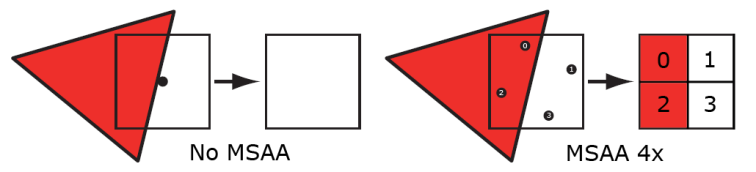
Are you referring to supersampling / downsampling? Because 4xMSAA uses 4 samples per pixel, not 4x4 samples. See:

Sampling patterns

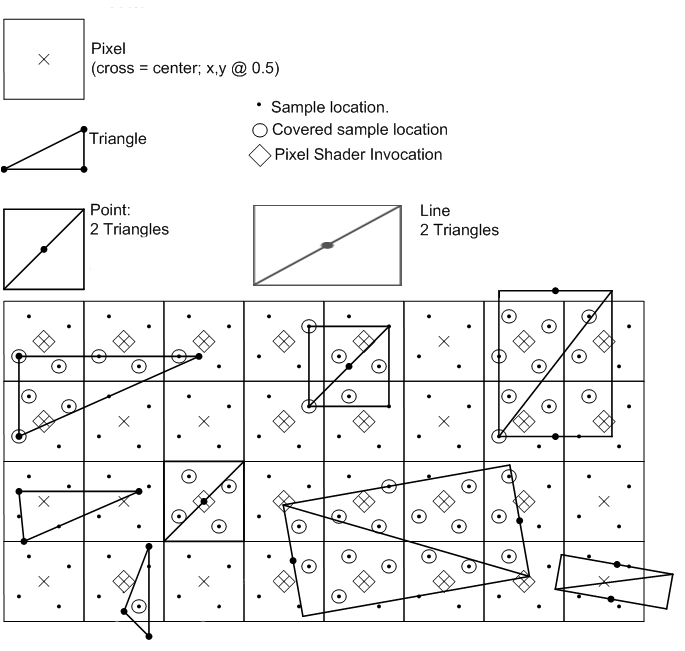
Afaik, it is HW-vendor specific which exact pattern is used by the GPU. But you can expect something like the 2×1 pattern for 2xMSAA and the 2×2 grid or 2×2 RGSS for 4xMSAA, as well as something like the 8 rooks for 8xMSAA. It only performs the fragment shader once per pixel, but performs the geometry coverage test N times per pixel for NxMSAA, in HW-specific offsets. The hardware tracks which sample spots of a pixel were already taken and which weren't, afaik. This source claims this is a typical 4xMSAA pattern:

MSAA_Partial_Coverage2

And here we see that each pixel only has a single pixel shader invocation.

JoeJ said:
No, it's MSAA which was broken from the start. It begun with those Voodoo boards which needed 4 chips just to do lousy 2x2 multisampling (true MS, afaik).

AFAIK, that was for single-cycle bilinear texture filtering (GL_LINEAR), but that was before my time.

JoeJ said:
But let's stop this here. TAA vs. MSAA discussions never move to any agreement or insight. The only proper conclusion is that both sucks and we still need to work on something better.

I don't see how hardware-accelerated sub-pixel coverage tests for geometry are a bad thing. It allows you to create almost the same visuals as supersampling/downsampling, but at much lower cost. Yes, it doesn't do that for GL_NEAREST texture sampling within a triangle, but that's acceptable, IMO. So MSAA only invokes the coordinate test multiple times, but does not invoke any duplicate memory accesses or anything (except maybe having a larger memory footprint to store sample coverage, but I don't actually know how that works or whether they do that at all). So for anything that isn't geometry-coverage-check-bound in its performance, multisampling shouldn't really create much of a difference in performance (although it does potentially cause some performance hit due to the blending performed at triangle edges.

JoeJ said:
I can not (or don't want to) afford raytracing. Cost is way too high for what it gives. Any cost. Gaming became a luxury, accessible only to top earners these days. It's not for anyone anymore, and RT is even less.

I was not saying that to advocate for raytracing. I think it's a bad meme technology. But just considering that people actually do build raytracing into their games but then claim that performing a geometry check multiple times per pixel is impossible, is weird. Because MSAA is way cheaper than raytracing. Yet most games nowadays don't even assume anymore that anyone would render at full resolution and would want to use MSAA. Because then you wouldn't need TAA anymore. And if you didn't use TAA, you couldn't use dithering as aggressively anymore. And it also probably doesn't work with nanite…

Walk with God.
RmbRT
RmbRT

Aressera said:
That's been around since at least 2005 (Oblivion). Almost any game made since the advent of floating-point textures is using software-based HDR for internal rendering, with a final tone mapping step to convert to display on whatever display you have (LDR or HDR). The tone mapping is where you can play tricks with dithering to avoid banding artifacts.

By HDR I meant emulating HDR screens, as in, creating more than 2²⁴ colours on the actual screen. And yeah, that's basically something you'd do during tone mapping, I guess. I wasn't really concerned with high-bit-depth (>8 per channel) input images, or the precision used internally in the shader).

Aressera said:
HDR is more about having a really bright display with more color bits. You can't just make a LDR display HDR by doing the equivalent of adding more bits, it needs a brighter backlight too. You wouldn't call the original gameboy an HDR device just because it used temporal dithering to create grey from a 1-bit display.

Well, if 1 bit was LDR at the time, and 2 bit were considered HDR at the time… As far as I understand the term, 10 bit HDR would not be about having brightness values of up to 1024, but rather having 1024 shades between black and pure white. Who would want to spend 75% of his colour space on a 1x–4x intensity white colour range? Would 12-bit HDR require sunglasses to view? Anyway, if HDR means going brighter than white, then that's not what I'm trying to achieve. I want to achieve more colour granularity with that technique, and I thought HDR was the term for it.

Aressera said:
That's a poor quality implementation then, not inherent to the technique. Motion vectors are enough to prevent that from happening.

Well, I saw it in footage of recent AAA games. I don't remember which game though, they all look the same to me, and I haven't bought a AAA game in probably over a decade.

Aressera said:
Nice, then you just increased your framebuffer memory usage and bandwidth, as well as number of pixels rendered by a factor of 3, at minimum. That won't be any more viable in practice than supersampling is.

Well, considering how many passes a game nowaday makes, I think that is not a big deal. And you don't have to use it. It would be optional for those devices that can handle it. And it would only be a very fancy and barely noticeable refinement to the image quality, so nobody would lose out much if it were turned off. And I also haven't tried to make a serious implementation of it yet, so I haven't thought it through yet. So I don't know what exactly it all entails if I were to try to find an optimised approach.

Walk with God.
JoeJ
JoeJ

RmbRT said:
And yes, MSAA is technically multisampling, since the geometry test is invoked multiple times per pixel.

Only if this test is all you do. But if you do any shading / texturing or what not, true multisampling requires to do all this work per sample.
That's at least what the offline guys do, and they defined those terms long before we turned SS into just edges, or path tracing into blurring sparse samples across all 11 dimensions.

Not sure what ‘supersampling’ means, but myabe it's another term for true MS.

When i'm done with my GI, i will call it ‘instant future GI’, to point out it's actually realtime for real this time.

RmbRT said:
Are you referring to supersampling / downsampling? Because 4xMSAA uses 4 samples per pixel, not 4x4 samples. See:

Yeah, and trying to avoid any confusion, i always call it 2x2 or 4x4 (or 4^2), but i never use just ‘4x’.

Anyway, in the picture they call it ‘4x4 grid’, which is good enough quality. (But you still see plenty of quantization.)
That's still expensive on modern HW, gives you nothing but edges, and it's lame brute force.

Contrary, TAA gives you 8x8 quality (in ideal cases but most of the time), is efficient, and isn't restricted regarding forward vs deferred.
And that's why it has won. It did not win because Tim Sweeney loves Vaseline but wants to kill games, or something like that.

But MSAA isn't useless, to correct myself. There are tricks to render and quarter resoultion and doing reconstruction / upscaling, checkerboard rendering, higher quality VSM shadows, etc.

RmbRT said:
AFAIK, that was for single-cycle bilinear texture filtering (GL_LINEAR)

If so, that's even worse. No wonder 3Dfx is gone. They could not really improve after a good start.

RmbRT said:
I don't see how hardware-accelerated sub-pixel coverage tests for geometry are a bad thing. It allows you to create almost the same visuals as supersampling/downsampling, but at much lower cost.

On some or most mobile GPUs MSAA is totally free and you should use it all the time. But it still has the cost of chip area and increased complexity, making chip design more costly and difficult.
Mobile is super power limited, so fixed function makes sense. You also can't do deferred well because bandwidth.
Desktop / console isn't, and fixed function makes much less sense. Lacking support for deferred limits its potential application a whole lot.
I would not shed a tear if they would finally deprecate it, together with geometry and tessellation shaders.
Oh, and you can remove tensor cores as well. I'm not interested.
And i'm not willing to pay for so many features i neither need nor want.

RmbRT said:
(except maybe having a larger memory footprint to store sample coverage, but I don't actually know how that works or whether they do that at all)

It's surely very complicated, because you can determine coverage only after all triangles were drawn.
So you need to store all samples, until the pass is done and you can ‘resolve’ it for the final result.
Pixels with multiple triangles then also need multiple pixel shader invocations, which causes more idle threads and needs to be stored as well.

If all this is ‘practically free’ on hardware X, i can only conclude the HW design is inefficient, spending time on doing nothing in case the feature is not used.

RmbRT said:
then claim that performing a geometry check multiple times per pixel is impossible, is weird.

But i did not say that. It's not ‘impossible’. I have only said that we can not effort true multi sampling, e.g. downsampling.
Ofc. you can use MSAA in practice, if you have a forward renderer, and if your geometry is not too dense.

Now, in recent years we saw forward becoming much more popular again. The main advantage is savings on GBuffer bandwidth.
But we have cluster occlusion culling everywhere now, which works great to minimize overdraw, so we need to reevaluate.
In case your geometry is dense, forward tanks due to idle threads from pixel shader quads, so the trend becomes deferred again, i think.
(Edit: Using a visibility buffer which also becomes more and more popular, the GBuffer BW disadvantage goes completely away in practice, as we write each GBuffer pixel only once after visibility is known.)

RmbRT
RmbRT

JoeJ said:
But i did not say that. It's not ‘impossible’. I have only said that we can not effort true multi sampling, e.g. downsampling. Ofc. you can use MSAA in practice, if you have a forward renderer, and if your geometry is not too dense.

Ok, then we were talking about different things. And with forward+, you can get basically all the benefits of deferred rendering and the fixed-function MSAA, which at 2×2 RGSS (so, 4 geometry coverage checks per pixel, but only one pixel shader per pixel per triangle, the result of which gets duplicated into all affected sample slots), has the same quality as a 4×4 (16 coverage checks, 16 pixel shader invocations) SSAA/supersampling/downsampling. So it takes 4 times less space and 16 times fewer pixel shader invocations. Which means 16 times fewer texture lookups, and 16 times less memory bandwidth. I haven't looked into forward+ in detail yet, but it is at least claimed to be a modern revision of forward rendering that can basically do all the same things as deferred rendering can. I gotta look into that for the game I'll be making sometime soon. I wonder whether forward+ requires modern GPU features or not. My intuition is that it does not inherently require modern features, and simply was a previously undiscovered way of rendering.

… Ok, so I just looked it up, in what seems to be the original paper on Forward+, and it indeed only requires compute shader support, and that's it. What it does is use a compute shader to divide the image into tiles, and then for each tile, it checks which lights affect that tile (frustum vs. sphere, assuming point lights, but you could also adapt that to handle directed lights). Then, a normal forward rendering is performed, which accesses the per-tile list of lights to iterate through. This still limits the number of lights per tile, I think, but also makes the pixel shaders only look at exactly the lights that affect a pixel. So only areas in which more lights shine are more expensive to render, while all other areas are as expensive as the normal forward rendering.

JoeJ said:
Now, in recent years we saw forward becoming much more popular again. The main advantage is savings on GBuffer bandwidth. But we have cluster occlusion culling everywhere now, which works great to minimize overdraw, so we need to reevaluate. In case your geometry is dense, forward tanks due to idle threads from pixel shader quads, so the trend becomes deferred again, i think.

That's why you need to sort out the order in which you render, and take care of your LODs, to make sure you don't get lots of subpixel triangles or simliarly small geometry. Since pixel shaders are not invoked for already Z-occluded geometry, sorting your scene can help a lot. Keeping your triangles at around 2x2 pixels or larger means few wasted pixel shader invocations, and front-to-back rendering means also little overdraw. And you can entirely skip the step of AI upscaling and weird AA solutions and all that if you use MSAA in forward+, which should also help reduce cost. Then we can also replace AI cores with rendering cores in GPUs. Maybe we can finally reach unfaked, real 60/120 FPS again, at unfaked resolution, with real anti-aliasing based on increased geometric sample density.

And the reduced memory bandwidth also means that it is more friendly not just to mobile, but also iGPUs on laptops. Which mean it's perfect for the indie market. The tile-based light culling of forward+ also perfectly fits mobile GPUs which want to use tile-based rendering anyway.

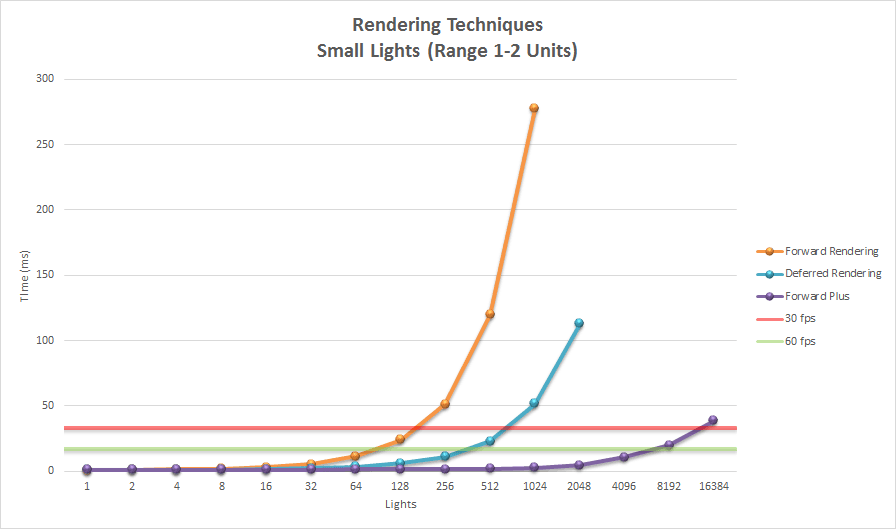
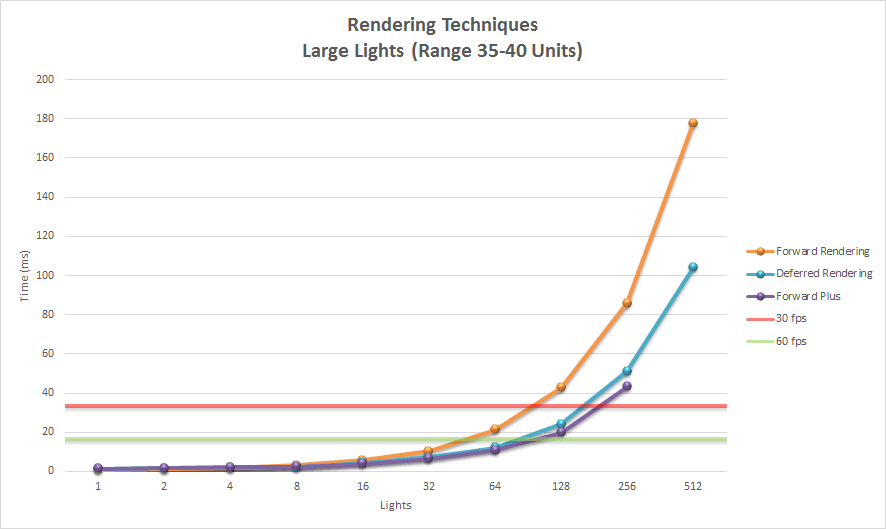
After reading this excellent article comparing all 3 rendering approaches (forward, deferred, forward+), I must say I'm quite impressed. It is quite long because it lists the source code in the article, as well. This is 10 years old technology. Here are his benchmark results of a scene with massive amounts of lights (the “Large Lights” benchmark has each light cover big parts of the scene, while the small lights are reasonably sized, but not tiny):

The benchmark was not particularly optimised, it did not make use of accelerator structures in the scene for the light culling or anything like that. Each frame considered all lights of the entire scene. The light culling pass for the forward+ rendering also did not eliminate a lot of false positives (shown at the end of the article), so it could be even faster. If you built an engine around forward+, you would definitely use accelerator structures like octrees or something to make it have to handle less data, and other architectural decisions specifically targeting forward+. The forward+ method is massively faster than deferred rendering for scenes where most lights only affect smaller parts of the scene. For scenes with few lights in general, you can also just use normal forward rendering, too. For scenes with massive amounts of lights, forward+ is still comfortably sitting at ~100fps when deferred rendering is already grinding to a halt at <10fps. This means you could even use true supersampling and still beat deferred lighting in that scenario, and certainly would be able to use MSAA, and still consume less memory than the deferred rendering, and still be at 60fps or something. And it's mobile-friendly and laptop-friendly. Literally perfect.

Walk with God.
JoeJ
JoeJ

RmbRT said:
And with forward+, you can get basically all the benefits of deferred rendering

I have forgotten how F+ works, but i assume:

It needs a depth prepass. (expensive with dense geom - twice the work compared to visibility buffer)
It creates tiled light lists using that depth.
2nd pass with pixel shaders, iterating the light list. (light iteration is the most expensive part of rendering, but with forward you waste all those threads assigned to empty quad pixels)

Conclusion: Forward is good for mobile and lo-fi retro gfx, but bad for advanced lighting and/or detailed geometry.
That's how you decide, but we can't argue about a general winner. We are not there yet.

RmbRT said:
so, 4 geometry coverage checks per pixel, but only one pixel shader per pixel per triangle

Yes, but if your triangles are small, every pixel contains multiple triangles. That's where MSAA becomes unpractical, and why they almost all use TAA since many years. (Or thy did until upscaling has replaced it)
But the right decision depends ofc. on the game and HW. Similar as above it's pretty pointless to figure out what's better in general.

2×2 RGSS … has the same quality as a 4×4

I don't get this one. What is RGSS? And how can 2x2 be as good as 4x4?

RmbRT said:
My intuition is that it does not inherently require modern features, and simply was a previously undiscovered way of rendering.

Well, it needs compute shaders to make the light lists per tile. I guess F+ paper came out shortly after CS was introduced.

RmbRT said:
This still limits the number of lights per tile, I think

Not necessarily. Basically we have two options:

Define a max number of lights per tile. Simpler, but artifacts if we exceed the limit. Practical only with small number of lights per scene.

Or we do binning, requiring to iterate the lights twice. First it increase tile counters, then prefix sum on the counters to get memory addresses of densely packed lists. Iterate a second time to fill the lists.
Binning like this is very useful for many things and usually very cheap. Also a nice exercise to learn parallel programming.

RmbRT said:
So only areas in which more lights shine are more expensive to render, while all other areas are as expensive as the normal forward rendering.

This makes actually little sense. ‘Normal FW’ would mean to iterate all lights for each pixel, so the tile lists will always beat that.
(Even if i had only 1 light which covers only a part of the screen, lists would still win because most tiles would be empty.
Binning cost is negligible, but shadow map sampling is by far the most expensive task of all in my current renderer.)

I would say, you really need to go very lo-fi to make the old forward a win. Definitively look into F+.

RmbRT said:
Here are his benchmark results of a scene with massive amounts of lights

Notice things completely change if you want shadows too. (I'm probably very biased here, always assuming that every light is shadowed.)

RmbRT said:
it did not make use of accelerator structures in the scene for the light culling or anything like that.

Even with 10000 lights i see no need for an acceleration structure.
You would eventually want this for ray tracing, but even here they prefer Restir which is a similar idea to screenspace tile lists.

What i did for optimization is a very accurate bounding volume for my spot lights, using an ellipse and a triangle. So lights don't go into nearby tiles which they do not really intersect. But that's already much more than others do. Typically they only use a simple bounding rectangle.
And my binning is hierarchical. So i first bin to coarse 256^2 tiles, and than to 8x8 tiles, or something like that.
But that's also more advanced than usual. Mostly they use just 16x16, knowing their light count is not super high.
(iirc, i did this hierarchical thing actually to reduce the number of dispatches, not to enable massive light counts)

Notice those GPUs have thousands of cores. So frustum culling and binning 1000 lights is nothing to them. The overhead from doing the compute dispatches will dominate the timings, not the actual work (!)

RmbRT said:
Literally perfect.

If so, then only for your specific application.
But from how i imagine your goals, F+ and MSAA makes sense.
Just don't waste your lifetime on implementing AA on FGPA. AA is still a luxury in my eyes. ; )

RmbRT
RmbRT

JoeJ said:
It needs a depth prepass. (expensive with dense geom - twice the work compared to visibility buffer)

It can help, yes. But it is not strictly mandatory for an optimised scene. The benchmark in the paper does use a depth prepass, afaik.

It creates tiled light lists using that depth.

Yeah, that is a possible and common implementation.

JoeJ said:
2nd pass with pixel shaders, iterating the light list. (light iteration is the most expensive part of rendering, but with forward you waste all those threads assigned to empty quad pixels)

I don't quite get what you mean. The benchmark uses a real benchmark scene with randomly placed lights, and it consistently outperformed deferred shading. It iterates over all lights that affect a tile (16×16 or 32×32 pixels), for each fragment in that tile. There was a follow-up refinement of the method that also did depth clustering of lights in addition to screen space clustering, to further reduce false positives. I don't know how exactly deferred works, but I assume even that has false positives, and iterates over lights per pixel. And with a depth prepass, you can ensure pixel shading only happens once. Maybe I'm out of touch with how much a depth prepass costs, though.

And the lighting also is not a screenspace pass. So it doesn't really allocate threads to places where there is no geometry. It is a normal forward-rendered lighting pass, but with a per-tile list of lights to iterate over. Which means you iterate over common memory per tile. If there are only 2-3 lights affecting one 16×16 or 32×32 pixel region, all triangles in that region iterate over those same 2-3 lights. Which is not that expensive.

JoeJ said:
This makes actually little sense. ‘Normal FW’ would mean to iterate all lights for each pixel, so the tile lists will always beat that. (Even if i had only 1 light which covers only a part of the screen, lists would still win because most tiles would be empty. Binning cost is negligible, but shadow map sampling is by far the most expensive task of all in my current renderer.)

I would say, you really need to go very lo-fi to make the old forward a win. Definitively look into F+.

I might have been too tired when writing that post last night…

I don't know how dynamic shadows work exactly in F+, but that could cause problems if you had to iterate over a subset of a larger set of shadow maps in a fragment shader, yeah. But since the tech is over 10 years old, and barely got attention (it is hard to even look it up on the internet), I'm not sure whether someone quietly in some corner found a way to make massive amounts of shadow casters work. I also never rendered shadows myself, so I am not an expert on it.

JoeJ said:
Even with 10000 lights i see no need for an acceleration structure. You would eventually want this for ray tracing, but even here they prefer Restir which is a similar idea to screenspace tile lists.

Yeah. I think the follow up to F+, Volume Tiled Forward Shading, used an accelerator structure and better depth clustering/culling for light lists, to render millions of lights. But those did certainly not all cast shadows, LOL.

But I think even in deferred, you have limits to how many shadow casters you can have. Just that maybe in deferred, you can more freely access arbitrary buffers, instead of using a texture sampler with a fixed texture bound to it. I'm not sure. Maybe you would need a shadow atlas texture in F/F+.

But honestly, shadows are expensive on lower end devices anyway, regardless of how you do it. Especially for indie, you want to target people with lower end devices, and you don't have the manpower for high fidelity assets anyway (unless you asset flip, but that undermines creative direction, which is the one thing that needs to be absolutely nailed in indies).

JoeJ said:
Notice those GPUs have thousands of cores. So frustum culling and binning 1000 lights is nothing to them. The overhead from doing the compute dispatches will dominate the timings, not the actual work (!)

Yeah. You can probably do the complete binning/culling on all available cores in one go.

JoeJ said:
If so, then only for your specific application. But from how i imagine your goals, F+ and MSAA makes sense. Just don't waste your lifetime on implementing AA on FGPA. AA is still a luxury in my eyes. ; )

Well, at around 1080p, you definitely do need AA, especially on 24" screens. On 4k, maybe not. There are also ways to use 1080p MSAA rendering and then an upscaler to get 4k. Forgot what exactly the proposal was for that, but it sounded really neat. And since shadow casters are somewhat expensive anyway on lower end devices, which is what I as an indie would target, I think the inability to have thousands of shadow casters is not an issue for me. I wouldn't have many lights in a scene anyway, realistically speaking. And if a light is static, I can also precompute the static shadows it casts on static geometry, and simply bake that in as a geometric decal with perfect edges. And only if a dynamic object enters a static light, would the shadows for that have to be recomputed and the light would be a shadow-caster for that frame. So even in F+ you can have massive amounts of shadow-casting lights, if most of them are static, and you don't have massive amounts of dynamic geometry that enters the light radiuses.

I haven't even started designing the FPGA circuit (well, I did spend some weeks thinking about how it could be done, though), so I'm spending more time writing about that than actually thinking about it or working on it, haha. First comes the games and my compiler, then a custom linux live distro made for my language and multimedia applications written in it (so it becomes a developer and user distro for just my language, benefitting from a highly standardised environment and allowing me to make my own HW abstraction layer). When that is done, I would one day make an FPGA board that fits exactly that HW abstraction layer, with some lightweight OS/kernel, that can then run my programs from my custom linux distro out of the box. Of course it would not be as powerful as an ASIC CPU/GPU, but it should be enough for basic productivity tasks (development, etc.) and at least 2D games. Maybe simple 3D, like in the N64 era. I would probably not be able to produce anything that goes beyond that, realistically speaking. But a modernised architecture that makes use of deeply pipelined parallelism can help reduce friction and improve efficiency compared to the old N64 which was in-order SISD, afaik. The nice thing about simply setting up a SIMD pipeline instead of trying to do out of order computation is that it's relatively low-overhead, silicon-wise and circuit-complexity wise. Of course, the scalar path would still probably be in-order or very simplistic out-of-order. But almost all things that are expensive to run are usually expensive because of the amount of work, and not because of an extremely long serial dependency chain, if properly implemented.

And AA in software on a chip maybe as powerful as an N64… haha, yeah. Memory bandwidth and small caches are also a huge problem on FPGAs, as far as I understand, since you only get limited amounts of I/O ports on the FPGA, and the FPGA runs at maybe 300MHz at most or something. But if the custom linux distro is running on legacy computers, and then there is an FPGA board that runs the same software well in hardware, then would be an appropriate moment to one day go for an ASIC. At which point, if my design is actually a better fundamental approach than current legacy-constrained designs, it would be superior to conventional computers. But that's a long chain of hypotheticals that I don't earnestly assume to ever come to pass.

P.S.: Since we're already at it and nitpicking about the shortcomings of various techniques, a search summary of F+ also mentioned this interesting fact/claim/hallucination:

AI overlord said:
A key advantage over deferred shading is that Forward+ supports both opaque and transparent geometry without significant performance loss and natively handles multiple materials and lighting models, which is challenging in deferred rendering due to the need for a single "uber-shader".

The mention of uber-shaders is especially interesting, since modern games seem to suffer a lot from combinatoric explosions of shader variants, probably because they have lots of uber-shaders for various situations, which leads to those extremely long shader compilations at startup, and then also the stutters in game.

Interestingly enough, it seems that deferred shading has to use forward rendering for transparency anyway, so you would get the same performance problem on the transparent geometry. At least that was the claim in that F+ article from 10 years ago. Which would be solved by F+. Or you ditch blended transparent materials and simply use dithering on geometry instead, or something like that. And then use TAA to hide the dither.

Walk with God.
JoeJ
JoeJ

RmbRT said:
The benchmark uses a real benchmark scene with randomly placed lights, and it consistently outperformed deferred shading.

Didn't read, but i'm confused about the results.

Fact is: With deferred you saturate all threads because it's just processing the framebuffer. Saturation is guaranteed no matter if you use PS or CS for the shading.

With forward you have more divergence, because PS operates on 2x2 blocks of pixels ('quads'). Some fragments are outside the triangle but in a quad, so those threads are wasted. The smaller your triangles, the bigger the loss.

Other things, e.g. building the light lists or the shading algorithm, are (or should be) equivalent for both methods. So i don't get why his results scale differently with the number of lights. He might explain.

Afaict the pros and cons are:

F+:
+ does not need a GBuffer
+ can use MSAA
+ supports arbitrary materials due to unique pixel shader per drawcall
- needs depth prepass (if you want to cull occluded lights)
- quad inefficiency

Deferred:
+ does not need depth prepass
+ quad inefficiency / geometric density does not affect shading cost
+ full threads saturation
+ allows arbitrary clustering of pixels e.g. to batch materials or to do clustered shading
- can't use MSAA (it somehow can, but afaik that's no good)
- GBuffer causes high bandwidth cost (can be reduced to one write per pixel using visibility buffer or depth prepass)
- You want to implement multiple materials into an uber shader, increasing register pressure

F+ should be a bit less work to implement too, since there is no GBuffer

RmbRT said:
Maybe I'm out of touch with how much a depth prepass costs, though.

Depends on scene complexity. Cost is the same as with rendering a shadow map. (Just SM has more aggressive scene clipping ofc.)
Very cheap for Quake, prohibitively expensive for Nanite.

RmbRT said:
And the lighting also is not a screenspace pass. So it doesn't really allocate threads to places where there is no geometry.

It does. But i think i have explained now.

RmbRT said:
but with a per-tile list of lights to iterate over.

Oh, this gives another disadvantage i did not think of:
With F+ you iterate the same list multiple times, for each triangle which intersects the tile.
With Deferred you process each list exactly once, and your thread group matches the tile size exactly.
That's a big one.

RmbRT said:
There was a follow-up refinement of the method that also did depth clustering of lights in addition to screen space clustering

You can do this with either method. But imo it's bad and i wonder why there is so much fuzz about it. Clustered shading goes even further, which imo is even worse.
You can get the same advantage in practice simply by using a smaller tile size. But maybe i miss something.

Culling lights by depth is good, especially indoors. But clustering remaining lights into depth ranges seems overkill to me.

RmbRT said:
I don't know how dynamic shadows work exactly in F+, but that could cause problems if you had to iterate over a subset of a larger set of shadow maps in a fragment shader, yeah.

Yeah, but it's the same for F+ or deferred.
But again a new advantage for Deferred:
With Deferred all threads of a thread group process the SMs in the same order, so it's cache friendly. (Reason to prefer CS or PS, because only CS gives the necessary control)
With F+ the SM sampling becomes more random due to the issues mentioned before.

RmbRT said:
But I think even in deferred, you have limits to how many shadow casters you can have.

Same for F+ or deferred.

Maybe you would need a shadow atlas texture in F/F+.

Same for both, but atlas is a good idea if your scene has more than single digits of lights.
Personally i have two atlas.
One to render the selected SMs to be updated in the current frame.
A second (larger) for the SM cache.
I copy from the first to the second before i do the shading, which is no waste because currently i keep only the SM mipmaps but throw away the original higher resolution.

But since the tech is over 10 years old, and barely got attention

It did get full attention. See interesting presentations about Doom 2016 and probably Eternal was still forward too.
I feel like forward is actually more popular again (or it was, until UE became the only one true god there is)

RmbRT said:
But honestly, shadows are expensive on lower end devices anyway, regardless of how you do it.

I was very surprised how fast rendering SMs is. I came up with a clever method to render all SMs in parallel and GPU driven.
Rendering 10 SMs in the Sponza scene takes something like 0.3 ms iirc.

I was also very surprised how problematic the SM sampling afterwards is. I have a crazy HQ sampling method requiring 4x4 samples. And i may sample 3 mip levels for area light approximation. It's really high end, but i could not find a cheaper way to fix all those issues of acne, peter panning and leaks.
In the end, the shader has occupancy of only 20% due to register pressure.
Worst shader i have ever done.
But performance is still good, surprisingly. Because of the tile lists, the sampling work is reduced efficiently.
So i'm happy although i hate it. : )

RmbRT said:
Well, at around 1080p, you definitely do need AA, especially on 24

After trying Silent Hill, i have tried Eclipsium. It's visually more impressive, imo. Look it up. VGA resolution, super lo-fi, no AA, meh lighting, but extremely good sense for color and interesting art style does the trick.

You do not need AA at 1080p if you keep your overall detail level low. And it can still look great.

RmbRT said:
I wouldn't have many lights in a scene anyway, realistically speaking.


If you want to keep light count low, you also want to get the missing light from GI then. So you may want to think about light maps or volume of probes.
If you can, use light maps. That's really good results compared to alternatives. You still need probes too, which are then good enough for dynamic objects.

If you can't use GI, maybe because you generate procedurally, well, then constant ambient or a global environment probe is your only option. But this really looks like shit no matter in which decade we are. So i would not count on lighting at all, and instead use an art style which does not need lighting. The problem when doing so is: You don't get depth sense from lighting then, only from the size of the objects on screen. And many devs do not realize that is is actually exhausting to the brain. So i would recommend to use fog for depth cues. Can be subtle and still works. I would use it all the time, ignoring realism, and integrate the idea from ground up into art style.

Ofc. that's just such some personal ideas and proposals. But looking good is not the primary goal. Recognizing the scene instantly is. Much harder in 3D than in 2D.

RmbRT said:
A key advantage over deferred shading is that Forward+ supports both opaque and transparent

Ah yes, i have forgotten about that too. With a deferred renderer, you always need a forward path too for transparent objects. Which is exactly like F+ then. (Traditional deferred used rasterized lights, so drawing a cone per light for example. The cone pixel shader did the lighting this one light and results were accumulated with additive blending.)

RmbRT said:
modern games seem to suffer a lot from combinatoric explosions of shader variants

I do not really understand where this problem comes from. It must be too much artist freedom. Likely they create too many shaders for specific materials. UE for example endorses such artist freedom, while in house AAA engines often prevent it. Also, shaders are treated as assets. But on PC you can nut just stream this in like textures, you have to compile them. So the end of loading screens gave us this new and unexpected problem i guess. Personally i have little interest in complex materials and i do not worry.

RmbRT said:
Or you ditch blended transparent materials and simply use dithering on geometry instead, or something like that. And then use TAA to hide the dither.

This is often used to fade out occluders near the camera, but i have never seen it working well to handle real transparency e.g. of a colored glass wall. But idk, and i am curious about this for years.

RmbRT
RmbRT

JoeJ said:
With forward you have more divergence, because PS operates on 2x2 blocks of pixels ('quads'). Some fragments are outside the triangle but in a quad, so those threads are wasted. The smaller your triangles, the bigger the loss.

That is true. Triangle performance becomes abysmal at <1px, and bad at 2px. Definitely a LOD issue. Don't keep LODs around that have more than a certain ratio/amount of <2×2px triangles, especially relative to the amount of screen space they cover. Optimise your topology to maximise triangle size, even at the cost of more triangles, if necessary. The cost of edges compared to full 2×2 coverage is even greater for MSAA, probably, but I'm not sure about that. At least I think the MSAA test is only performed if they know they're at an edge.

JoeJ said:
It does. But i think i have explained now.

Well, it wastes threads on partially occluded 2×2px quads. But it does not waste threads on quads that are entirely unoccluded. I initially thought you were making that claim. Although for creating the initial G buffer, you also have the same problem, just with a simpler pixel shader. But it also depends on what exactly the bottleneck is, and how expensive the pixel shader is, etc.. For example while deferred might not have this specific bottleneck due to the simple pixel shader, the massive increase in memory bandwidth compared to F/F+ might still outweigh the 2×2 quad waste. For very simple pixel shaders, the cost also differs (such as when there is only ambient light affecting a tile), so it depends on how much complex lighting the complex models in a scene receive, and how complex their materials are to render. If you then have an overly detailed object, you easily waste ¾ of your performance or more. It always comes back to rendering geometry front to back, and keeping track of triangle size and topology. If you don't do that, you kill your performance. Although I guess that is what nanite is trying to solve, in part.

JoeJ said:
Ofc. that's just such some personal ideas and proposals. But looking good is not the primary goal. Recognizing the scene instantly is. Much harder in 3D than in 2D.

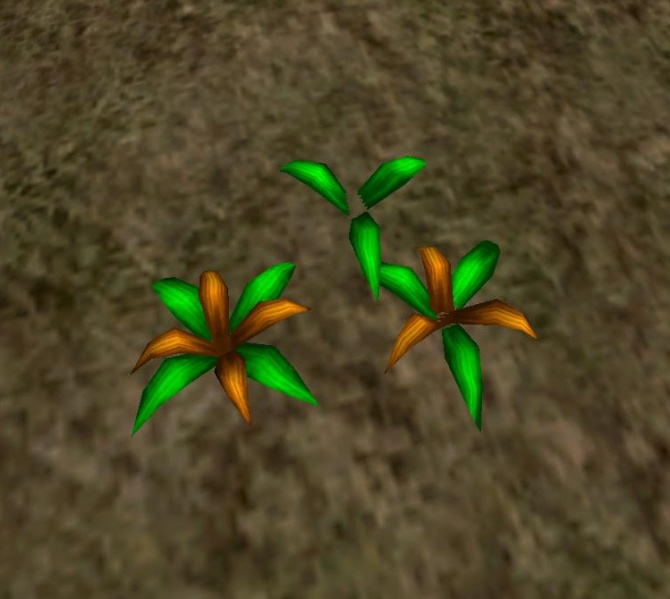
Definitely. Well, it has to also not look jarring. It is okay to have graphics that don't stand out, if they convey everything well. But the best graphics can still not help you if they obscure visibility. Like how they now have the yellow marker on everything in games that can be interacted with, or the HUD arrow hovering over interactible things. One horrible example was the Gothic 1 remake. They added fancy tall grass, but you could no longer see the medicinal flowers that you want to pick up. So now the flowers are surrounded by a ½ meter clearing and have a HUD marker floating overhead. Completely ridiculous. Before that, you just had a grass texture on the ground, and a few small weeds here and there, and clearly recognisable medicinal plant models. No markers, no weird unnatural clearings around them, etc. This decision to add the tall flowy grass completely broke the art direction.

Datei:HeilkräuterG1.jpg
Picture background

This ends up looking like someone placed a flowerbed there and made a clearing to remove weeds to cultivate that wild flower. In the original, there was no struggle to make the plant stand out, because there was no grass obscuring it. Realism only works if you make the game mechanics realistic, too. Otherwise, it just works against your game mechanics, beyond a certain degree.

JoeJ said:
I do not really understand where this problem comes from. It must be too much artist freedom. Likely they create too many shaders for specific materials. UE for example endorses such artist freedom, while in house AAA engines often prevent it. Also, shaders are treated as assets. But on PC you can nut just stream this in like textures, you have to compile them. So the end of loading screens gave us this new and unexpected problem i guess. Personally i have little interest in complex materials and i do not worry.

Yeah. Engines let artists do stuff that should be left to programmers, because artists have 0 clue about performance, usually. But yeah, I also have no idea why you would need new shaders for each part of a level. Which is why people can already accurately predict a stutter in new UE5 games whenever they cross a zone boundary (and zones can be quite small).

JoeJ said:
(Traditional deferred used rasterized lights, so drawing a cone per light for example. The cone pixel shader did the lighting this one light and results were accumulated with additive blending.)

That is a neat technique.

JoeJ said:
After trying Silent Hill, i have tried Eclipsium. It's visually more impressive, imo. Look it up. VGA resolution, super lo-fi, no AA, meh lighting, but extremely good sense for color and interesting art style does the trick. You do not need AA at 1080p if you keep your overall detail level low. And it can still look great.

The Eclipsium style works great with the plot and setting, yeah. But it's something that can't fit all games. In this case, it works because it underlines the message. But a game theme and setting that demands a slick look, you do also need smooth edges. Car games for example. Car enthusiasts want their cars to look shiny and slick. Which would also mean you probably should add reflections to cars. But for example a Skyrim-like does not need reflections on swords or anything like that. Maybe a game about fishing needs reflective water and high-accuracy water rendering.

JoeJ said:
This is often used to fade out occluders near the camera, but i have never seen it working well to handle real transparency e.g. of a colored glass wall. But idk, and i am curious about this for years.

They do that for trees and plants, and it is atrocious.

JoeJ said:
And many devs do not realize that is is actually exhausting to the brain. So i would recommend to use fog for depth cues. Can be subtle and still works. I would use it all the time, ignoring realism, and integrate the idea from ground up into art style.

Yeah. You do need depth cues, which is why solid shading without textures is also really bad. You need at least a bit of surface grain, and ideally also something like slight fog and other things like shadows that communicate clearly how things on the screen relate to each other and which ones need to stand out, etc.. Which is another thing about the realistic grass in the screenshots above: it just clutters up the visuals and it becomes hard to tell what's actually on screen. There are even screenshots of a fight with a wolf, and you can only see the wolf's head, because the wolf is in the grass, lol. An RPG where you can't even see the enemy clearly, without that being a deliberate outcome.

JoeJ said:
Personally i have two atlas. One to render the selected SMs to be updated in the current frame. A second (larger) for the SM cache. I copy from the first to the second before i do the shading, which is no waste because currently i keep only the SM mipmaps but throw away the original higher resolution.

That's cool.

——————————————————————

I guess if you for some reason do need highly detailed models with tiny polygons, many of them even sub-pixel sized, as well as dynamic lighting, then deferred can be worth it, even compared to F+. A problem, though, is that those tiny polygons would also benefit a lot from MSAA to also give properly detailed outlines to models, but that would corrupt some of the G buffers (maybe you can select MSAA for some buffers, but not for others, idk). TAA needs multiple frames and ideally also high framerates to work with, which also increases memory bandwidth. MLAA and others can kind of work in most cases, but also have their issues in certain other cases, and also can't handle sub-pixel edges (so some fences etc. might still flicker). If you want AA, then you will have a much harder time achieving that with deferred. For most scenes that don't have many dynamic lights, either forward is sufficient, or forward+ also works, and it is friendlier for lower end devices. I guess I would use supersampled, deferred rendering if I were to make some really high quality renders, but didn't want to use straight up pure raytracing. Or maybe a combination of that and raytracing for the shiny parts of the scene, using traditional deferred rendering as a prepass and then a secondary pass with raytracing that just enhances the quality some more, but doesn't need full granularity compared to a full raytraced render.

I actually had the problem in Path of Exile 1 where I couldn't play the game well on my integrated ~2020 GPU, because it used deferred shading and it just overwhelmed the iGPU. Even with dynamic resolution (upscaling, with resolution depending on framerate), and everything set to minimum, it barely ran at playable framerates, and everything was pixelated. Meanwhile, Titan Quest, which is essentially the same game, ran fine at native resolution and medium settings or something, with anti-aliasing. Later on, they updated PoE so that it would refuse to even start on my laptop, lol.

The lesson for me here is that if I want to target iGPUs, I cannot afford deferred rendering, because even if it might be more efficient than F+ under certain scenarios or with the proper optimisation, iGPUs can run F+, but can't run deferred. So deferred is firmly AAA territory for me. Big budget games for big budget hardware. I assume the average indie gamer is someone who can't afford AAA games or AAA hardware, for the most part. I cannot expect an indie gamer to have a dedicated GPU on his device. And if I want to target the switch or steam deck, or even (God forbid) mobile phones, I also need to have the right rendering pipeline for that.

And it's not like F+ performs really badly on big dedicated GPUs, either. So by focusing on the lowest end hardware and making sure it runs well there, I also ensure that it runs even better on dedicated GPUs. At which I can add ultra settings that throw in all kinds of weird stuff like true supersampling and subpixel-aware downscaling, and all that. But a game should run at 60FPS, full 1080p, even on low end devices. Maybe with less texture resolution or something, or with lower quality shader effects, or maybe reduced LOD or fewer props and decals, if need be. But I would not ever have the idea to demand that you play at half or quarter resolution and then get a really pixelated experience in a game that wasn't supposed to be Eclipsium.

P.S.: Thanks for the long discussion by the way, it really helped me get a good grasp on all the rendering techniques out there. I'll be making my own custom graphics engine for a game soon, and there I will definitely need all the knowledge I got over the last few days.

Walk with God.
JoeJ
JoeJ

RmbRT said:
Although I guess that is what nanite is trying to solve, in part.

Ignoring the LOD solution itself, the rendering pipeline is also interesting and relevant:

Rasterization generates a visibility buffer only, which is depth and a trinagle ID to another buffer. No UV coords, material info or normals, just the ID. This way software rendering for small triangles is practical and beats the HW. Large triangles still go to ROPs as usual.

First it renders all triangle clusters which were drawn in the previous frame. (One cluster is something like 128 triangles or vertices)

Generata max mips from the depth buffer for occlusion culling. (often called 'Z-Pyramid, HZB, Hierarchical Depth Buffer')

Secondly it iterates all clusters that were not yet drawn, does the occlusion test (cluster bounding rect vs. depth mip level matching it's size), draws them if they pass the test.

This is called ‘two pass occlusion culling’. Contrary to previous methods it does not need a reprojection of the previous depth buffer and avoids false positives. The only remaining issue is, if you rotate the camera, strafe sideways, or move backwards, you get holes at the screen edges after the first pass. Small holes become large holes up the depth mip hierarchy, and many occluded clusters will be drawn.
But so far it's the best occlusion culling method i know. I use it too and i'm very happy with it.
(It's actually a bit more complicated due to Nanite LOD switches, but without that it's that simple and super fast.)

After that the visibility buffer is complete, and a GBuffer is generated from depth and IDs. Writing each pixel only once, later reading each pixel only once. So BW is no problem. Visibility buffer is quite an old idea, but became really popular only this gen.

RmbRT said:
So now the flowers are surrounded by a ½ meter clearing and have a HUD marker floating overhead.

Well, this only confirms devs are fully aware their games are no longer interesting and tense enough so we would pay enough attention and have enough patience to find those interactive objects on our own. They know those outlines kill any immersion and ruin any image, and they do it still. This is no overlooked mistake, but pure disparity.

But it might be good to add those outlines to the gfx options menu.

RmbRT said:
Realism only works if you make the game mechanics realistic, too. Otherwise, it just works against your game mechanics, beyond a certain degree.

Yeah, but we can't have realism anyway. Right now we are deeper down the uncanny valley than ever before. Too deep. It's not good and does not yet work, even just visually.
Thing is, i do not want to see individual pores on skin, or individual beard hair mesh strips, or copies of detailed rocks on not so detailed height maps. I don't want it, even if i could have it for free. Just like a 5090.
I do not know how to model a beard then, but i hope i will figure something out…

RmbRT said:
That is a neat technique.

Oh no. Tile lists are so much better, they write only once per pixel, not once per light per pixel.
Tame the devil of nostalgia! Doing things wrong again won't make them great. ; )

RmbRT said:
But a game theme and setting that demands a slick look, you do also need smooth edges. Car games for example.

If your entire game is low poly, then a hexagon becomes a circle, and the boxy car becomes round.
A static environment map can fake reflections, well enough if the entire game does the same thing everywhere else too.

But it's not enough to emulate the gfx of yesterday. We need to do something, so the game expresses itself, instead of a nostalgic past which is long gone.

But i can't go into details, having not thought much about this yet. I see a current trend of low poly games becoming popular again, similar to how pixel art came back long before. I see it often works great, but i do not well understand how it works in cases. There are no common patterns yet, and people come up with wildly different ideas.
But the actual goal is clear to me: I want to see something fantastic, not something realistic. Obviously, because realism and boredom is the same thing.
However, this does not serve as an excuse. We still want realistic lighting to make depth perception work for example. Or maybe spatial audio, or whatever. So chasing realism is not wrong either, but progress necessary to give us more options. Artistic and technical goals are different, but they do not conflict each other. They merge well together, if they ignore their general goals for a moment, replacing it with one common higher goal given by the current game.

But well, easy to say such things… ; )

RmbRT said:
They do that for trees and plants, and it is atrocious.

How would you do it better? Giving legs to plants, so they can flee the front clipping plane? :D

I mean, if it's just about the plants, we could remove them. But for 3rd person games view obstacles are always a problem in one way or the other.

RmbRT said:
Which is another thing about the realistic grass in the screenshots above: it just clutters up the visuals and it becomes hard to tell what's actually on screen.

Yeah, they love to do this wrong. If they can draw more plants than they could before, they tend to exaggerate and driving attention to those plants. They just can't resist. The solution is to lower contrast of high frequency content, but increasing it for low frequencies.

RmbRT said:
iGPUs can run F+, but can't run deferred.

Yeah, could be. On the other hand, Steamdeck can run UE5 games, the latest Doom, Cyberpunk, etc. Using upscaling i guess, but this needs BW too. Idk. Sadly i never had an iGPU. I also never found a way to figure out if i'm limited by BW, e.g. using GPU profilers. So i don't have any belly feeling on this either.

However, it's not actually so much work to implement both deferred and forward to compare it. I did this initially. Not well enough for a fair comparison, but it wouldn't be much of a burden to maintain both.

But even more than that i think, if you have a clear preference and are convinced about it, then just doing it and ignoring alternatives usually works ; )

RmbRT
RmbRT

JoeJ said:
Oh no. Tile lists are so much better, they write only once per pixel, not once per light per pixel. Tame the devil of nostalgia! Doing things wrong again won't make them great. ; )

Well, the neat part is that it only does the light calculation at all on a perfectly culled area. So for some setups, that is a win, maybe. Especially with very few lights, you might beat the overhead of the binning pre-pass. I wasn't planning on using that method, but I would probably have considered using it, haha. But yeah, the tile lists are very impressive. I'm sure there are also neat tricks that can reduce the complexity of light calculations somewhat by either doing some precomputations in the binning step, or by reusing some info from the last frame. Kind of like how nanite makes use of what was rendered last frame and what wasn't. But that would depend on the specific lighting formula you use, it needs to be aware of camera movement, etc. But I guess anything that doesn't help in reducing the peak frametime is also not really that useful, so it would have to be something really clever.

JoeJ said:
If your entire game is low poly, then a hexagon becomes a circle, and the boxy car becomes round. A static environment map can fake reflections, well enough if the entire game does the same thing everywhere else too.

Definitely. But would a car & racing enthusiast rather want to look at higher quality car visuals? You need to give the thing that the target audience enjoys the most, as long as it is still within your means to make. If you can't afford to model anything more detailed than that, then that is what you should go for. After all, maybe that effort needs to be spent on making a really good driving AI instead. And preventing that cars can fall through the ground, lol (apparently still a thing in flagship racing games of our day).

The game I'll be making will use baked lighting and pre-rendered reflection probes wherever possible. I can cast static shadows ahead of time as untextured decals, or project static light ahead of time, also as untextured decals. It'll be a bit harder to pull off maybe, as it will have procedural terrain, but I will be able to afford loading screens in my game design. And you can also create those reflection probe renders in a slightly ahead-of-time manner using basic movement prediction, and only near objects that that actually need it, potentially using weighted blending between adjacent reflection probes or something, depending on whether what will be cheaper to perform. You could spread out and amortise the cost of adding new reflection probes over multiple frames, and if the framerate is too low, you just decrease the rate of updates. This will create slightly more noticeable artifacts or inaccuracies on very reflective, moving surfaces whenever the new reflection node pops in, but the occasional, potentially visible pop should be less problematic than a bad framerate. In fact, in an open world, when outside, you can simply reuse the upper skybox texture for the upper side of all reflection probes.

That's stuff that you can use even on a stylised, chunky geometry. And as you said, the more spatial visual cues you can give, the easier the game becomes to look at, psychologically.

JoeJ said:
But it's not enough to emulate the gfx of yesterday. We need to do something, so the game expresses itself, instead of a nostalgic past which is long gone.
However, this does not serve as an excuse. We still want realistic lighting to make depth perception work for example. Or maybe spatial audio, or whatever. So chasing realism is not wrong either, but progress necessary to give us more options. Artistic and technical goals are different, but they do not conflict each other. They merge well together, if they ignore their general goals for a moment, replacing it with one common higher goal given by the current game.

As I just said, you can use stuff like reflection probes and baked shadow decals or lights to help with that, for example. Another thing that I found very interesting was in the most recent video by Threat Interactive (I know, you're not a fan…), where he showed how Lambert diffuse lighting for example makes things look like plastic, because the behaviour it generates is very close to what plastic exhibits, but differs wildly from many real materials such as skin or metals or stone. He explains parts of the uncanny valley effect in face renderings with that. Using a better lighting model is much more pleasing to the eye, or less jarring. Adding that to a low-poly game would make it feel less like looking plastic, and that might help a lot with making the game look better, without adding effort during modeling.

JoeJ said:
How would you do it better? Giving legs to plants, so they can flee the front clipping plane? :D I mean, if it's just about the plants, we could remove them. But for 3rd person games view obstacles are always a problem in one way or the other.

To clarify, they use it not just to make you look through something that is directy in front of the camera. They use it also for trees and foliage that are at medium or comfortable distances. Which means regular trees that games had been able to render for ages already, are now a flickery mess, and only TAA can hide it, but it can't hide the checkerboard flicker well if you move the camera.

JoeJ said:
Yeah, they love to do this wrong. If they can draw more plants than they could before, they tend to exaggerate and driving attention to those plants. They just can't resist. The solution is to lower contrast of high frequency content, but increasing it for low frequencies.

Yeah. I was also thinking about playing with contrast/saturation a bit to make the moment-to-moment scene easier to take in for the game I'm planning (it's a racing game). Having clearly visible tracks that don't just blend into the environment means that you won't need those obnoxious holographic arrows on the floor anymore like you're some toddler. It'll help with reducing reaction times and make it less straining when trying to recognise shortcuts or corners in time when driving at high speeds. One also doesn't have to be too aggressive about that, so it doesn't end up being jarring instead. But a slight emphasis and de-emphasis can go a long way. And the alternative of those glowing, moving arrows on the road is way worse than that anyway. It makes the player only look at the arrows, and he no longer decides how to place his car on the road, how to take curves, etc. He just follows the line. That's the entire game at that point: follow a line with your car, for hours on end. He doesn't even look at the actual street or scene anymore, psychologically. That's the worst thing for a driving and racing game, because the player wants to experience driving and racing, not the experience of following a line on the ground and constantly looking at the floor in front of him.

In real life, you have extremely good depth cues, so a real driver has an easier time taking in the scene as he drives a real car, but since screens are flat and have much lower resolution than reality, and worse colour depth, you will need to put in effort to make it easy to look at and classify. The tall grass is the perfect example of that. Or general “photorealism” which makes everything somehow blend together like a big “find waldo” scene.

I think instead of realism, what you need is realistic shading (where materials behave very close to reality in their optics, so that you don't get a cognitive dissonance looking at them), and good depth cues for easy spatial recognition, and proper emphasis and de-emphasis that makes it possible to classify what's what. Old games only could afford few props or entities on screen at any time, which is why it was so easy to play them. It was usually evident what is just flavour stuff, and what is an important item, and the ratio of flavour to interactibles was pretty good. But as they cranked up the drawcount, they just drowned everything in noise, and then it feels like looking at my desk and trying to find something, or instead they chose to use a golden glow on everything that can be interacted with, which also has the same effect as a line on the road in racing games. The only thing that would be more immersion-breaking and over the top than that would be if you enter a room, and a cut scene plays where it zooms in on the key on the desk, and the character says “I should pick up this key!”, while the key constantly glows brightly. This totally kills the mood of the room and makes you acutely aware that “this is a game, and this is your objective”, instead of leaving you in your immersed state. Yellow paint syndrome is the same thing. It completely kills the immersion of the game.

So any realism that would produce too much of a noise ratio either needs to be dialled back, or accompanied with slight emphasis or de-emphasis, but also only as long as it does not break immersion. If you don't have the artistic sensitivity for such things, the best route is to do it like the old games and try to keep things very tidy. Tidy looks don't age badly. What ages badly is when a game tries too hard with realism, ends up making it noisy (which at the time was acceptable because the visuals were just so revolutionary), and then a few years later, other games pushed the realism way further. Then you end up with bland/outdated realism, and still have the noisy graphics. It's not nostalgia that makes old games look good, it's that they are easy to look at, which makes them fun to play.

JoeJ said:
However, it's not actually so much work to implement both deferred and forward to compare it. I did this initially. Not well enough for a fair comparison, but it wouldn't be much of a burden to maintain both.

But even more than that i think, if you have a clear preference and are convinced about it, then just doing it and ignoring alternatives usually works ; )

If I have the time, I will definitely try out both implementations. So that I also have a proper comparison to benchmark each version against. After all, I need it to be as efficient as I can make it, or I'm doing lower-end customers a huge disservice.

If you aren't opinionated, then that just means you waste much more time not knowing what to do, or get tempted into doing useless busywork that feels like progress, but doesn't actually get you anywhere, and in the end you have to undo it all again. Like how OOP class hierarchies and problem modeling instead of solution modeling feels like progress, since you constantly write code, but it actually does not really contribute towards solving the problem, and it also usually prevents efficient implementations of a solution. By efficient I don't mean “it runs at 60fps (on my big dev machine)”, but “it runs as close to the theoretical limit as I could possibly get it".

JoeJ said:
I also never found a way to figure out if i'm limited by BW, e.g. using GPU profilers. So i don't have any belly feeling on this either.

You can emulate iGPU performance hits by for example just doubling the number of texture accesses or something. Or whatever the ratio is between an iGPU and a dGPU. Or you can check whether you're BW-bound by reducing the number of texture accesses and replacing them with more computation, maybe. Although the critical path still needs to be roughly equally long on both versions. It's not really accurate, but at least you can get a rough intuition of where a pain point is. For geometry-bound, you can also do something like add a depth prepass that doesn't involve shading, or something (and then clear the depth buffer afterwards, to not detract from the real render), and see whether that changes anything. Or you lower your LODs forcefully by one or two levels. That should actually be quite representative, too.

Thos are easy to use indicators, and I think a GPU profiler might not actually give you exact metrics on what causes the bottleneck, and would be more about which draw call takes how long or something, but you probably wouldn't know how the performance within that was split up. But a GPU profiler will give you accurate timings for all your draw calls, etc., so that you can know what to look at and examine. If anything spikes weirdly in the call graph, you know you might have an issue there. Or if you have many draw calls that dispatch only very little geometry, etc.

Another thing that profilers might not tell you is when you stream model or texture data onto the GPU and using it in the same or next frame might actually lock up the GPU because the transfer is not done yet. Sometimes, it is better to stream dynamic data onto the GPU and only use it after 1-3 frames, so that you can keep streaming that data while multiple new frames are already bein rendered. LODs for procedural terrain are a good candidate for that. Stream the new LOD and only use it one or two frames after it is triggered, which prevents a big frame spike during the LOD pop-in.

This is another benefit of writing your own engine: you know exactly what is going on where, and you can keep track of what things might be latency-bound, throughput-bound, etc.. I don't think someone just picking up Unity would really get that much awareness of things or the ability to look at those things easily. You can easily add additional unshaded render passes or something, or adjust LODs, etc.

Walk with God.
JoeJ
JoeJ

RmbRT said:
I'm sure there are also neat tricks that can reduce the complexity of light calculations somewhat by either doing some precomputations in the binning step, or by reusing some info from the last frame.

Well, one of the biggest open problems we have is the fact that we do the same calculations every frame again and again, although the image changes only slightly between them. Basically all our realtime rendering is horribly inefficient, we have to admit.

But there is progress, and ironically the most effective so far is upscaling and frame interpolation. If we render at half resolution and double the frame rate, we calculate only each 8th pixel per frame, which is already pretty good.

Also, any form of temporal accumulation (e.g. TAA, screenspace hacks of AO and SSR, RT denoising and Restir) is actually an attempt to distribute work over time as well.

Another idea we might like better is texture space shading (or object space shading). Here we do not shade frame buffer pixels, but texture texels, and we reuse the results over multiple frames. But that's very hard. We need unique texture space on each surface, so likely we have to create some cache for that. (Quake 1 already did this, combining texture and lightmap to a cache which is then reused for shading until the polygon goes out of view. Just static lighting, but already the same concept back then.)
Unfortuantely Oxide (Ashes of the signularity RTS) is the only developer who has the balls to work on this. But their latest engine can do it also for 1st/3rd person games. But complexity and overhead is very high, and a clear performance win would only show with very advanced lighting, afaict.

This is a big reason why i'm interested in point splatting. I could use the points themselves as the cache, and complexity would vanish.

Another idea i have is to use the previous framebuffer for the cache. (Actually a buffer containing only the incoming light, so reprojection error does not affect materials)
I wonder why nobody tried this yet. Seems very simple. That's why i'm interested in TAA because i could reuse it's reprojection method.

No matter how we get there, there is also a related paradox on this subject: If we succeed on this, Ray traced shadows will at some point outperform shadow maps, even in situations where it shouldn't like a low number of lights.
This is because, if we only update a low percentage of pixels, texels, points or whatever, we still need to update the whole (or at least large parts) of the shadow map before that. Rasterization is only efficient to generate some larger image, but for a single sample at arbitrary location ray tracing is faster.
So RT is indeed the future, even on the low end. They just pushed it to market too early, imo. We need to solve the texture space shading problem first. Only after that RT makes sense.
The same applies to the primary frame buffer as well. Ideally we want to reproject most of it, and using RT to update the few pixels having too much error.

At this point a lot of doubt and uncertainty piles up, no?
But it becomes worse. Trying to predict the future further, we discover another monster, lurking in the depths of topology.
The problem is LOD and textured triangles. It's basically two meshes: The visual 3D geometry defining the shape, and the 2D UV mapping in texture space. Both are meshes consisting of points, edges and triangles.

But the UV mesh is not connected over the surface of the 3D models. There are seams in texture space. And there is no way to remove those seams, as proofed in the other thread. The seams are necessary. We could only hide them visually using symmetries, but they are still there.

And because of that, continuous LOD for both geometry AND texture is impossible.
Nanite does it only for geometry, ignoring texture space. As a result we get heavy seams if we reduce detail a lot but still show the mesh up close. It looks like shit. And that's why they use Nanite primarily to increase detail to an ‘insane’ level, but they can not use it to reduce detail and getting better performance, which is our primary reason why we need LOD at all.

Conclusion: Textured triangles are not the future. We need something else, ideally something which does not have separate data structures for geometry and material. E.g. point clouds, voxels, spherical gaussians, and all that stuff we do not really take serious because we want to stay loyal to our beloved triangles, defining an industry standard over decades for both games and CGI.

But it is what it is. Triangles are doomed, because we can't truly solve the LOD problem using them. Nanite is very complex. Voxel mip maps are trivial and give us continuous LOD without any problem. Same for all other alternatives in my list. They all give us LOD and lighting cache.

So we must indeed work on geometry alternatives. And we need to hurry. Because they already try to replace triangles with neural rendering, and they will take all control away from us if they win. They will dictate us.

There is a holy war going on, and actually we can't predict the future of gfx at all.
But one thing is clear: ROPs and RT cores are just temporary hacks.
Which is why i'm fine with deprecating all of this crap already now, to ignite some serious progress.

This is what you really need to know about gfx. But maybe i'm just crazy. ; )

RmbRT
RmbRT

JoeJ said:
So RT is indeed the future, even on the low end. They just pushed it to market too early, imo. We need to solve the texture space shading problem first. Only after that RT makes sense.

To me it sounds like you would need to cache a rendering of all surfaces, though? So depending on surface area & complexity, you would have a massive cache requirement. Which on a 1GiB VRAM card like my iGPU, is a big no-no.

JoeJ said:
Conclusion: Textured triangles are not the future. We need something else, ideally something which does not have separate data structures for geometry and material. E.g. point clouds, voxels, spherical gaussians, and all that stuff we do not really take serious because we want to stay loyal to our beloved triangles, defining an industry standard over decades for both games and CGI.

I think you are driving yourself into a corner with that approach, and you need to go through massive lengths to come back out the other end, and see the light again. I don't really understand all of what you want to do, and maybe it can be as great as you envision. It just seems to me like it won't run on old hardware.

JoeJ said:
This is what you really need to know about gfx. But maybe i'm just crazy. ; )

Crazy are those who don't succeed, that's all.

But I also considered similar approaches about reprojecting geometry with staggered cubemaps + parallax mapping that only need periodic re-renders. But the problem with that is that it can only really handle very simple geometry, so it basically can only handle the ground and mountains or something. Things that have too many gaps, or too many layers which require parallaxing, would fail. For example a forest could look weird with that. And sadly, the ground probably isn't complex enough to warrant the complexity of using parallax mapping on a cubemap (including a depth cubemap).

Walk with God.

Topic Locked

This topic has been locked by a moderator. New replies are not allowed.

Sign in to reply to this topic.