GameDev.net gamedev.net
🔒 Locked

PBR and light source amount in modern games.

Started by Happy SDE Dec 27, 2016 at 4:10 PM 6 replies 5k views
Original Post
Happy SDE
Happy SDE

Hi guys!

I am in half way to PBR implementation of my renderer.

I found some ideas, that using PBR, there is no need for big amount of auxiliary light sources.

One of benefits of using deferred renderer is to have a lot of lights and render them in (geom + lights) instead of (geom*lights) draw calls, that is quite cheap.

I tried to figure it out, how much real light sources do I need in open environment game, and found not much:

  1. Main light for shadows.
  2. Cube map for skybox/environment ambient.
  3. 3-4 light sources on a scene like fire/explosions.

So here are the questions:

  1. In real games (not a demo, that shows difference in FPS for 16/64/256/1024 light sources), how much light sources are there? I don’t expect answer: “42”, but what about order?
  2. Will PBR remove necessity of placing aux lights or I should use them to proper render scene anyway?
  3. Deferred (as a tool) gives ability to render more lights cheaper.

    Does PBR decrease needed amount of lights to render good graphics?

Thanks in advance!

cgrant
cgrant

1. There is not limit or hard count for the amount of light ( at least excluding hardware and performance ) in a scene. Lights are used by artist to convey a certain mood for ex...and however many lights it takes to convey that mood ( within the performance constraints ), thats how much that will be used.

2. PBR is a technique for more realistic lighting and NOT a replacement for lights in general. Lights are input into the technique so they are no independent of each other. To answer the question.

3. See #2.

JoeJ
JoeJ


Does PBR decrease needed amount of lights to render good graphics?

I'd say yes if you use (lots of?) enviroment probes for IBL. However there is no simple answer if probes are cheaper than lights - depends on shadowed or not, how to occlude reflections or not, parallax correction or not, etc.

There is also the additional question to place probes manually or automatically.

Matias Goldberg
Matias Goldberg
  1. See cgrant post
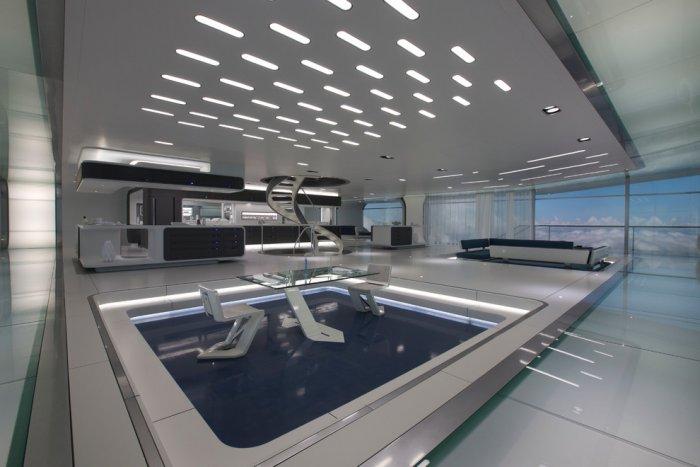
  2. Many lights are used as an aesthetic reason, not technical. In this concept art for the movie Oblivion: http://founterior.com/wp-content/uploads/2013/08/futuristic-minimalist-living-room-interior.jpg the amount of light sources are way too many to count. Another real life photo of the set of The Enterprise in Star Trek: https://s-media-cache-ak0.pinimg.com/originals/20/06/49/200649cb4470d3cf36182dbe64b8f47c.jpg
  3. Many lights are also used to compensate for the lack of proper GI. This can also be complimented with the use of lots of IBLs. PBR does not solve this problem.
Happy SDE
Happy SDE
Many lights are used as an aesthetic reason, not technical. In this concept art for the movie Oblivion: http://founterior.com/wp-content/uploads/2013/08/futuristic-minimalist-living-room-interior.jpg

Great example!

Here is a new question about the ceiling from this picture: can it be just faked via environment cubemap texture?

I recently found MJP's MSAAFilter example from here: https://github.com/TheRealMJP/MSAAFilter

and I think it is a great starting point to migrate to PBR.

Especially I am amazed by reflections from skybox.

mjp.png

Assume I have an open world.

On top of it there will be skybox texture with sun/blue sky...

I am going to populate it with robots/buildings.

There will be dynamic light sources like explosions.

It seems it should be enough to proper light the scene using skybox and dynamic lights.

Am I missing/forgot something?

I'd say yes if you use (lots of?) enviroment probes for IBL.

JoeJ, I don't understand this phrase it all, but it is a great starting direction to dig into! :)

Here is another question: I found in the code "Spherical harmonics". Is it related to it?

Thank you all!

Hodgman
Hodgman

Ignoring PBR for a minute, there's always been ways to try to represent many lights with a single bit of data.

In pre-PBR renderers, you'd put an environment map on something to make it look glossy. That env map contains reflections of every light source and other lit object (secondary bounces!) in the scene. You'd typically store these env-maps as cubemaps or spheremaps.

SH is basically equivalent to a cubemap / spheremap, except instead of storing data in a "spatial" format, it stores it in a "frequency" format. You don't really need to know the details, but a fun fact: in a "spatial" format, each number/colour in the image corresponds to one location only, but in a "frequency" format, each number/colour contributes to every location in the image in a very particular way. So with a cube-map, to get the colour of a particular direction, you read a single colour out of the image... but with SH, you have to read all of the colours in the image file and sum them all up in a special way.
That seems like a really bad idea to begin with, but it turns out that they're pretty good at storing low-resolution images.
e.g. a 1x1(x6) cube-map image requires six colours to be stored, but a 2-band SH image only requires four colours to be stored and has similar quality.

In pre-PBR renderers, you'd often use a 1x1(x6) cube-map to store the diffuse ambience for an area -- which you'd compute by down-sampling an environment map. SH is an alternative format for this.
Both SH and 1x1x6 cubes are actually still used in PBR renderers for storing extremely low-detail lighting data, such as diffuse ambience.

In many games, they couldn't afford to render too many lights, but the artists/level designers wanted a lot of lights... Typically in an old-style forward renderer, you would select the N most important lights for each object, and render the object with those lights. One trick that many games used was to "merge" many lights together, so the forward-rendering shader would still only process N lights, but you could merge N*M lights together before using that shader! One way to do this involves SH -- it's possible to create an "SH image" that corresponds to a directional light source, so you get these SH images for all the directional lights that affect the object, sum them together, and then render the object using that single SH image as it's lighting data.

I found some ideas, that using PBR, there is no need for big amount of auxiliary light sources.

No, PBR usually means that you need more light sources, as having accurate ambient light is important to get things to look realistic.
You're probably mixing together PBR and modern IBL techniques. IBL is the thing that environment maps are trying to achieve; lighting an object using an image as the light source.
The difference between an old-school environment map and modern IBL techniques is that the latter tries to get the math right, instead of being a complete hack :)
The standard way to do this in games is explained in the Karis UE4 lighting presentation, which still actually involves a big hack/approximation, but looks great.

Note that pre-PBR games did this too. Also, light-mapping was probably more popular in older games, which allows you to use as many lights as you like and then render them really cheaply... whereas now, lightmapping is a lot harder with PBR.

In real games (not a demo, that shows difference in FPS for 16/64/256/1024 light sources), how much light sources are there? I don’t expect answer: “42”, but what about order?

I've worked on quite a few games that only use 2-5 lights in a scene, plus an environment map of some kind for ambience.
Other games do actually use 1000+ lights per scene (including lights attached to special effects / particles / etc).

Will PBR remove necessity of placing aux lights or I should use them to proper render scene anyway?

No, PBR by itself makes it really important to make sure that light is hitting every object from every angle.
IBL is a great way to achieve that, which reduces the requirement to have lots of actual light sources everywhere.

Deferred (as a tool) gives ability to render more lights cheaper. Does PBR decrease needed amount of lights to render good graphics?

Kind of. Modern IBL looks great by itself, so many art tools these days actually preview models using just PBR and IBL.

JoeJ
JoeJ
JoeJ, on 27 Dec 2016 - 9:00 PM, said: I'd say yes if you use (lots of?) enviroment probes for IBL. JoeJ, I don't understand this phrase it all, but it is a great starting direction to dig into! :) Here is another question: I found in the code "Spherical harmonics". Is it related to it?

In my answer i refer with 'lights' to point or spotlights (usually dynamic), and with 'probes' to enviroment from all angles (IBL: Cubemaps, SH... usually static and precomputed).

Hodgman above refers to both of them as lighting - just to clarify and avoid confusion.

So what i mean is, you can put any number of static lights into the precomputed enviroment and thus potentially reduce the number of required dynamic lights.

Of course the same is true for an older game using lightmaps for static geometry and ambient cube grid for dynamic objects.

mjp.png Assume I have an open world. On top of it there will be skybox texture with sun/blue sky... I am going to populate it with robots/buildings. There will be dynamic light sources like explosions. It seems it should be enough to proper light the scene using skybox and dynamic lights. Am I missing/forgot something?

What you may miss is that this approach works pretty well for, say a flat outdoor landscape scene with a single car.

If we add another car beside, things start looking a bit wrong because the reflections on the car show the sky, but not the other car.

Things go totally wrong if we put a garage around the cars. The cars still show reflection from sky even the garage roof should occlude them.

You would need another enviroment probe for the interior of the garage and proper methds to interpolate multiple probes for transition cases.

To be really correct, we would need a dynamic generated enviroment probe for each single spot on each surface for the whole scene.

Some games do this with static precomputed lightmaps containing enviroment information per texel (SH or SG basis) or at least with a main light direction to support bump mapping.

Some games can do this even dynamic to some degree (e.g. using Enlighten).

So, technically PBS is just some fast math to render photorealistic materials, but it does not help to solve any of the missing GI problems we have.

This can bee seen wery well in the screenshot: The model is complex and thus missing self reflection and occlusion shows up.

L. Spiro
L. Spiro
This is not really an issue specific to physically based rendering. How many lights you can have in your scene depends on what high-level rendering method you employ (forward vs. deferred vs. forward+), optimizations (tiled deferred vs. deferred, early culling, distance-based simplification of lights), etc.
How many shadows you can have depends on optimizations as well.

In real games, artists place the lights they want where they want, the engine team works on making the game faster, and finally 2 weeks before release the artists concede that they had simply placed too many lights and they rework the scenes most impacted.

#1: In Final Fantasy XV when you are outside you have the sun or moon (never both) and the 4 cascade shadows that come with it, plus several lights scattered around as streetlights, lamps, etc. Windows on buildings are just emmissive, not actual light sources. Plus 1 light on the main characters and a bouncing light to make it look as if there is some fancy-pants light propagation. Inside tunnels or buildings you can have up to 12-20 lights overlapping a single pixel. More lights are in the scene but have been optimized away.
#2: See #1 regarding fake lights used to create effects such as propagation.
#3: That is entirely subjective. I normally wouldn’t consider reducing the number of lights just because of a change to physically based rendering, but in any case it is the job of the artists to use exactly as many lights as needed regardless of the type of lighting.


L. Spiro
I restore Nintendo 64 video-game OST’s into HD! https://www.youtube.com/channel/UCCtX_wedtZ5BoyQBXEhnVZw/playlists?view=1&sort=lad&flow=grid

Topic Locked

This topic has been locked by a moderator. New replies are not allowed.

Sign in to reply to this topic.