

Concentration of all The Lessons in Common Library GLSummary in MFC
All NeHe's OpenGL Lessons integrated in one project in Visual C++ MFC.
Explaining the Concept
Not a long time ago I've found the Russian site of NeHe's OpenGL lessons and thus my study of OpenGL commenced. This is a great idea of people's tutorial on OpenGL. I hope this lesson will help to a lot of users in OpenGL and MFC. While I've adopted the codes of the lessons above one by one to Microsoft Visual Studio the idea of their integration aroused for the compilation of the programs of my own. Download the source files And already after this job to be completed I've found out the fine adaptation of all the lessons to MS Studio .NET (Grant James) on the NeHe GameDev site, but not adopted to Microsoft Foundation Classes (MFC). As for my point of view MFC have much more possibilities for the application development. I've adopted almost all the codes of the lessons one by one in LessonsGLCode directory and integrated them in one common program GLSummary. While adaptation of the codes I found some conflicts occurred in projects modification from one version of MS Visual Studio to another. Finally in demonstration purpose I've developed the projects as follows (references on me appreciated but not compulsory):- GLSummaryCode_2010 - concentration of all the lessons in one project;
- LessonsGLCode_2010 - projects of all the lessons (you may call any lesson from another one).
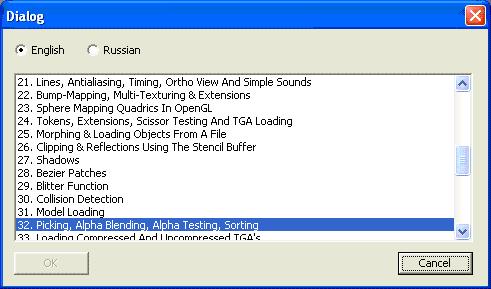
- create new directory (say, GLTest);
- copy program GLSummary.exe(located in ../GLSummary/Release directory) into this new directory;
- copy Data, Art ? BoxData directories into this new directory and application is ready for use.
int CGLSummaryView::OnCreate(LPCREATESTRUCT lpCreateStruct) { if (CView::OnCreate(lpCreateStruct) == -1) return -1; CreateGLWindow(this,32); return 0; } Initialization procedure InitGLn to be called by virtual procedure OnInitialUpdate: void CGLSummaryView::OnInitialUpdate() { CView::OnInitialUpdate(); FILE * f = fopen("LastNum.txt","rt"); //Get last lesson name if(f != NULL) { fgets(str, 256, f); fclose(f); CString tString = str; m_strNum = strtok(str, ". _-:"); m_strLesson = tString; m_pDlgTitle = new CDlgTitle; m_pDlgTitle->SetTitle(tString); } InitGLn(); GetDocument()->SetTitle(GetLessonName(m_strNum)); } The string variable m_strNum is global and serves as identification of the lesson selected. Procedure ResizeGLScene to be called by virtual procedure OnSize: void CGLSummaryView::OnSize(UINT nType, int cx, int cy) { CView::OnSize(nType, cx, cy); ReSizeGLScene(cx,cy); GetMainFrameGlob->SetTitlePos(); } The image performance maintains by DrawGLSceneN to be called by virtual procedure OnDraw: void CGLSummaryView::OnDraw(CDC* /*pDC*/) { DrawGLSceneN(); } or by virtual procedure OnTimer: void CMainFrame::OnTimer(UINT nIDEvent) { switch(nIDEvent) { case TIMER_PLAY: UpdateGLScene(); DrawGLSceneN(); break; } CFrameWnd::OnTimer(nIDEvent); } or after some actions performed by user. The attributes changes for image performance maintains by UpdateGLScene procedure to be called by virtual procedure OnTimer. The procedures WndProc and WinMain are not required in MFC. The event handler for Visual C++ in MFC to be used instead WinMain procedure in original lessons. E.g., handling of 'L' key pressed executed by CGLSummaryView::OnVkL: void CGLSummaryView::OnVkL(){ProcessKeyboardN("L");} This procedure has been created by AppStudio (menu View->Resource View). I will not describe the order of the creation of event handler (see the details in MSDN Library). Full screen view in difference with the original lessons occurred by simultaneous pressing Ctrl+Enter and maintained by CMainFrame::OnVkReturnCtrl procedure: void CMainFrame::OnVkReturnCtrl() { m_bFullScreen = ! m_bFullScreen; if (m_bFullScreen) { ModifyStyle(WS_CAPTION, 0); m_wndToolBar.ShowWindow(SW_HIDE); m_wndStatusBar.ShowWindow(SW_HIDE); ShowWindow(SW_SHOWMAXIMIZED); HideMenu(); } else { ModifyStyle(WS_CAPTION, WS_OVERLAPPED | WS_CAPTION | FWS_ADDTOTITLE | WS_THICKFRAME | WS_SYSMENU | WS_MINIMIZEBOX | WS_MAXIMIZEBOX | WS_MAXIMIZE); ShowMenu(); m_wndToolBar.ShowWindow(SW_SHOWNORMAL); m_wndStatusBar.ShowWindow(SW_SHOWNORMAL); ShowWindow(SW_SHOWNORMAL); }//if (m_bFullScreen) } F1 key in difference with the original lessons is used for standard use for help call (menu Help->GL Help Summary) and maintained by CMainFrame::OnHelp(): void CMainFrame::OnHelp() { if(m_pAboutDlg == NULL) m_pAboutDlg = new CAboutDlg(); m_pAboutDlg->ShowWindow(SW_SHOWNORMAL); Dialog window m_pAboutDlg is non-modal thus the program handling may be performed as from this window and/or by the other ways: 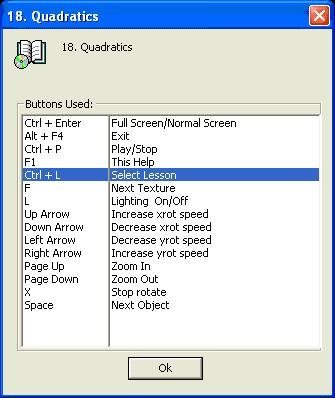
int LoadGLTextureImage(CString fName) { if(!isFileExist(fName)) { AfxMessageBox("LoadGLTextureImage\nNo File exist:\n" + fName); return FALSE; } CImage * pImg = new CImage; pImg->Load(fName); CBitmap * pBm = GetImgBitmap(pImg); if(pBm == NULL) return FALSE; BITMAP BMP; pBm->GetBitmap(&BMP); GLuint nt = LoadGLTexture(BMP.bmWidth, BMP.bmHeight,GL_BGR_EXT, BMP.bmBits); delete pBm;delete pImg; pImg = NULL; return nt; } You may copy GlobGLTexture.cpp file and use it for any projects using OpenGL development. The lesson's codes themselves are presented in Solution Explorer window as *DrawInit.cpp files. These are the codes presented in NeHe's GameDev site (Grant James) and as far as possible I've tried not to change the codes while adaptation to MFC. The only big difference is that I dare to exclude Glaux.lib library from all the projects. Nevertheless I hope the authors of the original codes will not complain. Sure they could not expect from MS VS developers that Glaux.lib library to be excluded from 10th version commenced. And if it is still possible to include Glaux.lib in the MS VS 10th version in the 11th version it is not working. The concentrations of all the procedures in one common directory GlobUse make it possible to use and combine common procedures in separate lessons and also to develop new applications based on original lessons. The samples of application development are presented in projects lessonX4/UFOgame and lessonX5/BoxMan. Lesson X4.UFO Games combined from the lessons 07, 11, 30, 32, 34. Lesson X5.BoxMan demonstrates the possibility of figures and their movements creation in outer text files and the user no need to know programmer details space imagination enough. I think that the idea of OpenGL study with the help of the ready working projects completely fit to the people's tutorial on OpenGL. I have not too mu?h experience OpenGL handling and two of the lessons I've failed to adapt to MFC. I hope that for respected authors of the original codes will not be difficult to improve my codes to fit them completely to their original intentions.
Related Tutorials

Procedural Generation of 2D Tile Maps in Games
The article explains how to build a procedural 2D cave map generator using cellular automata. It covers map representat…

Localizing A Game Into French — Which Variant Should You Choose?
So, you’re making an awesome indie game, and now you’re thinking about localizing it into French? Great idea! There ar…
 Level Up Translation

How Long Does It Take To Localize An Indie Game?
So you’re planning on localizing your indie game, but you’re not sure how much time to schedule in. While the timing o…
Level Up Translation

Creating game videos: best practices and pitfalls to avoid
Game video production: practical tips on how to create a game trailer or teaser that you can be proud of. Give your aud…
 Alconost

Adopting CI/CD: How Midwinter Entertainment iterates at speed with the help of IMS
Game development was once like one long sprint: a huge effort until you reached the finish line — at which point you co…
 GameDev.net

5 Things to Consider When Making a Video to Promote Your App or Game
How can you show an app or game in your video in a way that attracts new users? Let’s take a look at what to go by when…
Alconost

Discussion