

Unity DOTS Life Tutorial entities 0.4.0 preview.10 #2 Worker Threads : updated to entities 0.8.0
Second tutorial on Unity DOTS Life Tutorial entities 0.4.0 preview.10 & Entities 0.5.0 Preview.17. Switching code to be multithreaded is covered.
This tutorial covers changing the jobs from the first tutorial to be scheduled on worker threads.
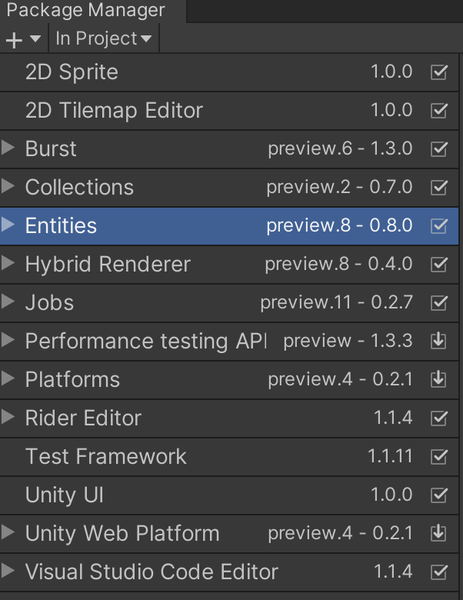
Build tested on entities 0.4.0 preview.10 .Checked against 2019.3.5f1 & Entities 0.8.0 Preview.8 on March 13, 2020. Packages used are shown here Note: DOTS Platforms is not the latest. it is only 0.2.1 preview 4 because Entities 0.8.0 does not compile with 0.2.2
The source is at https://github.com/ryuuguu/Unity-ECS-Life.git (commits after this tutorial have been made). The Zip file of the tutorial is here.
Warning: DOTS is still bleeding edge tech. Code written now will not be compatible with the first release version of DOTS. There are people using the current version DOTS for release games, but they usually freeze their code to a specific package and will not be able to use future features without rewriting existing code first to compile and run with newer versions. So if you need 10,000 zombies active at once in your game this is probably the only way to do it. Otherwise, this tutorial is a good introduction if you think you will want to simulate thousands of entities in the future or just want to get a feel for code this type of thing in Unity.
To change the code to be multithreaded only the systems need changes no changes are needed to the Entities or Components in this case. First I will change the UpdateLiveSystem since it is a very simple change. The line "var job = " was added. The line "}).Run();" was changed to "}).Schedule(inputDeps);" this causes the job to be scheduled on worker threads and causes inputDeps to be returned where the first change assigns it to job.
Finally "return default;" is changed to "return job;" to return the inputDeps+ any dependencies introduced by this job.
public class UpdateLiveSystem : JobComponentSystem
{
    protected override JobHandle OnUpdate(JobHandle inputDeps)
    {
        float zDead = ECSGrid.zDead;
        float zLive = ECSGrid.zLive;

        var job = Entities
            .WithChangeFilter<NextState>()
            .ForEach((ref Live live,ref Translation translation, inNextState nextState) => {
                live.value = nextState.value;
                translation.Value = new float3(translation.Value.x, translation.Value.y,
                math.select( zDead,zLive, live.value == 1));
            }).Schedule(inputDeps);

        return job;
    }
}
The UpdateLiveSystem system was easy to change because it is self contained and references nothing out of the single entity being processed by the foreach. The GenerateNextStateSystem needs more work to change because it needs to access 8 other entities. It only needs to read from them so it is still possible for this job to run multithreaded. Here is the old code.
protected override JobHandle OnUpdate(JobHandle inputDeps)
{
    int[] stay = new int[9];
    int[] born = new int[9];
    stay[2] = stay[3] = 1; // does NOT include self in count
    born[3] = 1;

    var liveLookup = GetComponentDataFromEntity<Live>();

    Entities.WithoutBurst().ForEach((ref NextState nextState, in Live live, in Neighbors neighbors) => {
        int numLiveNeighbors = 0;

        numLiveNeighbors += liveLookup[neighbors.nw].value;
        numLiveNeighbors += liveLookup[neighbors.n].value;
        numLiveNeighbors += liveLookup[neighbors.ne].value;
        numLiveNeighbors += liveLookup[neighbors.w].value;
        numLiveNeighbors += liveLookup[neighbors.e].value;
        numLiveNeighbors += liveLookup[neighbors.sw].value;
        numLiveNeighbors += liveLookup[neighbors.s].value;
        numLiveNeighbors += liveLookup[neighbors.se].value;

        //Note math.Select(falseValue, trueValue, boolSelector)
        nextState.value = math.select( born[numLiveNeighbors],stay[numLiveNeighbors], live.value== 1);
    }).Run();

    return default;
}
"var liveLookup = GetComponentDataFromEntity
"struct SetLive : IJobForEach
"[ReadOnly]public ComponentDataFromEntity
protected override JobHandle OnUpdate(JobHandle inputDeps) {
    // make a native array of live components indexed by entity
    ComponentDataFromEntity<Live> statuses = GetComponentDataFromEntity<Live>();

    SetLive neighborCounterJob = new SetLive() {
        liveLookup = statuses,
    };

    JobHandle jobHandle = neighborCounterJob.Schedule(this, inputDeps);

    return jobHandle;
}
which assigns to livelookup in the SetLive struct initialization, which is allowed for [ReadOnly] fields. Then schedules and returns a jobHandle like UpdateLiveSystem does. Here is the SetLive struct.
struct SetLive : IJobForEach<NextState, Live, Neighbors> {

    [ReadOnly]public ComponentDataFromEntity<Live> liveLookup;

    public void Execute(ref NextState nextState, [ReadOnly] ref Live live,[ReadOnly] refNeighbors neighbors){

        int numLiveNeighbors = 0;

        numLiveNeighbors += liveLookup[neighbors.nw].value;
        numLiveNeighbors += liveLookup[neighbors.n].value;
        numLiveNeighbors += liveLookup[neighbors.ne].value;
        numLiveNeighbors += liveLookup[neighbors.w].value;
        numLiveNeighbors += liveLookup[neighbors.e].value;
        numLiveNeighbors += liveLookup[neighbors.sw].value;
        numLiveNeighbors += liveLookup[neighbors.s].value;
        numLiveNeighbors += liveLookup[neighbors.se].value;

        //Note math.Select(falseValue, trueValue, boolSelector)
        // did not want to pass in arrays so change to
        // 3 selects
        int bornValue = math.select(0, 1, numLiveNeighbors == 3);
        int stayValue = math.select(0, 1, numLiveNeighbors == 2);
        stayValue = math.select(stayValue, 1, numLiveNeighbors == 3);

        nextState.value = math.select( bornValue,stayValue, live.value== 1);
    }
}
The Execute function has a different format for its signature than lambda did before.
"(ref NextState nextState, in Live live, in Neighbors neighbors)" changed to
"(ref NextState nextState, [ReadOnly] ref Live live,[ReadOnly] ref Neighbors neighbors)"
"in" is just short hand for [ReadOnly] ref so these signatures are really the same but the compiler does not recognize this case yet. The other thing that has been changed is
nextState.value = math.select( born[numLiveNeighbors],stay[numLiveNeighbors], live.value== 1);changed to
int bornValue = math.select(0, 1, numLiveNeighbors == 3);
int stayValue = math.select(0, 1, numLiveNeighbors == 2);
stayValue = math.select(stayValue, 1, numLiveNeighbors == 3);
nextState.value = math.select( bornValue,stayValue, live.value== 1);
job structures cannot have variable length fields in them which is why ComponentDataFromEntity
After all this, the ECS multithreaded code only runs a few percent faster than the GameObject code on a 400x400 grid :( . Why? It turns out that this code is bound by setting up the graphics for 160,000 cells. I used the Hybrid graphics system which still fairly young. I could not find a way to un-enable the renderer of the cells in ECS as I did in the GameObject version. So I just moved them out of the Camera view which still means some graphics code is still calculated even though the result not used. I think the future version of DOTS will add features to handle just turning off a renderer. The other reason the ECS is not faster is that the simulation is very simple and fast. So even though it runs much faster on the ECS it does not make much difference. Something like simulating a complete city with traffic in Cities Skylines is an example of a case where faster simulation would have an effect.
Recommended resources
Game Engines

Unreal Engine 5 Best Practices
Amazon · Book
Written by multi-award-winning Unreal generalist Tyson J. Butler-Boschma, Founder and Creative Director of Toybox Games Studios, this book addresses common challenges you face when advancing your expertise in lighting, environment design, and cinematic storytelling.
GameDev.net may earn a commission if you purchase through these links. This helps fund the site at no extra cost to you.
Related Tutorials

Ai image to 3D Game ready model and animation in 3 minutes
No 3D modeling or animation skills? No problem! In this video, a professional 3D artist, demonstrates how to create a f…
 alex_cgw

Unreal Engine: Creation of Parallax Occlusion Mapping (POM) in details
Parallax Occlusion Mapping (POM) is a complex texture-based approach to add more details for meshes. With POM we get mo…

Generating a SoulerCoaster in Unity
Learn to create a basic SoulerCoaster effect in Unity.

Creating Promo Art: The Process | Hyperclass Ark
Our artist, Philip Bell, discussed the stages involved in creating promotional artwork for the project.
 hyperclassark

Lessons, Stages of drawing Digital illustration "Fairytale house in the forest"
At the beginning of this illustration, I did the rough sketch, then drawing the outline, then painting in color, applyi…
 Nadia_Meldova
Lessons, Stages of drawing "Magic book"
At the beginning of this illustration, I did the rough sketch, then drawing the outline, then painting in color, applyi…
Nadia_Meldova
Discussion
More from AntHillPlan
Unity DOTS Life Tutorial entities 0.4.0 preview.10: updated to entities 0.8.0 Preview.8
Unity DOTS Life Tutorial that compiles with the latest preview package entities 0.4.0 preview.10 and runs in Unity 201…

Unity DOTS Life Tutorial entities 0.4.0 preview.10 #6 ECS unit testing : Update Entities 0.8.0
This tutorial covers writing unit tests for ECS. Entities 0.4.0 Preview.10 & Entities 0.5.0 Preview.17 This is a practi…

Unity DOTS Life Tutorial Ent 0.4.0 #5 SharedComponentData & Chunk Components: Update to Ent 0.8.0
Covers Unity ECSEntities 0.5.0 Preview.10 & Entities 0.5.0 Preview.17 SharedDataComponent & Chunk Components, including…
Discussion