

Unity DOTS Life Tutorial entities 0.4.0 #4 Interfacing ECS and GameObjects : Update Entities 0.8.0
This tutorial covers a simple interface between entities and GameObjects in Unity DOTS Life Tutorial entities 0.4.0 preview.10 & Entities 0.5.0 Preview.17 This will be used along with the ChangedTag optimization to speed up the FPS by 4x~10x depending on how active the life is, at the cost of extra startup time.
This tutorial covers a simple interface between entities and GameObjects. This will be used along with the ChangedTag optimization to speed up the FPS by 4x~10x depending on how active the life is, at the cost of extra startup time. If you already have Monobehaviour based project and just want to switch one portion of the code this is useful.
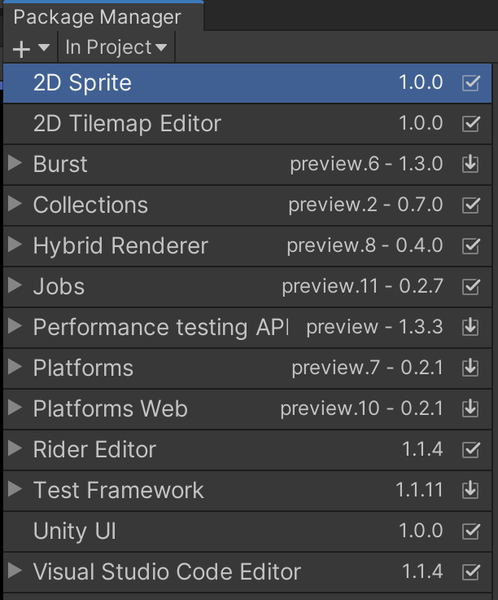
Checked against 2019.3.5f1 & Entities 0.8.0 Preview.8 on March 13, 2020. Packages used are shown here
Note: DOTS Platforms is not the latest. It is only 0.2.1 preview 4 because Entities 0.8.0 does not compile with 0.2.2Burst 1.3.0 preview.6 is also not the latest. preview.5 & preview.7 can cause errors at run time depending on what Entities functions are called.
The source is at https://github.com/ryuuguu/Unity-ECS-Life.git . The Zip file of the project is at http://ryuuguu.com/unity/ECSLifeTutorials/ECSLifeTutorial4.zip
Warning: DOTS is still bleeding edge tech. Code written now will not be compatible with the first release version of DOTS. There are people using the current version DOTS for release games, but they usually freeze their code to a specific package and will not be able to use future features without rewriting existing code first to compile and run with newer versions. So if you need 10,000 zombies active at once in your game this is probably the only way to do it. Otherwise, this tutorial is a good introduction if you think you will want to simulate thousands of entities in the future or just want to get a feel for code this type of thing in Unity.
GameObjects will be built to display every cell. The simulation will run in ECS and call a MonoBehaviour to turn on or off a cell when it is changed. ECSGrid has been changed to generate the cell GameObjects and a static method in ECSGrid will turn on and off a cell's MeshRenderer at a given XY coordinate. ECS entities will only be used for simulation not for display so the Entity will be created directly with
var instance = entityManager.CreateEntity();instead of creating them from GameObjects as before.
var entity = GameObjectConversionUtility.ConvertGameObjectHierarchy(prefabCell, settings);
var instance = entityManager.Instantiate(entity);
This means no components will be automatically added to Entities on creation. So an extra component PosXY is added in code to track a cell's location.
Border cells which are always dead, they are just used to allow the code to run without if statement checks for special edges cases, will now have only two components. PosXY & Live . Regular cells will have PosXY, Live, NextState Nieghbours and sometimes ChangedTag.
ECSGrid will first make the GameObjects used for display
public void InitDisplay() {
       _scale = ( Vector2.one / size);
       _offset = ((-1 * Vector2.one) + _scale)/2;
       _meshRenderers = new MeshRenderer[size.x+2, size.y+2];
       var cellLocalScale  = new Vector3(_scale.x, _scale.y,_scale.x);
       for (int i = 0; i < size.x+2; i++) {
           for (int j = 0; j < size.y+2; j++) {
               var c = Instantiate(prefabMesh, holder);
               var pos = new Vector3((i-1) * _scale.x + _offset.x, (j-1) * _scale.y + _offset.y, zLive);
               c.transform.localScale = cellLocalScale;
               c.transform.localPosition = pos;
               c.name += new Vector2Int(i, j);
               _meshRenderers[i, j] = c.GetComponent<MeshRenderer>();
           }
       }
   }
Then make the entities for all cells
void InitECS() {
   var entityManager = World.DefaultGameObjectInjectionWorld.EntityManager;

   _cells = new Entity[size.x+2, size.y+2];

   for (int i = 0; i < size.x+2; i++) {
       for (int j = 0; j < size.y+2; j++) {
           var instance = entityManager.CreateEntity();
           entityManager.AddComponentData(instance, new Live { value = 0});
           entityManager.AddComponentData(instance, new PosXY { pos = new int2(i, j)});
           _cells[i, j] = instance;
       }
   }

   for (int i = 1; i < size.x+1; i++) {
       for (int j = 1; j < size.y+1; j++) {
           var instance = _cells[i, j];
           entityManager.AddComponentData(instance, new NextState() {value = 0});
           entityManager.AddComponentData(instance, new Neighbors() {
               nw = _cells[i - 1, j - 1], n = _cells[i - 1, j], ne =  _cells[i - 1, j+1],
               w = _cells[i , j-1], e = _cells[i, j + 1],
               sw = _cells[i + 1, j - 1], s = _cells[i + 1, j], se =  _cells[i + 1, j + 1]
           });
       }
   }
   InitLive(entityManager);
}

public static void ShowCell(int2 pos, bool val) {
   _meshRenderers[pos.x, pos.y].enabled = val;
}
The first loop makes all cells including a border of size 1 around the square. The second loop adds NextState & Neighbors to active cells. Then some cells are set to live by InitLive to start the game. Finally the static method code ShowCell() will be called by an ECS System.
The UpdateMoveChangedSystem is gone and replaced with UpdateDisplayChangedSystem which runs on the main thread using .WithoutBurst() since it calls a Monobehaviour method ECSGrid.ShowCell(). UpdateClearChangedSystem runs multithread on worker threads filling the BeginSimulationEntityCommandBufferSystem with RemoveComponent
[UpdateInGroup(typeof(PresentationSystemGroup))]
[AlwaysSynchronizeSystem]
public class UpdateDisplayChangedSystem : JobComponentSystem {
   protected override JobHandle OnUpdate(JobHandle inputDeps) {
       Entities
           .WithoutBurst()
           .WithAll<ChangedTag>()
           .ForEach((Entity entity, int entityInQueryIndex, in Live live, in PosXY posXY) => {
             ECSGrid.ShowCell(posXY.pos, live.value ==1);
           }).Run();
       return inputDeps;
   }
}

[UpdateInGroup(typeof(PresentationSystemGroup))]
[AlwaysSynchronizeSystem]
[UpdateAfter(typeof(UpdateDisplayChangedSystem))]
[BurstCompile]
public class UpdateClearChangedSystem : JobComponentSystem {
   // I would like to do this in EndPresentationEntityCommandBufferSystem
   // but it does not exist
   protected BeginSimulationEntityCommandBufferSystem m_BeginSimulationEcbSystem;

   protected override void OnCreate() {
       base.OnCreate();
       // Find the ECB system once and store it for later usage
       m_BeginSimulationEcbSystem = World
           .GetOrCreateSystem<BeginSimulationEntityCommandBufferSystem>();
   }

   protected override JobHandle OnUpdate(JobHandle inputDeps) {
       var ecb = m_BeginSimulationEcbSystem.CreateCommandBuffer().ToConcurrent();
       var jobHandle =
           Entities
               .WithAll<ChangedTag>()
               .ForEach((Entity entity, int entityInQueryIndex) => {
                   ecb.RemoveComponent<ChangedTag>(entityInQueryIndex, entity);
               }).Schedule(inputDeps);
       m_BeginSimulationEcbSystem.AddJobHandleForProducer(jobHandle);
       return jobHandle;
   }
}
In conclusion, code was split between simulation in ECS and display with GameObjects. This resulted in simpler code and faster (4x~10x) running time. Using ECS for display could be just as fast or faster but I had a lot of problems getting this to work cleanly with the current Hybrid package. As Entity and Hybrid packages & docs are updated, using ECS will produce the highest performance code. OOP will still have its place and it useful to be able to communicate between the two code bases.
Recommended resources
Game Engines

Unreal Engine 5 Best Practices
Amazon · Book
Written by multi-award-winning Unreal generalist Tyson J. Butler-Boschma, Founder and Creative Director of Toybox Games Studios, this book addresses common challenges you face when advancing your expertise in lighting, environment design, and cinematic storytelling.
GameDev.net may earn a commission if you purchase through these links. This helps fund the site at no extra cost to you.
Related Tutorials
Ai image to 3D Game ready model and animation in 3 minutes
No 3D modeling or animation skills? No problem! In this video, a professional 3D artist, demonstrates how to create a f…
 alex_cgw

Unreal Engine: Creation of Parallax Occlusion Mapping (POM) in details
Parallax Occlusion Mapping (POM) is a complex texture-based approach to add more details for meshes. With POM we get mo…

Generating a SoulerCoaster in Unity
Learn to create a basic SoulerCoaster effect in Unity.

Creating Promo Art: The Process | Hyperclass Ark
Our artist, Philip Bell, discussed the stages involved in creating promotional artwork for the project.
 hyperclassark

Lessons, Stages of drawing Digital illustration "Fairytale house in the forest"
At the beginning of this illustration, I did the rough sketch, then drawing the outline, then painting in color, applyi…
 Nadia_Meldova
Lessons, Stages of drawing "Magic book"
At the beginning of this illustration, I did the rough sketch, then drawing the outline, then painting in color, applyi…
Nadia_Meldova
Discussion
More from AntHillPlan
Unity DOTS Life Tutorial entities 0.4.0 preview.10: updated to entities 0.8.0 Preview.8
Unity DOTS Life Tutorial that compiles with the latest preview package entities 0.4.0 preview.10 and runs in Unity 201…

Unity DOTS Life Tutorial entities 0.4.0 preview.10 #6 ECS unit testing : Update Entities 0.8.0
This tutorial covers writing unit tests for ECS. Entities 0.4.0 Preview.10 & Entities 0.5.0 Preview.17 This is a practi…

Unity DOTS Life Tutorial Ent 0.4.0 #5 SharedComponentData & Chunk Components: Update to Ent 0.8.0
Covers Unity ECSEntities 0.5.0 Preview.10 & Entities 0.5.0 Preview.17 SharedDataComponent & Chunk Components, including…
Discussion