Original Post

i only know the Game Loop standard:
- input;
- collision test;
- draw;
- test if ends or restart.
but i need understand more about these: like how can i give the enemy move? and more
i only know the Game Loop standard:
- input;
- collision test;
- draw;
- test if ends or restart.
but i need understand more about these: like how can i give the enemy move? and more
This question is pretty vague. I'll just describe how I generally do the main game loop, but this is just one of many ways that it can work.
I have an object Game... this is the object that contains the main game loop. It also contains a member called ActiveGameScene which implements the interface IGameScene. The IGameScene has three primary responsibilites... Respond to a request, Update the GameState or Render the gamestate. The IGameScene contains a list of IGameSystems. Game Systems are very tightly focused "functionality packets" so, one system may be my input system and another may be my rendering system and there may be many more... lighting systems, ai systems etc. Each System has methods ProcessRequest, Update, and Render.
So, the Game contains a Scene which contains a set of Systems and the main game loop is
//Pseudo Code
//In Game
while(running)
{
while(requestsPending)
Scene.ProcessRequest(request);
Scene.Update();
Scene.Render();
}
//In GameScene
ProcessRequest(){
Foreach(ISystem sys in Systems)
sys.ProcessRequest(request);
}
Update(){foreach(ISystem sys in Systems) sys.Update();}
Render(){foreach(ISystem sys in Systems) sys.Render();}
Then, it's in the specific systems where the interesting things happen.
Maybe there is an AI System...
//In AI System
ProcessRequest(request){ }
Update(){
Foreach(AIUnit){
if (AIUnit.CurrentAction==null)
{
AIUnit.CurrentAction = AIUnit.ChooseNextAction();
}
switch(AIUnit.CurrentAction)
{
case Idle : Break;
case Attack: AIUnit.Attack(); break;
case Move: AIUnit.Position+= (AIUnit.Dest-AIUnit.Pos).Normalize();
}
}
}
This is not a Game Design question. Moving to a more appropriate forum.
7 hours ago, cambalinho said:but i need understand more about these: like how can i give the enemy move? and more
Your Game loop is most of the game.
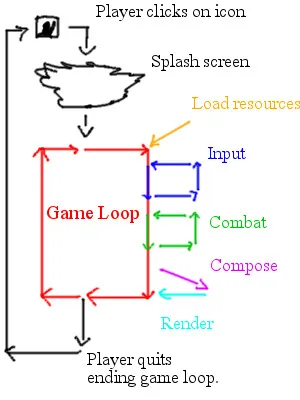
You can say that everything that happens in a game after it started is done in the Game Loop. It's isn't a fact that everything is inside the loop but most of the game is.
Pseudocode:
//First you define variables
GameRunning   = true;
CombatRunning = false;

//We would declare functions to use

string GetPlayerInput(){
//Here would be code to get input as a string or something
  return //The key as a string
}

void Combat(){
    //Fight
}

void QuitGame(){
  //All the quit game function does is changes a variable
  GameRunning = false;
};


//About here we make the game loop

void UpdateGameLoop(){
  if (GetPlayerInput() == "Space_Key"){
    CombatRunning = true; // so pressing space turn on the combat.
  }
  //The combat loop will keep runing as needed
  while (CombatRunning == true){
    Combat();
  }

  if (GetPlayerInput() == "Q_Key"){
    QuitGame() = false; //Q sets GameRunning to false
  }
}

//Finally you run the game loop

while(GameRunning == true){ // when Q is pressed GameRunning = false so it no longer does this loop.
  UpdateGameLoop();
}
As can be seen my code structure and @Eightvo are different but neither is wrong, there is many ways to do game loops.
The main purpose of a game loop is to advance time, so mostly it is used for real time content.
Warning: Third version of how it can look 
I have my "Game Loop" completely decoupled from the "main process" so what this means is that in a multithreaded environment you can let your traditional game loop update run in parallel so that you update all the game states, physics, AI whatever in different threads while your rendering is processing on another thread. This means some kind of synchronization is needed (I use a global/local shared event system to populate synchronization requests) when rendering has completed processing the command buffers telling other systems to populate there graphics changes.
Input is another task because you have two different kinds of input system; either message based or polling. I use a message based system so there is no real "gather my input know" state but when OS sends a message it will be processed in a task parallel to any other system update.
This is a kind of more advanced version of the "simple" game loop 
Just to take this back to a more fundamental level...
At a very basic level, for pretty much any task, computers work like this:
Collect input -> Process data based on input -> Display output
Lots of tasks require - or at least benefit from - repeating this process so that new input can be processed, and perhaps so the user can view the output and provide different input based on it.
Collect input -> Process data based on input -> Display output -> Repeat from start
Real-time systems like computer games and simulations work this way, with the additional constraint that they have some sort of hard or soft 'deadline'. In a computer game, the deadlines are typically 'soft' (in that the program doesn't break entirely if they are missed) but they are quite short, e.g. 33ms for a 30fps game or 16ms for a 60fps game. So the loop is executed with this deadline in mind. Note that on personal computers it's impractical to guarantee that each loop iteration takes a precise amount of time, so you normally aim for an arbitrary deadline but be prepared to measure the actual time taken and process with that in mind instead.
Collect input for next 16ms -> Process data based on input to cover the next 16ms -> Display output for the next 16ms-> Repeat from start (16ms can be swapped for any other small value, constant or variable)
Each of these iterations is generally called a 'frame' because you get one iteration for every one frame rendered to the screen (generally).
So, the way you would make an enemy move, in this basic system, is to recognise that a moved enemy is a type of data processing (i.e. the position data changes), and that the movement covers a certain time span (how far can an enemy move in 16ms? Or however long your frame took?) Each time though the loop, you move the enemy that tiny amount, then display the new position on the screen, and repeat.
my problem was that i was confused that doing enemy moving was taking several time. of course that time depends what i program.
thanks to all, now i understand: if i need several things on loop, the best is use multithread, if not, i do it normaly on loop.
thanks to all for all
59 minutes ago, cambalinho said:now i understand: if i need several things on loop, the best is use multithread, if not, i do it normaly on loop.
Just to clarify, you do not need to use a multithreaded setup to make multiple enemies move over time. Or to loop over enemies and also loop over spinning traps. For a beginner, I would recommend focusing on singlethreaded setups, not multithreaded.
Multithreading when it comes to a game loop is more an optimization -- you can do the same stuff as in a singlethread setup, but potentially quicker.
for now i need to understand what can i do without consuming very CPU\GPU. but i know that moving the enemies is more or less like using the AI, that's why i was confused... what i will consuming on CPU
thanks for all
3 minutes ago, cambalinho said:but i know that moving the enemies is more or less like using the AI,
It's vector math. So lets say you have a enemy at point (0,0) in the game. Your enemy needs to get to (8,8). It needs to get there in 8 frames.
So velocity is movement over time = Target(8,8)/Steps(8 frames) = (1,1) per step. So each loop you add (1,1) to the position of the enemy:
Step1 (0,0)+(1,1) = (1,1)
Step2 (1,1)+(1,1) =(2,2)
Step3 (2,2)+(1,1) = (3,3) etc.
So every loop you add (1,1) and then after the 8th step your enemy will be at (8,8), you will also see it move every frame.
If your new to the concept of vectors you can start here, it's a bit old but great post; it's very easy to understand:
i'm much more new than that 
i know count frames per second, but you use that. " time = Target(8,8)/Steps(8 frames) = (1,1) per step" didn't learn that yet, so my game can be more faster on some computers depending on CPU\RAM\GPU.
10 hours ago, Scouting Ninja said:Your Game loop is most of the game.

You can say that everything that happens in a game after it started is done in the Game Loop. It's isn't a fact that everything is inside the loop but most of the game is.
Is it just me or in that diagram does it look like Load Resources in the game loop? That makes no sense.
1 hour ago, cambalinho said:so my game can be more faster on some computers depending on CPU\RAM\GPU.
Yes that is why engines normally have a Delta time function, it measures time since the last frame. So you multiply with Delta time to get frame rate independent movement.
These are theoretical values, to make it easy:
Say a frame takes one second to show 1fps but the next frame takes only half the time 2fps. Delta time would return 1 on the first frame and 0.5 (1 second /2) on the second.
So if you multiply 1*1 = 1 and 1*0.5 = 0,5. So:
Step1 (0,0) + ((1,1)*DeltaTime[1]) = (1,1);
Step2 (1,1) + ((1,1)*DeltaTime[0.5]) = (1.5,1.5); //So it only moved half a step because the frame rendered twice as fast.
1 hour ago, cambalinho said:i'm much more new than that
Don't worry, Vectors are easy to understand. It's 1+1 for the most part.
If a object is at (5,7) it means it's on the X axis at 5 and Y axis at 7. Like a graph.
Moving to (8,13) from that point would need X+3 and Y+6. So move 3 right and 6 up.
To find how much you need is just subtraction (8,13) - (5,7) = (3,6) or X+3 and Y+6.
Velocity is just how much you need to move to get to that point divided by time. So if I wanted to get there in 3 steps: (3,6)/3 = (1, 2). If I add (1, 2) every step then in 3 steps I will reach that point.
38 minutes ago, Infinisearch said:Is it just me or in that diagram does it look like Load Resources in the game loop? That makes no sense.
The loading isn't done by the game loop but it is called from the main loop. That is why it's an arrow and not a loop, sorry if this wasn't clear.
thank you so much for all.
i never did a Game Loop and i'm learning Directx 9 for start and on start. what i have learned was using Game Maker.
and yes i did some Game on C++ before using Windows GDI and the events, but i didn't knew about the delta and more.
thanks for all. thank you
I admittedly speed-scanned the posts above, so I'm not sure if someone already mentioned Game Programming Patterns, by Bob Nystrom. But if not, have a look at this: http://gameprogrammingpatterns.com/game-loop.html
That's a link to a chapter in a free-as-in-beer ebook (as long as you read it online) - it's good for more than just game loop discussion, too. Check it out!
On 1/5/2018 at 9:02 AM, cambalinho said:i'm learning Directx 9 for start
D3D9 is VERY out of date and very little of it translates over to modern game programming. I would highly recommend switching to D3D11.
i'm sorry, but why some autors book use 50(or more) pages on just 1 chapter?
1 hour ago, cambalinho said:i'm sorry, but why some autors book use 50(or more) pages on just 1 chapter?
Probably because they feel they need 50 (or more) pages to describe what they're talking about in the best way.
yah... more big the chapter more big the boring lol
honestly a big chapter can be much more tired and much more information\study to 'eat'
This has been a fascinating discussion for me. I was aware of your concept of the Game Loop but have never had how you use this concept explained in such detail before (I read a couple of the linked articles, as well). As I've said before "Rube is a part of nature", a generic simulation of time combined with reality. All games and simulations simulate time in some form, however abstract. Even simple back and forth turns like in Checkers are a highly abstract simulation of time. Your Game Loop is a "moment of time containing reality" that is actually very similar to a Steve Cole "impulse". The foundation of what I call "Rube" is everywhere, because time is everywhere.
This topic has been locked by a moderator. New replies are not allowed.
With your permission, GameDev.net uses analytics cookies to understand how people use the platform. You can accept analytics or continue with necessary cookies only. Learn more