GameDev.net gamedev.net
🔒 Locked 🎮 Unity

3D-app Euler-Rotations to UE4 Euler-Rotations

Started by ManitouVR Jul 18, 2019 at 10:29 AM 29 replies 23.4k views
Original Post
ManitouVR
ManitouVR

Hello,

I dont really know how to ask the correct questions since i dont know the necessary steps that it takes to convert the given Euler angles from my 3D software to the needed Euler angles in Unreal Engine 4.

I made a plugin for UE4 to spawn instances of Static Mesh Actors into the UE4 level based on a text file which holds the Scale/Rotate/Transform information from the objects in my 3D software scene.

Basically the plugin mirrors the 3D apps objects into UE4.

Everything works but NOT the rotations.

So my question is:

Euler->??->Euler

Thanks!



3D Artist
Zakwayda
Zakwayda

I imagine someone's already solved this problem, so maybe someone can offer an off-the-shelf solution. Meanwhile though, I'll ask a couple questions.

Do you know what the Euler-angle order conventions are for the two tools (the modeling program and UE)? By order convention, I mean XYZ, XZY, YXZ, etc.

I assume if you import your models with no modifications, they're 'lying on their side' in UE, and are mirrored along an axis, with winding order reversed (which may or may not matter). Is that accurate? If so, have you already corrected for any of that (e.g. mirroring or winding order)?

Again, I'm guessing this particular conversion has been addressed somewhere - maybe someone else will jump in with a specific answer.

ManitouVR
ManitouVR

@Zakwayda

Hello and thanks for your answer.

My 3D software uses XYZ rotation order and Unreal Engine 4 uses XZY rotation order (As far as i could find out so far.)

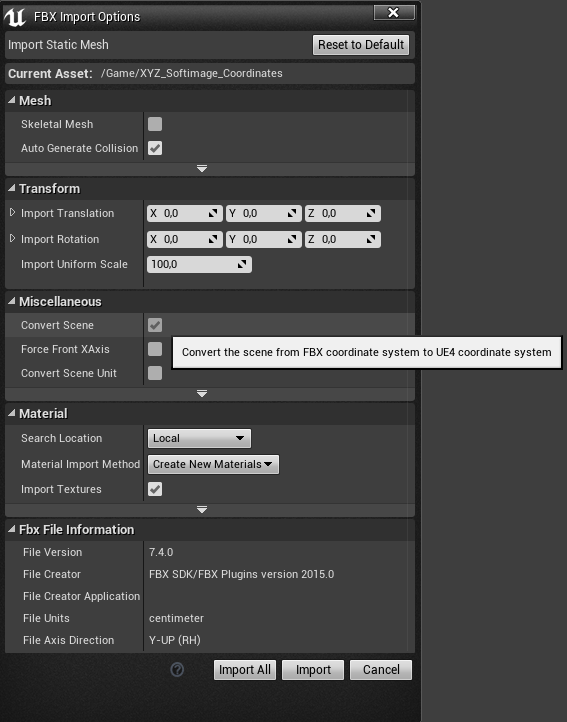
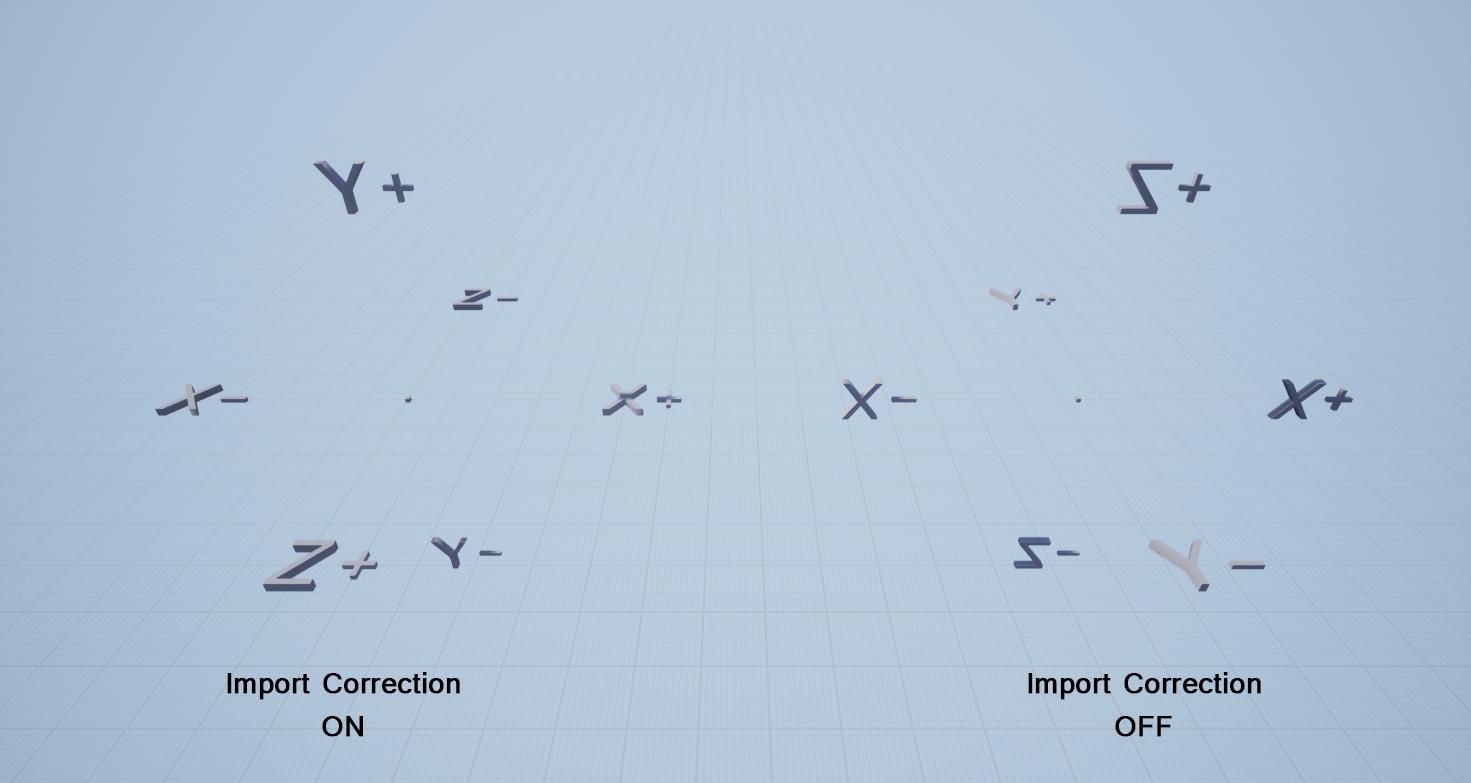
When i import a 3D model into UE4 then i just set the scaling to 100. Everything else gets corrected already on Import.

Import_Options.png

Import_Correction_off.png

3D Artist
Zakwayda
Zakwayda

I'm just winging it here, and this could be totally wrong, but maybe try this:


UE X = -(Softimage X)
UE Z = -(Softimage Y)
UE Y = -(Softimage Z)

For clarity, e.g. 'UE X = -(Softimage X)' means 'for the X Euler-angle value for UE, use the negative of the X Euler-angle value for Softimage'.

You probably already know this, but to test this thoroughly (more or less) you'd want to try a number of arbitrary orientations and make sure the results come out as expected (because with simple orientations you might get some matches 'by accident' even if the conversion is incorrect).

ManitouVR
ManitouVR

Hello, thanks for trying to help me. Much appreciated.

I indeed tryd to negate the rotation angles. In all possible combinations. But it seems to just make the values positive or negative.

I honestly think that it is a Matrix problem of some kind.

Here is the function that gets fed with the 3D-app( Softimage XSI) data.


void SpawnSMActor(const TCHAR *path,float sX,float sY,float sZ,float rX,float rY,float rZ,float pX,float pY,float pZ)
{
    // Load Static Mesh from given Reference Path from UE4 Explorer
    UStaticMesh* StaMesh = LoadObject<UStaticMesh>(nullptr, path);

    // Transform
    FVector objectScale(sX, sY, sZ);        // Scale

    // ************************************************************************************
    // Conversion XSI Coordinate System to UE4 Coordinate System

    FVector NewPosition;
    FRotator NewRotation;

    // We just simply swap the Z and Y Coordinates

    NewPosition.X = pX * 100; //    TX
    NewPosition.Y = pZ * 100; //    TZ
    NewPosition.Z = pY * 100; //    TY

    // We just simply swap the Pitch(Y) and Yaw(Z) angles

    NewRotation.Roll =  rX;     //    RX
    NewRotation.Pitch = -rZ;    //    RZ
    NewRotation.Yaw =   rY;     //    RY

    FRotator NewobjectRotation(NewRotation.Quaternion());

    FTransform objectTransform(NewobjectRotation, NewPosition, objectScale);

    // ************************************************************************************

    // Creating the Actor and Positioning it in the World based on the Static Mesh
    UWorld* currentWorld = GEditor->GetEditorWorldContext().World();
    ULevel* currentLevel = currentWorld->GetCurrentLevel();
    UClass* StaticMeshClass = AStaticMeshActor::StaticClass();
    AActor* NewActorCreated = GEditor->AddActor(currentLevel, StaticMeshClass, objectTransform, true, RF_Public | RF_Standalone | RF_Transactional);
    AStaticMeshActor* smActor = Cast<AStaticMeshActor>(NewActorCreated);

    smActor->GetStaticMeshComponent()->SetStaticMesh(StaMesh);
    smActor->SetActorScale3D(objectScale);

    // ID Name & Visible Name
    //smActor->Rename(TEXT("MyStaticMeshInTheWorld"));
    //smActor->SetActorLabel("MyStaticMeshInTheWorld");

    GEditor->EditorUpdateComponents();
    smActor->GetStaticMeshComponent()->RegisterComponentWithWorld(currentWorld);
    currentWorld->UpdateWorldComponents(true, false);
    smActor->RerunConstructionScripts();
    GLevelEditorModeTools().MapChangeNotify();
}


3D Artist
Zakwayda
Zakwayda

I looked around online a bit, but couldn't find an authoritative source as to what Euler-angle convention(s) UE uses. I found this thread on the UE forums:

https://forums.unrealengine.com/development-discussion/c-gameplay-programming/5398-euler-rotations-and-matrix-questions

Which seems to suggest maybe the convention is nonintuitive and/or nonstandard.

Earlier you said:

"...Unreal Engine 4 uses XZY rotation order (As far as i could find out so far.)"

Do you have a source for that? If so, can you post a link?

In any case, if UE's Euler-angle convention is different from what you're expecting, that may explain why your conversion isn't working.

Also, can you export the rotations/orientations from Softimage in another format, such as axis-angle or quaternion?

ManitouVR
ManitouVR

Hello, thanks for this link!

That gives some interesting insights.

I have tested the rotation order in Softimage, only possible in Local Space.

But that does not matter since in my test scene the object lies anyway in global space. So local and global is the same.

So if i switch the order from XYZ to XZW then i get the "same" values like in UE4.

Here is a new video to proof my point:


Also here is a link that i have found that says (scroll down to the bottom, last post) Maya to UE4 --> XZY.

Maya has the same coordinate system as XSI:

XSI (Right Handed , Y axis up )
Maya (Right Handed , Y axis up )

https://answers.unrealengine.com/questions/62077/what-is-the-rotation-order-for-components-or-bones.html

Quaternions are for game engines mostly. Every3D software that i know stores animations in Euler angles and so does XSI.


3D Artist
JohnnyCode
JohnnyCode

Also, are you sure the spaces of Softimage and UE are equal? (That is their axises are aligned as to direction of positive and negative and conveniently directed)

ManitouVR
ManitouVR

@JohnnyCode

UE4 (Left Handed , Z axis up )
XSI (Right Handed , Y axis up )
Maya (Right Handed , Y axis up )

3D Artist
JohnnyCode
JohnnyCode

You will need alignment transformation, not sure that fitting UE4 will be an affine transformation though- if handedness will not sit in tact after you rotate Y to Z. You may need inverse scale by handedness axis then, applied as last in the transformation.

ManitouVR
ManitouVR

Thanks for your answer.

How would such calculations/transformations look like?

Iam 100% new to this topic and i dont have a clue what to do.

If someone could just point me into the right direction i could find out myself maybe.

Euler Angles -> Matrix -> Matrix Operations? -> Back to Euler

3D Artist
Zakwayda
Zakwayda
8 hours ago, C3D_ said:

Quaternions are for game engines mostly. Every3D software that i know stores animations in Euler angles and so does XSI.

I understand that modeling programs and other types of editors generally use Euler angles. I just mentioned export options because it seems possible that some modeling programs might offer alternatives (such as quaternions) for export purposes.

ManitouVR
ManitouVR


Here is some code that i wrote already.
It moves the given 3 Euler angles into a matrix.


#include "pch.h"
#include <iostream>
#include <string>
#include "linalg.h"
using namespace linalg::aliases;
using namespace std;

float x,y,z;

//Pre

void MatrixXZY(float3 angles, float3x3& matrix);
void MatrixXYZ(float3 angles, float3x3& matrix);
void MatrixYXZ(float3 angles, float3x3& matrix);
void MatrixYZX(float3 angles, float3x3& matrix);
void MatrixZYX(float3 angles, float3x3& matrix);
void MatrixZXY(float3 angles, float3x3& matrix);

void PrintMatrix(string name, float3 angles, float3x3& matrix);
void MatrixDecomposeYXZ(float3x3& matrix, float3& angles);


int main()
{
    float3 AnglesIn = { 0, 0, 0 };
    float3 AnglesOut;
    float3x3 Matrix;  // Matrix [Spalte][Zeile]

    cout << "-----------------------------" << endl;
    cout << "Input" << endl;
    cout << AnglesIn[0] << " " << AnglesIn[1] << " " << AnglesIn[2] << " " << endl;
    cout << "-----------------------------" << endl << endl;

    MatrixXZY(AnglesIn, Matrix);
    PrintMatrix("XZY", AnglesIn, Matrix);
    MatrixXYZ(AnglesIn, Matrix);
    PrintMatrix("XYZ", AnglesIn, Matrix);

    MatrixYXZ(AnglesIn, Matrix);
    PrintMatrix("YXZ", AnglesIn, Matrix);
    MatrixDecomposeYXZ(Matrix, AnglesOut);
    cout << "-----------------------------" << endl;
    cout << AnglesOut.x << " " << AnglesOut.y << " " << AnglesOut.z << " " << endl;
    cout << "-----------------------------" << endl << endl;


    MatrixYZX(AnglesIn, Matrix);
    PrintMatrix("YZX", AnglesIn, Matrix);

    MatrixZYX(AnglesIn, Matrix);
    PrintMatrix("ZYX", AnglesIn, Matrix);
    MatrixZXY(AnglesIn, Matrix);
    PrintMatrix("ZXY", AnglesIn, Matrix);

}


void MatrixXZY(float3 angles, float3x3& matrix)
{
    float cosX = cosf(angles.x);     // X
    float sinX = sinf(angles.x);

    float cosY = cosf(angles.y);     // Y
    float sinY = sinf(angles.y);

    float cosZ = cosf(angles.z);     // Z
    float sinZ = sinf(angles.z);


    matrix[0][0] = cosZ * cosY;                         // Spalte 1
    matrix[0][1] = sinX * sinY + cosX * cosY * sinZ;
    matrix[0][2] = cosY * sinX * sinZ - cosX * sinY;

    matrix[1][0] = -sinZ;                               // Spalte 2
    matrix[1][1] = cosX * cosZ;
    matrix[1][2] = cosZ * sinX;

    matrix[2][0] = cosZ * sinY;                         // Spalte 3
    matrix[2][1] = cosX * sinZ * sinY - cosY * sinX;
    matrix[2][2] = cosX * cosY + sinX * sinZ * sinY;

}
void MatrixXYZ(float3 angles, float3x3& matrix)
{
    float cosX = cosf(angles.x);     // X
    float sinX = sinf(angles.x);

    float cosY = cosf(angles.y);     // Y
    float sinY = sinf(angles.y);

    float cosZ = cosf(angles.z);     // Z
    float sinZ = sinf(angles.z);


    matrix[0][0] = cosY * cosZ;                         // Spalte 1
    matrix[0][1] = cosX * sinZ + cosZ * sinX * sinY;
    matrix[0][2] = sinX * sinZ - cosX * cosZ * sinY;

    matrix[1][0] = -cosY * sinZ;                        // Spalte 2
    matrix[1][1] = cosX * cosZ - sinX * sinY * sinZ;
    matrix[1][2] = cosZ * sinX + cosX * sinY * sinZ;

    matrix[2][0] = sinY;                                // Spalte 3
    matrix[2][1] = -cosY * sinX;
    matrix[2][2] = cosX * cosY;

}

void MatrixYXZ(float3 angles, float3x3& matrix)
{
    float cosX = cosf(angles.x);     // X
    float sinX = sinf(angles.x);

    float cosY = cosf(angles.y);     // Y
    float sinY = sinf(angles.y);

    float cosZ = cosf(angles.z);     // Z
    float sinZ = sinf(angles.z);

    matrix[0][0] = cosY * cosZ + sinY * sinX * sinZ;    // Spalte 1
    matrix[0][1] = cosX * sinZ;
    matrix[0][2] = cosY * sinX * sinZ - cosZ * sinY;

    matrix[1][0] = cosZ * sinY * sinX - cosY * sinZ;    // Spalte 2
    matrix[1][1] = cosX * cosZ;
    matrix[1][2] = cosY * cosZ * sinX + sinY * sinZ;

    matrix[2][0] = cosX * sinY;                         // Spalte 3
    matrix[2][1] = -sinX;
    matrix[2][2] = cosY * cosX;

}
void MatrixYZX(float3 angles, float3x3& matrix)
{
    float cosX = cosf(angles.x);     // X
    float sinX = sinf(angles.x);

    float cosY = cosf(angles.y);     // Y
    float sinY = sinf(angles.y);

    float cosZ = cosf(angles.z);     // Z
    float sinZ = sinf(angles.z);


    matrix[0][0] = cosY * cosZ;                         // Spalte 1
    matrix[0][1] = sinZ;
    matrix[0][2] = -cosZ * sinY;

    matrix[1][0] = sinY * sinX - cosY * cosX * sinZ;    // Spalte 2
    matrix[1][1] = cosZ * cosX;
    matrix[1][2] = cosY * sinX + cosX * sinY * sinZ;

    matrix[2][0] = cosX * sinY + cosY * sinZ * sinX;    // Spalte 3
    matrix[2][1] = -cosZ * sinX;
    matrix[2][2] = cosY * cosX - sinY * sinZ * sinX;

}

void MatrixZYX(float3 angles, float3x3& matrix)
{
    float cosX = cosf(angles.x);     // X
    float sinX = sinf(angles.x);

    float cosY = cosf(angles.y);     // Y
    float sinY = sinf(angles.y);

    float cosZ = cosf(angles.z);     // Z
    float sinZ = sinf(angles.z);


    matrix[0][0] = cosZ * cosY;                         // Spalte 1
    matrix[0][1] = cosY * sinZ;
    matrix[0][2] = -sinY;

    matrix[1][0] = cosZ * sinY * sinX - cosX * sinZ;    // Spalte 2
    matrix[1][1] = cosZ * cosX + sinZ * sinY * sinX;
    matrix[1][2] = cosY * sinX;

    matrix[2][0] = sinZ * sinX + cosZ * cosX * sinY;    // Spalte 3
    matrix[2][1] = cosX * sinZ * sinY - cosZ * sinX;
    matrix[2][2] = cosY * cosX;

}
void MatrixZXY(float3 angles, float3x3& matrix)
{
    float cosX = cosf(angles.x);     // X
    float sinX = sinf(angles.x);

    float cosY = cosf(angles.y);     // Y
    float sinY = sinf(angles.y);

    float cosZ = cosf(angles.z);     // Z
    float sinZ = sinf(angles.z);


    matrix[0][0] = cosZ * cosY - sinZ * sinX * sinY;        // Spalte 1
    matrix[0][1] = cosY * sinZ + cosZ * sinX * sinY;
    matrix[0][2] = -cosX * sinY;

    matrix[1][0] = -cosX * sinZ;                            // Spalte 2
    matrix[1][1] = cosZ * cosX;
    matrix[1][2] = sinX;

    matrix[2][0] = cosZ * sinY + cosY * sinZ * sinX;        // Spalte 3
    matrix[2][1] = sinZ * sinY - cosZ * cosY * sinX;
    matrix[2][2] = cosX * cosY;

}


void PrintMatrix(string name, float3 angles, float3x3& matrix)
{
    cout << "-----------------------------" << endl;
    cout << name << "-Matrix" << endl;
    cout << "-----------------------------" << endl;

    cout << matrix[0][0] << " " << matrix[1][0] << " " << matrix[2][0] << " " << endl;
    cout << matrix[0][1] << " " << matrix[1][1] << " " << matrix[2][1] << " " << endl;
    cout << matrix[0][2] << " " << matrix[1][2] << " " << matrix[2][2] << " " << endl;
    cout << "-----------------------------" << endl << endl << endl;
}


void MatrixDecomposeYXZ(float3x3& matrix, float3& angles)
{
    angles.x = asinf(-matrix[2][1]);                        //              X
    if (cosf(angles.x) > 0.0001)                            // Not at poles X
    {
        angles.y = atan2f(matrix[2][0], matrix[2][2]);      //              Y
        angles.z = atan2f(matrix[0][1], matrix[1][1]);      //              Z
    }
    else
    {
        angles.y = 0.0f;                                    //              Y
        angles.z = atan2f(-matrix[1][0], matrix[0][0]);     //              Z
    }
}


1 minute ago, Zakwayda said:

I understand that modeling programs and other types of editors generally use Euler angles. I just mentioned export options because it seems possible that some modeling programs might offer alternatives (such as quaternions) for export purposes.

Okay. Thank you. Unfortunatly i will have to go with Euler angles.

@JohnnyCode mentioned affine transformations and alignment transformations.

I will look into that. I guess i have to really learn this stuff to succeed here.

3D Artist
Zakwayda
Zakwayda

I'm not sure how helpful any of this will be (if at all), but I'll offer a couple more things.

I found this:

http://softimage.wiki.softimage.com/xsidocs/transforms_RotatingObjects.htm

I assume this is the documentation for the software you're using, although I could be wrong about that.

On this page is a section titled Setting the Rotation Order. It says that in the 'kinematics property editor' you can set the rotation order for (presumably) Euler angles, e.g. XYZ, XZY, etc. If this is in fact the documentation for the software you're using, perhaps you could look in the kinematics property editor (if you haven't already) and report what Euler-angle order you're using, as that could be relevant information.

Also, in the section titled Animation and Rotation, it mentions that you can use quaternion keys. I don't know what this means exactly in the context of this particular software, but you might double check and make sure you're right that you can't export orientations in quaternion form. (The reason I mention this is that quaternions might be easier than Euler angles to convert from Softimage to UE.)

ManitouVR
ManitouVR

@Zakwayda Yupp. Thats the Software iam using. XSI.

In my second video on page one of this thread i show exactly how i set the rotation order in the local kinematics property editor.

You must have missed it. This is why i was sure that the order is XZY because it changes the XYZ values to those in UE4.

Regarding the quaternions: I know that i read some option in the animation editor that mentioned quaternions.

I will look into that!

And thank you for digging with me! :)


Here are the actual docs: Autodesk Softimage XSI Docs

3D Artist
Zakwayda
Zakwayda
9 minutes ago, C3D_ said:

In my second video on page one of this thread i show exactly how i set the rotation order in the local kinematics property editor.

You must have missed it.

I think it's more that I just didn't remember all the details from the videos you posted.

In any case, I have one more suggestion, which is to bypass UE's Euler angles entirely and use quaternions to build the UE orientation instead. This eliminates the issue of UE's Euler-angle order, which could simplify things.

Previously I mentioned that it seems the relationship between Euler angles in Softimage and UE (setting aside the issue of angle order) is as follows:


UE X = -(Softimage X)
UE Z = -(Softimage Y)
UE Y = -(Softimage Z)

Based on this, the process would be something like this:

- Make sure the Softimage Euler angles are in XYZ order. (You can use any order, but for other orders the following steps would be different.)

- In your conversion code:

- Build a quaternion from the world X axis, and the negative of the Softimage X angle (call this qx).

- Build a quaternion from the world Z axis, and the negative of the Softimage Y angle (call this qz).

- Build a quaternion from the world Y axis, and the negative of the Softimage Z angle (call this qy).

- Multiply these quaternions together in the order qy*qz*qx to yield a new quaternion q.

- Use the FRotator constructor that accepts a quaternion to construct an FRotator instance from q.

- Use this FRotator instance when creating the transform for the object.

- If that doesn't work, you could try reversing the quaternion multiplication order, that is, using qx*qz*qy instead.

There are enough variables and uncertainties here that I'd be (pleasantly) surprised if what I described here works out of the box, but it might be worth trying. If you try it and it doesn't work, maybe you could post your new code, as there might be errors someone could spot.

Regardless of whether I got all the details right in this post, the idea is to bypass UE's Euler angles entirely and construct the orientation directly yourself using quaternions and Softimage's Euler-angle values.

ManitouVR
ManitouVR

WoW! Thank you so much. I will try to do that!

I will post the code when i have it!

Thanks!! :)

3D Artist
fleabay
fleabay
Quote

Unreal engine doesn’t care about the rotate orders you set, it expects and “We always use same math for any rotation application, and it should be just xyz in the order. We don’t support rotation order change

I was reading up on Maya rigging and found info that looked pertinent to this thread. From https://www.riggingdojo.com/2014/10/03/everything-thought-knew-maya-joint-orient-wrong/

🙂🙂🙂🙂🙂<←The tone posse, ready for action.
ManitouVR
ManitouVR

@Zakwayda Okay, here is a first try. Not sure if this is what you meant.

Is this correct?


FQuat qx(pX, 0, 0, -rX);
FQuat qz(0, 0, pZ, -rY);
FQuat qy(0, pY, 0, -rZ);


3D Artist

Topic Locked

This topic has been locked by a moderator. New replies are not allowed.

Sign in to reply to this topic.